Bonjour,
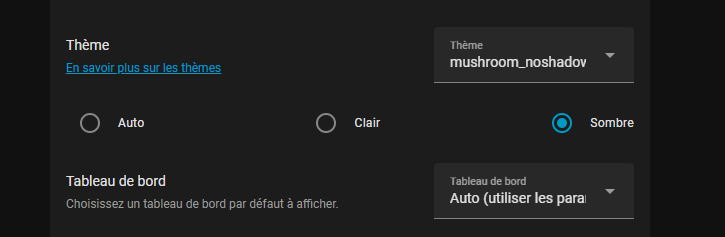
maintenant, avec le même utilisateur pour différent appareil, plus possible de choisir le thème et dashboard par appreil.
il faut un utilisateur différent par appareil.
sinon, c’est possible de contourner avec browser-mod.
c’est bon, j’ai trouvé comment faire avec browser-mod. l’ancienne facon ne fonctionne plus avec l’option default dashboard. Il faut passer par defaut action maintenant, pour changer de dashboard et thème avec le même utilisateur sur différent appareil.
action: browser_mod.sequence
data:
sequence:
- service: browser_mod.navigate
data:
path: /dashboard-mobile/0
- service: browser_mod.set_theme
data:
browser_id:
- 1f7ba8xxxxxxxxxxxxxxxxxxxxxxx
…
ouvert 10:57AM - 07 Feb 26 UTC
fermé 02:36PM - 07 Feb 26 UTC
user assistance
### My Home Assistant Version
Core: 2026.2.1
Frontend: 20260128.6
Browser Mod: … 2.7.2
Client: Chrome
### What I am doing
After the latest update, I am reconfiguring my browser and selecting a default dashboard for this ID; however, when opening Home Assistant, it still opens to the dashboard configured at the user level.
Thanks for this great mod and really thanks for your work.
### By checking each box below I indicate that I ...
- [x] Understand that this is a channel for reporting bugs, not a support forum (https://community.home-assistant.io/).
- [x] Have made sure I am using the latest version of the plugin.
- [x] Understand that leaving one or more boxes unticked or failure to follow the template above may increase the time required to handle my bug-report, or cause it to be closed without further action.
- [x] If this issue is to do with an Android device losing connection, sensors becoming unavailable etc., please confirm you have read, understood and tried methods described in Wiki Article [Andoird Devices 'Always On'](https://github.com/thomasloven/hass-browser_mod/wiki/Andoird-Devices-'Always-On')