Kyar
Janvier 17, 2024, 11:48
1
Bonjour,
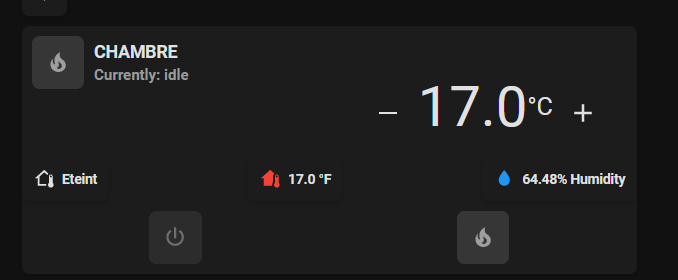
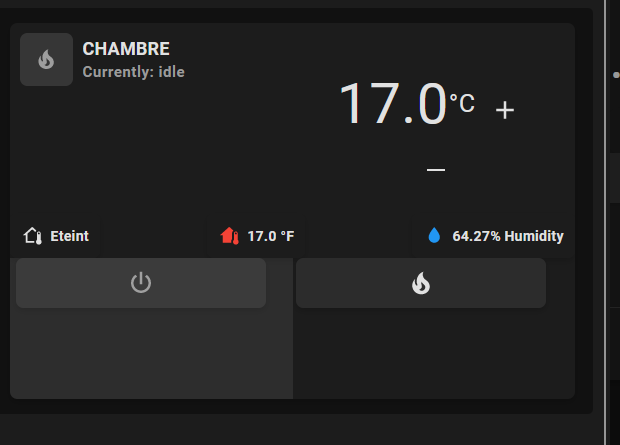
J’utilise cette carte pour mon chauffage :
J’aimerais que le bouton avec l’icone power et la flamme soit plus large (chacun fasse la moitié de la carte par exemple).
Est-ce possible ?
Mon code :
type: custom:stack-in-card
keep:
  margin: false
  box_shadow: false
  background: false
cards:
  - type: grid
    square: false
    columns: 2
    cards:
      - type: custom:mushroom-template-card
        style: |
          ha-card {
            padding-bottom: 1px !important;
          }
        primary: CHAMBRE
        secondary: |
          Currently: {{ state_attr('climate.chambre', 'hvac_action') }}
        icon: |-
          {% set mode = states('climate.chambre') %}
          {% if mode == 'off' %}
          mdi:power
          {% elif mode == 'cool' %}
          mdi:snowflake
          {% elif mode == 'heat' %}
          mdi:fire
          {% elif mode == 'heat_cool' %}
          mdi:autorenew
          {% else %}
          mdi:home-thermometer
          {% endif %}
        icon_color: |-
          {% set mode = state_attr('climate.chambre', 'hvac_action') %}
          {% if mode == 'idle' %}
          grey
          {% elif mode == 'cooling' %}
          blue
          {% elif mode == 'heating' %}
          red
          {% else %}
          grey
          {% endif %}
        tap_action: none
      - type: vertical-stack
        cards:
          - type: custom:simple-thermostat
            style: |
              ha-card {
                --st-spacing: px;
              }
              ha-card .current--value {
                color: #ffffff;
              }
              header {
                margin-bottom: 12px !important;
                padding-bottom: 0px !important;
              }
              ha-card .thermostat-trigger {
                color: #9e9e9e;
              }
            entity: climate.chambre
            header:
              name: false
              icon: false
            decimals: '1'
            fallback: 'Off'
            hide:
              temperature: true
              state: true
            layout:
              mode:
                names: false
                icons: false
                headings: false
              step: row
            step_size: '0.5'
            control:
              hvac:
                'off': false
                heat: false
                cool: false
                heat_cool: false
  - type: custom:mushroom-chips-card
    style: |
      ha-card {
        --chip-box-shadow: none;
        --chip-background: none;
      }
    alignment: justify
    chips:
      - type: template
        entity: sensor.mode_chambre
        icon: mdi:home-thermometer-outline
        content: '{{ states(entity) }}'
      - type: template
        content: '{{state_attr(entity, ''current_temperature'')}} °F'
        entity: climate.chambre
        icon: mdi:home-thermometer
        tap_action:
          action: more-info
        icon_color: |-
          {% set state=states(entity) %}
          {% if state=='cool' %}
          blue
          {% elif state=='heat' %}
          red
          {% else %}
          grey
          {% endif %}
      - type: template
        double_tap_action:
          action: none
        content: '{{ states(entity) }}% Humidity'
        entity: sensor.temp_chambre_humidity
        icon: mdi:water
        icon_color: blue
        tap_action:
          action: none
        hold_action:
          action: none
  - type: horizontal-stack
    cards:
      - type: custom:mushroom-template-card
        primary: null
        secondary: ''
        icon: mdi:power
        entity: input_boolean.chauffage_chambre
        layout: horizontal
        tap_action:
          action: call-service
          service: input_boolean.turn_off
          service_data:
            entity_id: input_boolean.chauffage_chambre
      - type: custom:mushroom-template-card
        primary: null
        secondary: ''
        icon: mdi:fire
        entity: input_boolean.chauffage_chambre
        layout: horizontal
        tap_action:
          action: call-service
          service: input_boolean.turn_on
          service_data:
            entity_id: input_boolean.chauffage_chambre
        icon_color: |-
          {% set mode = state_attr('climate.chambre', 'hvac_action') %}
          {% if mode == 'idle' %}
          grey
          {% elif mode == 'cooling' %}
          blue
          {% elif mode == 'heating' %}
          red
          {% else %}
          grey
          {% endif %}
Bonjour,
Je ne suis pas sur mais il me semble que les mushrooms-cards ne permettent pas autre chose qu’un ratio 1/1. Tu pourrais le faire sans souci avec des button-cards en revanche.
Kyar
Janvier 17, 2024, 12:18
3
Je pourrais avoir le même aspect de boutons ? Tu aurais un aperçu par exemple ?
Bj
Si tu veux tu as ceci en minimaliste
Aussi en version mushroom
# Climate card


## Description
A climate card allows you to control a climate entity.
## Configuration variables
All the options are available in the lovelace editor but you can use `yaml` if you want.
| Name | Type | Default | Description |
| :------------------------- | :-------------------------------------------------- | :---------- | :---------------------------------------------------------------------------------- |
| `entity` | string | Required | Climate entity |
| `icon` | string | Optional | Custom icon |
| `name` | string | Optional | Custom name |
| `layout` | string | Optional | Layout of the card. Vertical, horizontal and default layout are supported |
| `fill_container` | boolean | `false` | Fill container or not. Useful when card is in a grid, vertical or horizontal layout |
show original
et :
Kyar
Janvier 17, 2024, 12:54
6
Merci pour ta réponse, ma carte viens justement du dernier lien que j’ai épuré à ma manière.
Me reste juste ces 2 boutons qui me sont utiles et que j’aimerais « plus grand »
Je continue mes recherche
Je te fais un exemple avec button-card et je te poste ça dans la soirée…
Voilà ce que ça donne chez moi :
type: custom:stack-in-card
keep:
  margin: false
  box_shadow: false
  background: false
cards:
  - type: grid
    square: false
    columns: 2
    cards:
      - type: custom:mushroom-template-card
        mod_card:
          style: |
            ha-card {
              padding-bottom: 1px !important;
            }
        primary: CHAMBRE
        secondary: |
          Currently: {{ state_attr('climate.chambre', 'hvac_action') }}
        icon: |-
          {% set mode = states('climate.chambre') %}
          {% if mode == 'off' %}
          mdi:power
          {% elif mode == 'cool' %}
          mdi:snowflake
          {% elif mode == 'heat' %}
          mdi:fire
          {% elif mode == 'heat_cool' %}
          mdi:autorenew
          {% else %}
          mdi:home-thermometer
          {% endif %}
        icon_color: |-
          {% set mode = state_attr('climate.chambre', 'hvac_action') %}
          {% if mode == 'idle' %}
          grey
          {% elif mode == 'cooling' %}
          blue
          {% elif mode == 'heating' %}
          red
          {% else %}
          grey
          {% endif %}
        tap_action: none
      - type: vertical-stack
        cards:
          - type: custom:simple-thermostat
            style: |
              ha-card {
                --st-spacing: px;
              }
              ha-card .current--value {
                color: #ffffff;
              }
              header {
                margin-bottom: 12px !important;
                padding-bottom: 0px !important;
              }
              ha-card .thermostat-trigger {
                color: #9e9e9e;
              }
            entity: climate.chambre
            header:
              name: false
              icon: false
            decimals: '1'
            fallback: 'Off'
            hide:
              temperature: true
              state: true
            layout:
              mode:
                names: false
                icons: false
                headings: false
              step: row
            step_size: '0.5'
            control:
              hvac:
                'off': false
                heat: false
                cool: false
                heat_cool: false
  - type: custom:mushroom-chips-card
    style: |
      ha-card {
        --chip-box-shadow: none;
        --chip-background: none;
      }
    alignment: justify
    chips:
      - type: template
        entity: sensor.mode_chambre
        icon: mdi:home-thermometer-outline
        content: '{{ states(entity) }}'
      - type: template
        content: '{{state_attr(entity, ''current_temperature'')}} °F'
        entity: climate.chambre
        icon: mdi:home-thermometer
        tap_action:
          action: more-info
        icon_color: |-
          {% set state=states(entity) %}
          {% if state=='cool' %}
          blue
          {% elif state=='heat' %}
          red
          {% else %}
          grey
          {% endif %}
      - type: template
        double_tap_action:
          action: none
        content: '{{ states(entity) }}% Humidity'
        entity: sensor.temp_chambre_humidity
        icon: mdi:water
        icon_color: blue
        tap_action:
          action: none
        hold_action:
          action: none
  - type: horizontal-stack
    cards:
      - type: custom:button-card
        aspect_ratio: 3/1
        custom_fields:
          power_button:
            card:
              type: custom:button-card
              aspect_ratio: 3/0.9
              icon: mdi:power
              icon_size: 80%
              styles:
                card:
                  - background-color: rgb(44,44,44)
                icon:
                  - color: rgb(158,158,158)
                  - width: 40px
        entity: input_boolean.chauffage_chambre
        tap_action:
          action: call-service
          service: input_boolean.turn_off
          service_data:
            entity_id: input_boolean.chauffage_chambre
        styles:
          custom_fields:
            power_button:
              - position: absolute
              - top: 5px
              - left: 5px
              - width: 236px
      - type: custom:button-card
        aspect_ratio: 3/1
        custom_fields:
          fire_button:
            card:
              type: custom:button-card
              aspect_ratio: 3/0.9
              icon: mdi:fire
              icon_size: 80%
              styles:
                card:
                  - background-color: rgb(44,44,44)
                icon:
                  - color: >-
                      {% set mode = state_attr('climate.chambre', 'hvac_action')
                      %}

                      {% if mode == 'idle' %}

                      grey

                      {% elif mode == 'cooling' %}

                      blue

                      {% elif mode == 'heating' %}

                      red

                      {% else %}

                      grey

                      {% endif %}
                  - width: 40px
        entity: input_boolean.chauffage_chambre
        tap_action:
          action: call-service
          service: input_boolean.turn_off
          service_data:
            entity_id: input_boolean.chauffage_chambre
        styles:
          custom_fields:
            fire_button:
              - position: absolute
              - top: 5px
              - left: 5px
              - width: 236px
Tu peux jouer sur la position exacte de chacun des deux boutons aisni que leurs tailles
Voici le code pour le changement de couleur du nom d’un custom_fields en fonction de l’état de plusieurs capteurs (c’est à adapter : changer « name: » par « icon: » dans le « styles: » du custom_fields « fire_button: ») :
      styles:
        name:
          - font-size: |
              [[[
                if (states['binary_sensor.maison_detecteur_de_fermeture_portail_contact'].state == 'off' && states['binary_sensor.maison_detecteur_d_ouverture_battant_droit_portail_contact'].state == 'on')
                  return '1.0em';
                else if (states['binary_sensor.maison_detecteur_de_fermeture_portail_contact'].state == 'on' && states['binary_sensor.maison_detecteur_d_ouverture_battant_droit_portail_contact'].state == 'off')
                  return '1.0em';
                else if (states['binary_sensor.maison_detecteur_de_fermeture_portail_contact'].state == 'on' && states['binary_sensor.maison_detecteur_d_ouverture_battant_droit_portail_contact'].state == 'on')
                  return '0.9em';
              ]]]
          - font-weight: bold
          - align-self: end
          - color: |
              [[[
                if (states['binary_sensor.maison_detecteur_de_fermeture_portail_contact'].state == 'off' && states['binary_sensor.maison_detecteur_d_ouverture_battant_droit_portail_contact'].state == 'on')
                  return 'rgba(0,128,0,0.7)';
                else if (states['binary_sensor.maison_detecteur_de_fermeture_portail_contact'].state == 'on' && states['binary_sensor.maison_detecteur_d_ouverture_battant_droit_portail_contact'].state == 'off')
                  return 'rgba(255,0,0,0.7)';
                else if (states['binary_sensor.maison_detecteur_de_fermeture_portail_contact'].state == 'on' && states['binary_sensor.maison_detecteur_d_ouverture_battant_droit_portail_contact'].state == 'on')
                  return 'rgba(255,140,0,0.7)';
              ]]]
1 « J'aime »
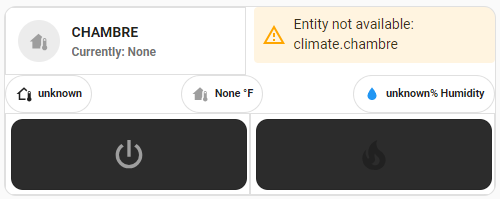
Je t’ai posté un exemple, tu dois pouvoir créer une nouvelle carte vierge et coller directement l’ensemble du code dedans.
Dis-moi ce que ça donne chez toi.
Kyar
Janvier 17, 2024, 2:25
9
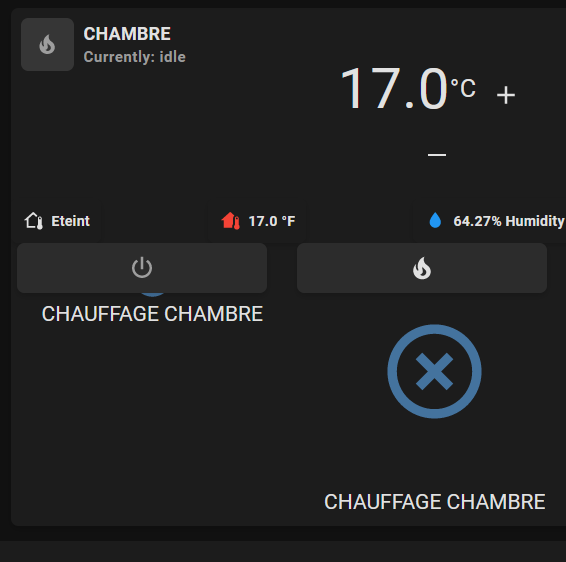
Merci pour ton exemple, j’ai ce problème en voulant réduire :
type: custom:stack-in-card
keep:
  margin: false
  box_shadow: false
  background: false
cards:
  - type: grid
    square: false
    columns: 2
    cards:
      - type: custom:mushroom-template-card
        mod_card:
          style: |
            ha-card {
              padding-bottom: 1px !important;
            }
        primary: CHAMBRE
        secondary: |
          Currently: {{ state_attr('climate.chambre', 'hvac_action') }}
        icon: |-
          {% set mode = states('climate.chambre') %}
          {% if mode == 'off' %}
          mdi:power
          {% elif mode == 'cool' %}
          mdi:snowflake
          {% elif mode == 'heat' %}
          mdi:fire
          {% elif mode == 'heat_cool' %}
          mdi:autorenew
          {% else %}
          mdi:home-thermometer
          {% endif %}
        icon_color: |-
          {% set mode = state_attr('climate.chambre', 'hvac_action') %}
          {% if mode == 'idle' %}
          grey
          {% elif mode == 'cooling' %}
          blue
          {% elif mode == 'heating' %}
          red
          {% else %}
          grey
          {% endif %}
        tap_action: none
      - type: vertical-stack
        cards:
          - type: custom:simple-thermostat
            style: |
              ha-card {
                --st-spacing: px;
              }
              ha-card .current--value {
                color: #ffffff;
              }
              header {
                margin-bottom: 12px !important;
                padding-bottom: 0px !important;
              }
              ha-card .thermostat-trigger {
                color: #9e9e9e;
              }
            entity: climate.chambre
            header:
              name: false
              icon: false
            decimals: '1'
            fallback: 'Off'
            hide:
              temperature: true
              state: true
            layout:
              mode:
                names: false
                icons: false
                headings: false
              step: row
            step_size: '0.5'
            control:
              hvac:
                'off': false
                heat: false
                cool: false
                heat_cool: false
  - type: custom:mushroom-chips-card
    style: |
      ha-card {
        --chip-box-shadow: none;
        --chip-background: none;
      }
    alignment: justify
    chips:
      - type: template
        entity: sensor.mode_chambre
        icon: mdi:home-thermometer-outline
        content: '{{ states(entity) }}'
      - type: template
        content: '{{state_attr(entity, ''current_temperature'')}} °F'
        entity: climate.chambre
        icon: mdi:home-thermometer
        tap_action:
          action: more-info
        icon_color: |-
          {% set state=states(entity) %}
          {% if state=='cool' %}
          blue
          {% elif state=='heat' %}
          red
          {% else %}
          grey
          {% endif %}
      - type: template
        double_tap_action:
          action: none
        content: '{{ states(entity) }}% Humidity'
        entity: sensor.temp_chambre_humidity
        icon: mdi:water
        icon_color: blue
        tap_action:
          action: none
        hold_action:
          action: none
  - type: horizontal-stack
    cards:
      - type: custom:button-card
        aspect_ratio: 3/1
        custom_fields:
          power_button:
            card:
              type: custom:button-card
              aspect_ratio: 5/1
              icon: mdi:power
              icon_size: 80%
              styles:
                card:
                  - background-color: rgb(44,44,44)
                icon:
                  - color: rgb(158,158,158)
                  - width: 40px
        entity: input_boolean.chauffage_chambre
        tap_action:
          action: call-service
          service: input_boolean.turn_off
          service_data:
            entity_id: input_boolean.chauffage_chambre
        styles:
          custom_fields:
            power_button:
              - position: absolute
              - top: 0px
              - left: 5px
              - width: 200px
      - type: custom:button-card
        aspect_ratio: 1/1
        custom_fields:
          fire_button:
            card:
              type: custom:button-card
              aspect_ratio: 5/1
              icon: mdi:fire
              icon_size: 80%
              styles:
                card:
                  - background-color: rgb(44,44,44)
                icon:
                  - color: >-
                      {% set mode = state_attr('climate.chambre', 'hvac_action')
                      %}

                      {% if mode == 'idle' %}

                      grey

                      {% elif mode == 'cooling' %}

                      blue

                      {% elif mode == 'heating' %}

                      red

                      {% else %}

                      grey

                      {% endif %}
                  - width: 40px
        entity: input_boolean.chauffage_chambre
        tap_action:
          action: call-service
          service: input_boolean.turn_off
          service_data:
            entity_id: input_boolean.chauffage_chambre
        styles:
          custom_fields:
            fire_button:
              - position: absolute
              - top: 0px
              - left: 3px
              - width: 200px
bon on vas bipper @WarC0zes , il aime bien les cards
Le problème, c’est l’apparition de la croix et de « CHAUFFAGE CHAMBRE » ?
Kyar
Janvier 17, 2024, 2:30
12
Oui, comment les virer ou cacher ?
Il manque une valeur a --st-spacing:
Ajoutes « show_name: false » juste sous « - type: custom: button-card »
- type: custom:button-card
show_name: false
show_icon: false
show_state: false
aspect_ratio: 3/1
1 « J'aime »
Non Non! tu confonds avec @anon41081891 et ces custom_fields
Kyar
Janvier 17, 2024, 2:34
16
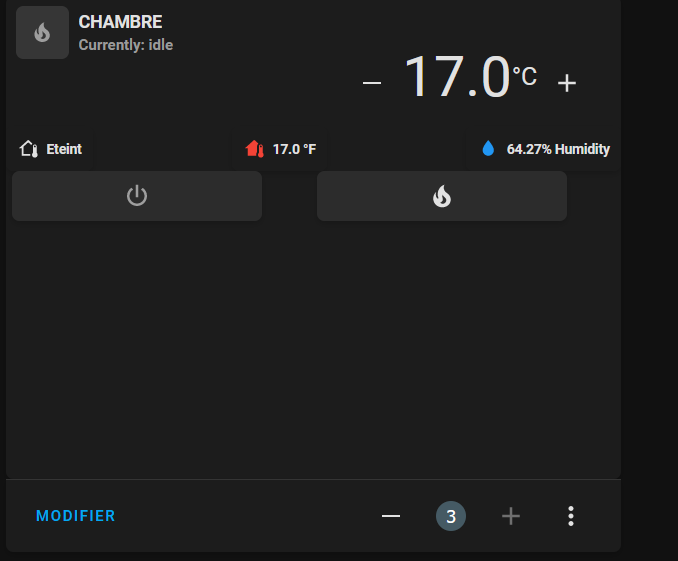
Ok avec les show à false c’est good mais la taille de la carte a une valeur définis, comment éviter tout le vide en bas :
@WarC0zes
Essaye en modifiant « aspect_ratio: 3/1 » en augmentant le premier chiffre
Si ça ne donne rien, reposte le code complet de la carte avec les modifications
Kyar
Janvier 17, 2024, 2:41
19
J’ai essayé plusieurs truc mais je peut pas faire plus petit car les boutons ont une partie invisible (visible sur cette photo) qui prend la place :
Le code :
type: custom:stack-in-card
keep:
margin: false
box_shadow: false
background: false
cards:
- type: grid
square: false
columns: 2
cards:
- type: custom:mushroom-template-card
mod_card:
style: |
ha-card {
padding-bottom: 1px !important;
}
primary: CHAMBRE
secondary: |
Currently: {{ state_attr('climate.chambre', 'hvac_action') }}
icon: |-
{% set mode = states('climate.chambre') %}
{% if mode == 'off' %}
mdi:power
{% elif mode == 'cool' %}
mdi:snowflake
{% elif mode == 'heat' %}
mdi:fire
{% elif mode == 'heat_cool' %}
mdi:autorenew
{% else %}
mdi:home-thermometer
{% endif %}
icon_color: |-
{% set mode = state_attr('climate.chambre', 'hvac_action') %}
{% if mode == 'idle' %}
grey
{% elif mode == 'cooling' %}
blue
{% elif mode == 'heating' %}
red
{% else %}
grey
{% endif %}
tap_action: none
- type: vertical-stack
cards:
          - type: custom:simple-thermostat
            style: |
              ha-card {
                --st-spacing: px;
              }
ha-card .current--value {
color: #ffffff;
}
header {
margin-bottom: 12px !important;
padding-bottom: 0px !important;
}
ha-card .thermostat-trigger {
color: #9e9e9e;
}
entity: climate.chambre
header:
name: false
icon: false
decimals: '1'
fallback: 'Off'
hide:
temperature: true
state: true
layout:
mode:
names: false
icons: false
headings: false
step: row
step_size: '0.5'
control:
hvac:
'off': false
heat: false
cool: false
heat_cool: false
- type: custom:mushroom-chips-card
style: |
ha-card {
--chip-box-shadow: none;
--chip-background: none;
}
alignment: justify
chips:
- type: template
entity: sensor.mode_chambre
icon: mdi:home-thermometer-outline
content: '{{ states(entity) }}'
- type: template
content: '{{state_attr(entity, ''current_temperature'')}} °F'
entity: climate.chambre
icon: mdi:home-thermometer
tap_action:
action: more-info
icon_color: |-
{% set state=states(entity) %}
{% if state=='cool' %}
blue
{% elif state=='heat' %}
red
{% else %}
grey
{% endif %}
- type: template
double_tap_action:
action: none
content: '{{ states(entity) }}% Humidity'
entity: sensor.temp_chambre_humidity
icon: mdi:water
icon_color: blue
tap_action:
action: none
hold_action:
action: none
- type: horizontal-stack
    cards:
      - type: custom:button-card
show_name: false
show_icon: false
show_state: false
aspect_ratio: 2/1
custom_fields:
power_button:
card:
type: custom:button-card
aspect_ratio: 5/1
icon: mdi:power
icon_size: 80%
styles:
card:
- background-color: rgb(44,44,44)
icon:
- color: rgb(158,158,158)
- width: 40px
entity: input_boolean.chauffage_chambre
tap_action:
action: call-service
service: input_boolean.turn_off
service_data:
entity_id: input_boolean.chauffage_chambre
styles:
custom_fields:
power_button:
- position: absolute
- top: 0px
- left: 5px
- width: 200px
- type: custom:button-card
aspect_ratio: 2/1
show_name: false
show_icon: false
show_state: false
custom_fields:
fire_button:
card:
type: custom:button-card
aspect_ratio: 5/1
icon: mdi:fire
icon_size: 10%
styles:
card:
- background-color: rgb(44,44,44)
icon:
- color: >-
{% set mode = state_attr('climate.chambre', 'hvac_action')
%}
{% if mode == 'idle' %}
grey
{% elif mode == 'cooling' %}
blue
{% elif mode == 'heating' %}
red
{% else %}
grey
{% endif %}
- width: 40px
entity: input_boolean.chauffage_chambre
tap_action:
action: call-service
service: input_boolean.turn_off
service_data:
entity_id: input_boolean.chauffage_chambre
styles:
custom_fields:
fire_button:
- position: absolute
- top: 0px
- left: 3px
- width: 200px
La fonction du bouton doit avoir la même taille que l’icone du bouton
Je dois partir là, mais je regarde ça en soirée. Dans le pire des cas, je te refais une carte complète basée uniquement sur une button-card avec des custom_fields pour chacune des parties que tu as actuellement. Il faudra juste changer les entités que je mettrais par les tiennes car là je travaille en aveugle avec des entités qui ne fonctionnent pas chez moi.