Ajouter des flèches de tendance dans un bouton_card

Bonjour,
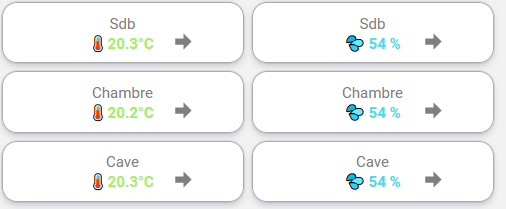
j’affiche mes températures et hygrométries dans des button-card avec quelques templates.
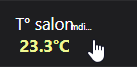
button_card_temp
je cherche a ajouter des flèches de tendance pour m’informer de l’augmentation ou diminution de la température
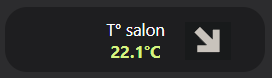
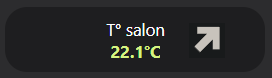
voila ce que je souhaiterai obtenir mais je n’y arrive pas
button_card_temp_up
button_card_temp_down
j’ai ajouté un custom_fields dans mon template mais je n’ai pas encore réussi à faire en sorte que cela fonctionne.

        custom_fields:
          notification:
            - icon: >
                [[[
                  if (states['binary_sensor.temp_salon_augmentation'].state == 1)
                    return "mdi:arrow-top-right-thick";
                  if (states['binary_sensor.temp_salon_diminution'].state == 1)
                    return "mdi:arrow-bottom-right-thick";
                  else return "mdi:arrow-right-bold";
                ]]]
            - border-radius: 50%
            - position: absolute
            - left: 60%
            - top: 10%
            - height: 20px
            - width: 20px
            - font-size: 8px
            - line-height: 20px 

une idée de ce que je loupe?

mon template complet

  temp_ext2:
      show_state: true
      show_name: true
      show_icon: false 
      state_display: >
        [[[
          if (entity.attributes.unit_of_measurement === '°C')
            return (Math.round(entity.state*10)/10) + (entity.attributes.unit_of_measurement);
          else
            return (Math.round(entity.state)) + " " + (entity.attributes.unit_of_measurement);          
        ]]]
      styles:
        name:
          - font-size: 0.9em
        state:
          - font-size: 0.9em
          - font-weight: bold
          - color: >
              [[[
                const MIN_TEMP = 5;
                const MAX_TEMP = 30;
                const MIN_HR = 0;
                const MAX_HR = 100; 
                const STATE = entity.state;
                const DEVICE_CLASS = entity.attributes.device_class;
                let hue = 0; // initialisation de la variable hue
                let color;
                if (DEVICE_CLASS  === 'temperature') {
                  if (STATE <= MIN_TEMP) {
                    hue = 240;
                  }
                  else if (STATE >= MAX_TEMP) {
                    hue = 0;
                  }
                  else {
                    hue = 240 - ((STATE - MIN_TEMP) / (MAX_TEMP - MIN_TEMP)) * 240;
                  }
                  color = `hsl(${hue}, ${Math.sqrt((STATE - MIN_TEMP) / (MAX_TEMP - MIN_TEMP)) * 100}%, ${(STATE - MIN_TEMP) / (MAX_TEMP - MIN_TEMP) * 85 + 15}%)`;
                }
                else if (DEVICE_CLASS === 'humidity') {
                  if (STATE < MIN_HR) {
                    color = 'pink'; 
                  } else if (STATE > MAX_HR) {
                    color = 'purple'; 
                  } else {
                    color = `hsl(${(STATE - MIN_HR) * 3.42}, ${Math.sqrt((STATE - MIN_HR) / (MAX_HR - MIN_HR)) * 100}%, ${(STATE - MIN_HR) / (MAX_HR - MIN_HR) * 85 + 15}%)`;
                  }
                }
                else if (DEVICE_CLASS  === 'carbon_dioxide') {
                  if (STATE < 1000) {
                    color = 'green';
                  } else if (STATE < 1530) {
                    color = 'orange';          
                  } else {
                    color= 'red'; 
                  }
                }
                else {
                  color = 'white'; // on peut également mettre un autre couleur ici si besoin
                }
                return color;
              ]]]  
        grid:
          - position: relative
        custom_fields:
          notification:
            - icon: >
                [[[
                  if (states['binary_sensor.temp_salon_augmentation'].state == 1)
                    return "mdi:arrow-top-right-thick";
                  if (states['binary_sensor.temp_salon_diminution'].state == 1)
                    return "mdi:arrow-bottom-right-thick";
                  else return "mdi:arrow-right-bold";
                ]]]
            - border-radius: 50%
            - position: absolute
            - left: 60%
            - top: 10%
            - height: 20px
            - width: 20px
            - font-size: 8px
            - line-height: 20px 

Je dispose pour chaque température de 2 binary_sensor fonctionnels sur ce modèle
binary_sensor.temp_salon_augmentation
binary_sensor.temp_salon_diminution

Bonjour,
essaye avec un elif ou else if:

        custom_fields:
          notification:
            - icon: >
                [[[
                  if (states['binary_sensor.temp_salon_augmentation'].state == 1)
                    return "mdi:arrow-top-right-thick";
                  elif (states['binary_sensor.temp_salon_diminution'].state == 1)
                    return "mdi:arrow-bottom-right-thick";
                  else 
                    return "mdi:arrow-right-bold";
                ]]]

ou

        custom_fields:
          notification:
            - icon: >
                [[[
                  if (states['binary_sensor.temp_salon_augmentation'].state == 1)
                    return "mdi:arrow-top-right-thick";
                  else if (states['binary_sensor.temp_salon_diminution'].state == 1)
                    return "mdi:arrow-bottom-right-thick";
                  else 
                    return "mdi:arrow-right-bold";
                ]]]

WarC0zes merci pour ta réponse
ce n’est pas le template et ses conditions qui ne fonctionne pas, c’est l’inclusion dans button_card
je ne dois pas utiliser correctement Button_card pour cela mais je sèche

C’est bon normalement, a tester:

      custom_fields:
        notification: > 
          [[[
            if (states['binary_sensor.temp_salon_augmentation'].state == 1)
              return "mdi:arrow-top-right-thick";
            if (states['binary_sensor.temp_salon_diminution'].state == 1)
              return "mdi:arrow-bottom-right-thick";
            else return "mdi:arrow-right-bold";
          ]]]
      styles:
        custom_fields:
          notification:
            - border-radius: 50%
            - position: absolute
            - left: 60%
            - top: 10%
            - height: 20px
            - width: 20px
            - font-size: 8px
            - line-height: 20px

pour le coup ça n’affiche pas l’icone mais le texte « mdi:arrow-top-right-thick »
image

je pense avoir trouvé
merci de m’avoir mis sur le chemin

        notification: |
            [[[
              if (states['binary_sensor.temp_salon_augmentation'].state == 'on')
                return  `<ha-icon
                          icon="mdi:arrow-top-right-thick"
                          style="width: 25px; height: 25px; color: white; ">
                          </ha-icon>`
              else if (states['binary_sensor.temp_salon_diminution'].state == 'on')
                return `<ha-icon
                          icon="mdi:arrow-bottom-right-thick"
                          style="width: 25px; height: 25px; color: white; ">
                          </ha-icon>`
              else return `<ha-icon
                          icon="mdi:arrow-right-bold"
                          style="width: 25px; height: 25px; color: white; ">
                          </ha-icon>`
            ]]]
            ]]]

une question subsidiaire :
comment déduire le nom des binary_sensor depuis le entity ?

Ce sujet est intéressant si tu as le temps de coller le code complet du bouton card :wink:

ok c’est tout bon.
à a demande de @Felix62 voila la marche à suivre :
créer pour chaque température à surveiller 2 binary_sensor avec le nom du sensor à surveiller suivi de « _augmentation » pour le premier et « _diminution » pour le deuxième

binary_sensor:
  - platform: trend # https://www.home-assistant.io/integrations/trend/
    sensors:
      temperature_salon_augmentation:
        entity_id: sensor.temperature_salon
        sample_duration: 3600
        max_samples: 360
      temperature_salon_diminution:
        entity_id: sensor.temperature_salon
        sample_duration: 3600    
        max_samples: 360
        invert: true

redémarrer et attendre un peu que des données soient collectées.
pour le template button_card j’ai appelé le mien temp_ext2 il contient d’autres personnalisations, notamment le changement de couleur selon la T°

temp_ext2:
      show_state: true
      show_name: true
      show_icon: false 
      state_display: >
        [[[
          if (entity.attributes.unit_of_measurement === '°C')
            return (Math.round(entity.state*10)/10) + (entity.attributes.unit_of_measurement);
          else
            return (Math.round(entity.state)) + " " + (entity.attributes.unit_of_measurement);          
        ]]]
     
      styles:
        custom_fields:
          notification:
            - border-radius: 50%
            - position: absolute
            - left: 70%
            - top: 40%
        name:
          - font-size: 0.9em
        state:
          - font-size: 0.9em
          - font-weight: bold
          - color: >
              [[[
                const MIN_TEMP = 5;
                const MAX_TEMP = 30;
                const MIN_HR = 0;
                const MAX_HR = 100; 
                const STATE = entity.state;
                const DEVICE_CLASS = entity.attributes.device_class;
                let hue = 0; // initialisation de la variable hue
                let color;
                if (DEVICE_CLASS  === 'temperature') {
                  if (STATE <= MIN_TEMP) {
                    hue = 240;
                  }
                  else if (STATE >= MAX_TEMP) {
                    hue = 0;
                  }
                  else {
                    hue = 240 - ((STATE - MIN_TEMP) / (MAX_TEMP - MIN_TEMP)) * 240;
                  }
                  color = `hsl(${hue}, ${Math.sqrt((STATE - MIN_TEMP) / (MAX_TEMP - MIN_TEMP)) * 100}%, ${(STATE - MIN_TEMP) / (MAX_TEMP - MIN_TEMP) * 85 + 15}%)`;
                }
                else if (DEVICE_CLASS === 'humidity') {
                  if (STATE < MIN_HR) {
                    color = 'pink'; 
                  } else if (STATE > MAX_HR) {
                    color = 'purple'; 
                  } else {
                    color = `hsl(${(STATE - MIN_HR) * 3.42}, ${Math.sqrt((STATE - MIN_HR) / (MAX_HR - MIN_HR)) * 100}%, ${(STATE - MIN_HR) / (MAX_HR - MIN_HR) * 85 + 15}%)`;
                  }
                }
                else if (DEVICE_CLASS  === 'carbon_dioxide') {
                  if (STATE < 1000) {
                    color = 'green';
                  } else if (STATE < 1530) {
                    color = 'orange';          
                  } else {
                    color= 'red'; 
                  }
                }
                else {
                  color = 'white'; // on peut également mettre un autre couleur ici si besoin
                }
                return color;
              ]]]  
        grid:
          - position: relative
      custom_fields:
        notification: | 
            [[[
              const entityid = entity.entity_id
              const augmentation = entityid.replace(/^(.+)\.(.+)$/, 'binary_sensor.$2_augmentation');
              const diminution = entityid.replace(/^(.+)\.(.+)$/, 'binary_sensor.$2_diminution');
              if (states[augmentation].state == 'on')
                return  `<ha-icon
                          icon="mdi:arrow-top-right-thick"
                          style="width: 25px; height: 25px; color: white; ">
                          </ha-icon>`
              else if (states[diminution].state == 'on')
                return `<ha-icon
                          icon="mdi:arrow-bottom-right-thick"
                          style="width: 25px; height: 25px; color: white; ">
                          </ha-icon>`
              else return `<ha-icon
                          icon="mdi:arrow-right-bold"
                          style="width: 25px; height: 25px; color: white; ">
                          </ha-icon>`
            ]]]

ensuite pour chaque button_card

type: grid # https://www.home-assistant.io/lovelace/grid/
columns: 2
square: false
cards:
  - type: custom:button-card # https://github.com/custom-cards/button-card
    entity: sensor.temperature_salon
    name: T° salon
    template: temp_ext2 # /config/lovelace/button_card/button_card_templates.yaml
    
  - type: custom:button-card # https://github.com/custom-cards/button-card
    entity: sensor.humidite_salon
    name: Hr salon
    template: temp_ext # /config/lovelace/button_card/button_card_templates.yaml

et le résultat donne cela
image

Top merci, par contre le deuxième template « ext » c’est le même que « ext2 » ?

le même sans les flèches pour les T° hr et Co² que je ne souhaitent pas visualiser via les flèches

j’avais oublié de supprimer la partie variables: que j’avais testé sans succès, j’ai corrigé mon post

J’ai un peu de temps pour une fois et je n’arrive pas a afficher une valeur. Combien de temps faut-il ? si je reprend ton exemple de capteur, faut-il inclure les valeurs du capteur sensor.temperature_salon dans le recorder ?
Ps: as tu fait une maj du code de ton coté ses derniers temps et dans quel autre cas de capteur utilise tu le trend ?

j’ai une erreur sur ces ligne « undefined » du template:

      custom_fields:
        notification: | 
            [[[
              const entityid = entity.entity_id
              const augmentation = entityid.replace(/^(.+)\.(.+)$/, 'binary_sensor.$2_augmentation');
              const diminution = entityid.replace(/^(.+)\.(.+)$/, 'binary_sensor.$2_diminution');
              if (states[augmentation].state == 'on')
                return  `<ha-icon
                          icon="mdi:arrow-top-right-thick"
                          style="width: 25px; height: 25px; color: white; ">
                          </ha-icon>`
              else if (states[diminution].state == 'on')
                return `<ha-icon
                          icon="mdi:arrow-bottom-right-thick"
                          style="width: 25px; height: 25px; color: white; ">
                          </ha-icon>`
              else return `<ha-icon
                          icon="mdi:arrow-right-bold"
                          style="width: 25px; height: 25px; color: white; ">
                          </ha-icon>`
            ]]]

Merci d’avance @papoo

oui
je n’ai pas mis mon code à jour depuis
pour l’erreur undefined, il faut bien s’assurer que les deux binary_sensor créés sont sous cette forme ‹ binary_sensor.nom-du-capteur_augmentation › et ‹ binary_sensor.nom-du-capteur_diminution ›

Du coup si je comprends bien ce que je lis sans le tester (je ne peux pas en ce moment) le template temp_text c’est le même que temp_text2 mais sans la partie suivante :

custom_fields:
        notification: | 
            [[[
                .......
            ]]]

C’est bien ça ?

Oui
c’est bien cela :+1:

Merci beaucoup pour ce partage
image

utilisation ici sans template j’aime bien avoir une version sans template pour mieux comprendre et tester.
ensuite on peut basculer éventuellement en template, enfin c’est ma pratique :slight_smile:

J’ai eu un petit soucis avec le nom de mon sensor qui été trop long au lieu d’être binary_sensor.exemple_augmentation/diminution été binary_sensor.exemple_exemple_augmentation/diminution.

J’ai modifié le code pour qu’il soit compatible dans la partie notification:
Code modifié:

        custom_fields:
          notification: | 
              [[[
                const entityid = entity.entity_id
                const augmentation = entityid.replace(/^(.+)\.(.+)_augmentation$/, 'binary_sensor.$2_augmentation');
                const diminution = entityid.replace(/^(.+)\.(.+)_diminution$/, 'binary_sensor.$2_diminution');
                if (states[augmentation].state == 'on')
                  return  `<ha-icon
                            icon="mdi:arrow-top-right-thick"
                            style="width: 25px; height: 25px; color: var(--text-color); ">
                            </ha-icon>`
                else if (states[diminution].state == 'on')
                  return `<ha-icon
                            icon="mdi:arrow-bottom-right-thick"
                            style="width: 25px; height: 25px; color: var(--text-color); ">
                            </ha-icon>`
                else return `<ha-icon
                            icon="mdi:arrow-right-bold"
                            style="width: 25px; height: 25px; color: var(--text-color); ">
                            </ha-icon>`
              ]]]

Code complet du template:

####################################################################################################################################################################################################################################################################################################################################################
####    TREND BUTTON TEMP
###############################################################################################################################################################
  trendtemp:
        show_state: true
        show_name: true
        show_icon: false 
        state_display: >
          [[[
            if (entity.attributes.unit_of_measurement === '°C')
              return (Math.round(entity.state*10)/10) + (entity.attributes.unit_of_measurement);
            else
              return (Math.round(entity.state)) + " " + (entity.attributes.unit_of_measurement);          
          ]]]
       
        styles:
          custom_fields:
            notification:
              - border-radius: 50%
              - position: absolute
              - left: 70%
              - top: 40%
          name:
            - font-size: 0.9em
          state:
            - font-size: 0.9em
            - font-weight: bold
            - color: >
                [[[
                  const MIN_TEMP = 5;
                  const MAX_TEMP = 30;
                  const MIN_HR = 0;
                  const MAX_HR = 100; 
                  const STATE = entity.state;
                  const DEVICE_CLASS = entity.attributes.device_class;
                  let hue = 0; // initialisation de la variable hue
                  let color;
                  if (DEVICE_CLASS  === 'temperature') {
                    if (STATE <= MIN_TEMP) {
                      hue = 240;
                    }
                    else if (STATE >= MAX_TEMP) {
                      hue = 0;
                    }
                    else {
                      hue = 240 - ((STATE - MIN_TEMP) / (MAX_TEMP - MIN_TEMP)) * 240;
                    }
                    color = `hsl(${hue}, ${Math.sqrt((STATE - MIN_TEMP) / (MAX_TEMP - MIN_TEMP)) * 100}%, ${(STATE - MIN_TEMP) / (MAX_TEMP - MIN_TEMP) * 85 + 15}%)`;
                  }
                  else if (DEVICE_CLASS === 'humidity') {
                    if (STATE < MIN_HR) {
                      color = 'pink'; 
                    } else if (STATE > MAX_HR) {
                      color = 'purple'; 
                    } else {
                      color = `hsl(${(STATE - MIN_HR) * 3.42}, ${Math.sqrt((STATE - MIN_HR) / (MAX_HR - MIN_HR)) * 100}%, ${(STATE - MIN_HR) / (MAX_HR - MIN_HR) * 85 + 15}%)`;
                    }
                  }
                  else if (DEVICE_CLASS  === 'carbon_dioxide') {
                    if (STATE < 1000) {
                      color = 'green';
                    } else if (STATE < 1530) {
                      color = 'orange';          
                    } else {
                      color= 'red'; 
                    }
                  }
                  else {
                    color = 'var(--text-color)'; // on peut également mettre un autre couleur ici si besoin
                  }
                  return color;
                ]]]  
          grid:
            - position: relative
        custom_fields:
          notification: | 
              [[[
                const entityid = entity.entity_id
                const augmentation = entityid.replace(/^(.+)\.(.+)_augmentation$/, 'binary_sensor.$2_augmentation');
                const diminution = entityid.replace(/^(.+)\.(.+)_diminution$/, 'binary_sensor.$2_diminution');
                if (states[augmentation].state == 'on')
                  return  `<ha-icon
                            icon="mdi:arrow-top-right-thick"
                            style="width: 25px; height: 25px; color: var(--text-color); ">
                            </ha-icon>`
                else if (states[diminution].state == 'on')
                  return `<ha-icon
                            icon="mdi:arrow-bottom-right-thick"
                            style="width: 25px; height: 25px; color: var(--text-color); ">
                            </ha-icon>`
                else return `<ha-icon
                            icon="mdi:arrow-right-bold"
                            style="width: 25px; height: 25px; color: var(--text-color); ">
                            </ha-icon>`
              ]]]

J’ai ajouter ma touche perso avec des emoji mais j’aimerai afficher dans une carte température et juste en dessous humidité mais je n’y arrive pas.
Penses-tu que c’est faisable @papoo

    state_display: >
      [[[
        if (entity.attributes.unit_of_measurement === '°C')
          return "🌡️ " + (Math.round(entity.state*10)/10) + (entity.attributes.unit_of_measurement);
        else if (entity.attributes.unit_of_measurement === '%')
          return "💦 " + (Math.round(entity.state)) + " " + (entity.attributes.unit_of_measurement);
        else
          return (Math.round(entity.state)) + " " + (entity.attributes.unit_of_measurement);          
      ]]]

image

Ce doit être faisable, mais la difficulté va être de réussir à aligner le tout