Bonjour,
Je suis sur HA depuis bientot 2 ans, le but a la base était de me permettre de rentrer chez moi sans utiliser de télécommande pour mon garage, jusque là j"ai vite trouvé des solutions en m’aidant de pas mal de tuto.
Aujourd’hui je m’attaque a faire un dashboard un peu plus « épuré et stylé ».
Je me sers de vertical stack in card et custom feature card de HACS
Ne connaissant que le langage C ou l’arduino, j’ai bien galéré a trouver les lignes pour modifier les couleur en fonction de l’état de mes portail,vert focntionnement habituel / rouge cellules bloqué (fonctionne via un relais zigbee qui coupe l’alimentation des cellule pour simuler un obstacle).
Je souhaiterai modifier les icones sur le slider dit « thumb » du toogle en fonction de s’il est bloqué ou non par celle-ci:
quand switch sur on : mdi:lock
quand switch sur off : mdi:lock_variant_open
Lorsque je met des apostrophes à la place de l’icone de mon switch, j’ai l’icone de l’entité qui apparait a la place et quand j’essai d’écrire un « if is state » ça me plante la carte.
J’ai vu qu’il faudrait peut être créer des template_switch qui gèrerait eux la double icone mais les tuto date de 2017 ou 2020.
Faut-il toujours faire comme ça ou y a t-il une autre solution via codage?
Merci beaucoup d’avance !!!
ma carte:
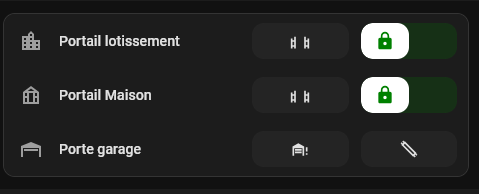
le code:
type: custom:vertical-stack-in-card
cards:
  - type: tile
    entity: switch.smartswitch1_l1
    name: Portail lotissement
    icon: mdi:city
    hide_state: true
    vertical: false
    tap_action:
      action: none
    icon_tap_action:
      action: none
    features:
      - type: custom:service-call
        entries:
          - type: button
            entity_id: script.fugitif_portail_lotissement_voiture
            icon: mdi:gate-open
            tap_action:
              action: perform-action
              perform_action: script.fugitif_portail_lotissement_voiture
              target:
                entity_id: script.fugitif_portail_lotissement_voiture
              data: {}
          - type: toggle
            entity_id: switch.smartswitch1_l4
            icon: mdi:lock
            tap_action:
              action: toggle
              target:
                entity_id: switch.smartswitch1_l4
              data: {}
              confirmation: false
            haptics: true
            styles: |-
              {% if is_state('switch.smartswitch1_l4' ,'on') %}
              .background {
                background: red;
              }

              .thumb {
                background: rgb(255,200,0);
                color: red;
              }
              {% else %}

              .background {
                background: green;
              }

              .thumb {
                color: green;
                background: white;
              }

              {% endif %}
    features_position: inline
  - type: tile
    entity: switch.portail_maison_l1
    name: Portail Maison
    icon: mdi:greenhouse
    show_entity_picture: false
    hide_state: true
    vertical: false
    tap_action:
      action: none
    icon_tap_action:
      action: none
    features:
      - type: custom:service-call
        entries:
          - type: button
            entity_id: script.fugitif_portail_maison_voiture
            icon: mdi:gate-open
            tap_action:
              action: perform-action
              perform_action: script.fugitif_portail_maison_voiture
              target:
                entity_id: script.fugitif_portail_maison_voiture
              data: {}
          - type: toggle
            entity_id: switch.portail_maison_l4
            icon: mdi:lock
            tap_action:
              action: toggle
              target:
                entity_id:
                  - switch.portail_maison_l4
              data: {}
              confirmation: false
            haptics: true
            styles: |-
              {% if is_state('switch.portail_maison_l4' ,'on') %}
              .background {
                background: red;
              }

              .thumb {
                color: red;
                background: rgb(255,200,0);
              }

              {% else %}

              .background {
                background: green;
              }

              .thumb {
                color: green;
                background: white;
              }

              {% endif %}
    features_position: inline
  - type: tile
    entity: script.fugitif_garage_porte
    name: Porte garage
    icon: mdi:garage-open-variant
    hide_state: true
    vertical: false
    tap_action:
      action: none
    icon_tap_action:
      action: none
    features:
      - type: custom:service-call
        entries:
          - type: button
            entity_id: script.fugitif_garage_porte
            icon: mdi:garage-alert
            haptics: true
            tap_action:
              action: perform-action
              perform_action: script.fugitif_garage_porte
              target:
                entity_id: script.fugitif_garage_porte
              data: {}
          - type: button
            entity_id: script.fugitif_garage_lumiere
            icon: mdi:lightbulb-fluorescent-tube-outline
            haptics: true
            tap_action:
              action: perform-action
              perform_action: script.fugitif_garage_lumiere
              target:
                entity_id: switch.smartswitch2_l2
              data: {}
    features_position: inline
