Bonjour,
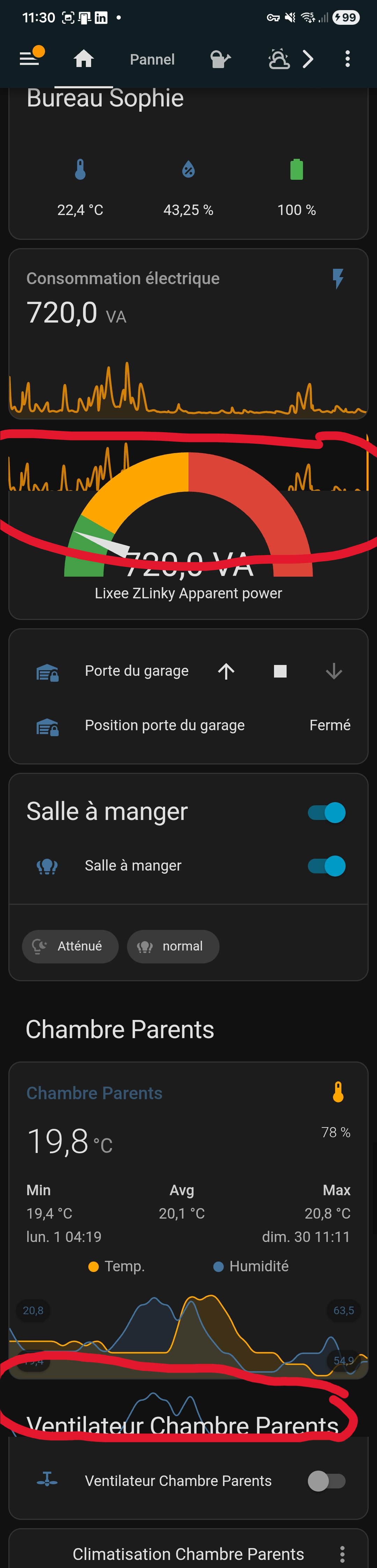
Comme vous pouvez le voir ci-dessus, la courbe de consommation s’affiche en double. De même, le graph de température en bas.
Le premier graph pour la consommation électrique est une simple Carte Capteur.
Le graph du bas est une carte mini-graph intégrée dans une pile verticale.
Le phénomène n’apparait pas du tout sur l’affichage du même tableau de bord sur mon PC.
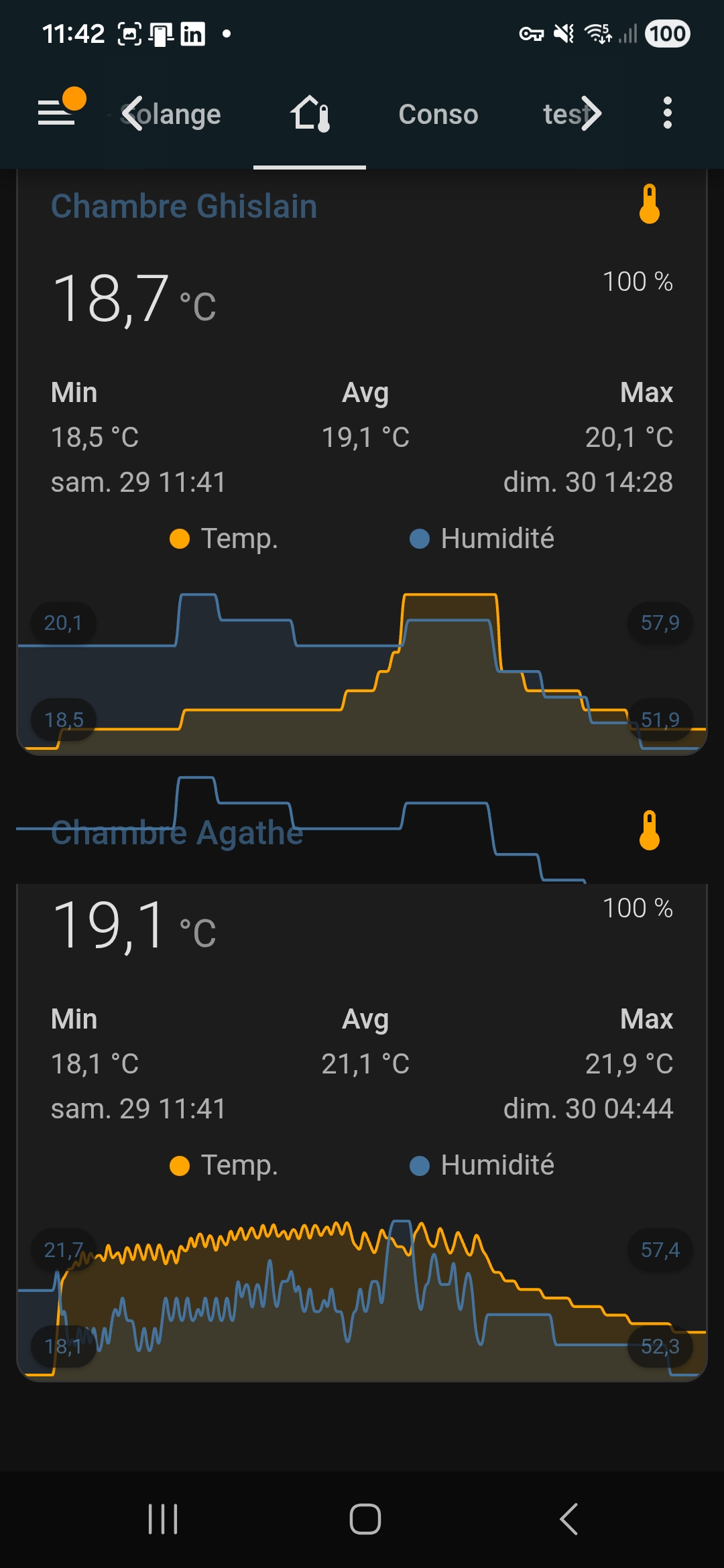
J’ai le même phénomène sur une autre page de mon tableau de bord, créé en mode sections:
Je ne comprends pas…
Salut,
ouvert 09:01PM - 24 Sep 25 UTC
question
I've tried several different dashboards and I see the same thing each time. Th… is only happens on my Android mobile phone in the companion app. Viewing this same dashboard on a desktop web browser works fine. Don't know about iPhone. Anyone else see this issue?

```title: Home
type: sections
cards: []
background:
opacity: 33
alignment: center
size: contain
repeat: repeat
attachment: fixed
icon: ""
sections:
- type: grid
cards:
- type: heading
heading_style: title
- type: custom:mini-graph-card
name: pH
entities:
- sensor.apex_ph
line_width: 4
font_size: 75
- type: custom:mini-graph-card
name: Temp
entities:
- sensor.apex_temp
line_color: green
line_width: 4
font_size: 75
color_thresholds:
- value: 79
color: "#16E2F5"
- value: 79.3
color: "#FFFF33"
- value: 79.5
color: "#C04000"
- value: 79.5
color: "#B21807"
- type: custom:mini-graph-card
name: ORP
entities:
- sensor.apex_orp
line_color: green
line_width: 4
font_size: 75
- type: grid
cards:
- type: heading
heading_style: title
- type: statistics-graph
entities:
- sensor.apex_volt_4
- type: horizontal-stack
cards:
- type: custom:mini-graph-card
name: No3
entities:
- sensor.apex_no3x6
line_color: blue
line_width: 8
font_size: 75
- type: custom:mini-graph-card
name: Po4
entities:
- sensor.apex_po4x6
line_color: green
line_width: 8
font_size: 75
- type: horizontal-stack
cards:
- type: custom:mini-graph-card
name: Alk
entities:
- sensor.apex_alkx5
line_color: blue
line_width: 8
font_size: 75
- type: custom:mini-graph-card
name: Ca
entities:
- sensor.apex_cax5
line_color: "#e74c3c"
line_width: 8
font_size: 75
- type: custom:mini-graph-card
name: Mg
entities:
- sensor.apex_mgx5
line_color: var(--accent-color)
line_width: 8
font_size: 75
- show_name: true
show_icon: true
type: button
entity: switch.apex_growlight
name: Grow Light
icon: mdi:lightbulb
show_state: false```
ouvert 05:46AM - 04 Jul 25 UTC
### Checklist
- [x] I have updated to the latest available Home Assistant versi… on.
- [x] I have cleared the cache of my browser.
- [x] I have tried a different browser to see if it is related to my browser.
- [ ] I have tried reproducing the issue in [safe mode](https://www.home-assistant.io/blog/2023/11/01/release-202311/#restarting-into-safe-mode) to rule out problems with unsupported custom resources.
### Describe the issue you are experiencing
I have a dashboard that has 11 temperature sensor cards on it. Some cards whilst showing their line data they are also showing the data of the previous graphs card. Below are two screen grabs of the top and bottom part of the dashboard:


Adding and removing cards does not always cause the same positional card to duplicate. The duplication is random and also happens across different sections on the same page.
Opening the same dashboard in brave browser on the same device does not exhibit the same behaviour.
### Describe the behavior you expected
Line graph data displayed as expected.
### Steps to reproduce the issue
1. Create a dashboard
2. Add multiple sensor cards using line mode.
### What version of Home Assistant Core has the issue?
2025.7.0
### What was the last working version of Home Assistant Core?
_No response_
### In which browser are you experiencing the issue?
Android client 2025.6.6-full
### Which operating system are you using to run this browser?
Android version 15
### State of relevant entities
```txt
```
### Problem-relevant frontend configuration
```yaml
```
### JavaScript errors shown in your browser console/inspector
```txt
```
### Additional information
This issue is not new to the latest release of Home Assistant / the Android client, it has been around for at least 4 months when I got all the sensors. I just haven't reported it before.
Merci @WarC0zes ,
system
Janvier 30, 2026, 2:00
4
Ce sujet a été automatiquement fermé après 60 jours. Aucune réponse n’est permise dorénavant.