Bonjour,
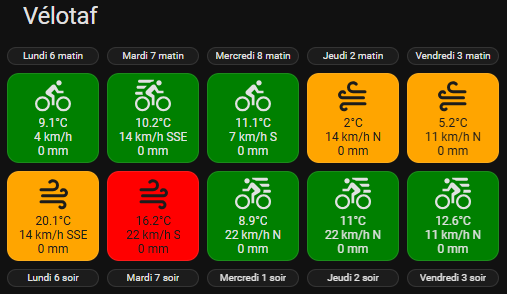
L’une des cartes que j’utilise le plus pour savoir si je peux me rendre à mon travail en vélo.
Je dois parcourir une distance de 30 km le matin et pareil le soir, la météo est donc très importante.
Ma carte indique pour tous les jours de la semaine les conditions météorologiques sur mon trajet le matin et le soir.
La couleur de fond vert, orange ou rouge et les icônes affichées dépendent des conditions pluie, vent, température.
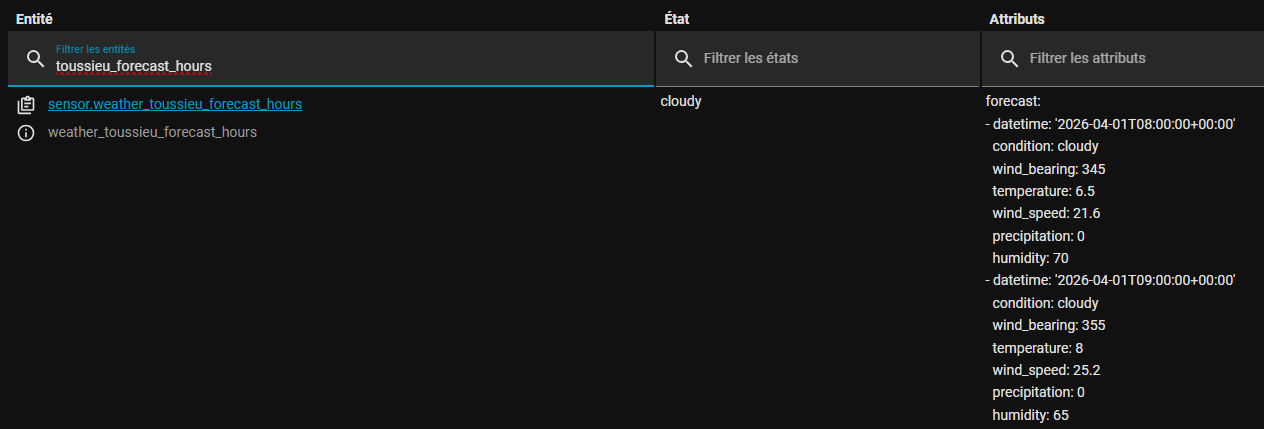
J’ai deux entités de prévisions météo France, l’une de la ville où j’habite, l’autre de la ville où se situe mon travail. Pour chaque heure, elles donnent les prévisions de température précipitation, vitesse et direction du vent …
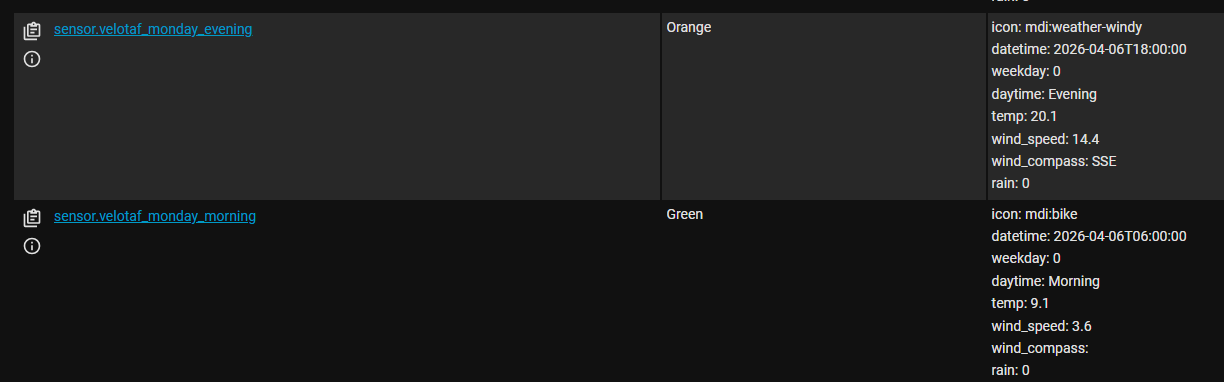
Un script Python, lancé toutes les heures par un automatisme, parcours les prévisions des 7 jours à venir sur les deux entités, fait la moyenne des températures, précipitations et vitesses du vent puis crée les entités pour chaque matin et chaque soir.
Les entités de prévision Météo France:
Le script Python:
LOW_TEMP_RED_THRESHOLD = 0.0
LOW_TEMP_ORANGE_THRESHOLD = 2.0
WIND_SPEED_RED_THRESHOLD = 20
WIND_SPEED_ORANGE_THRESHOLD = 10
RAIN_RED_THRESHOLD = 5
RAIN_ORANGE_THRESHOLD = 0

velotaf_morning_sensor = ['sensor.velotaf_monday_morning', 'sensor.velotaf_tuesday_morning', 'sensor.velotaf_wednesday_morning', 'sensor.velotaf_thursday_morning', 'sensor.velotaf_friday_morning']
velotaf_evening_sensor = ['sensor.velotaf_monday_evening', 'sensor.velotaf_tuesday_evening', 'sensor.velotaf_wednesday_evening', 'sensor.velotaf_thursday_evening', 'sensor.velotaf_friday_evening']

commuting_days = [True, True, True, True, True]
commuting = [{'hour': 6, 'city': 'Toussieu', 'sensor':'sensor.weather_toussieu_forecast_hours', 'direction':'N', 'returning':False, 'last':False},
             {'hour': 6, 'city': 'Montluel', 'sensor':'sensor.weather_montluel_forecast_hours', 'direction':'N', 'returning':False, 'last':True },
             {'hour':18, 'city': 'Montluel', 'sensor':'sensor.weather_montluel_forecast_hours', 'direction':'S', 'returning':True , 'last':False},
             {'hour':18, 'city': 'Toussieu', 'sensor':'sensor.weather_toussieu_forecast_hours', 'direction':'S', 'returning':True , 'last':True }]

attr_timestamp = []
attr_temp = []
attr_wind_bearing = []
attr_wind_speed = []
attr_rain = []
val_city = []
val_timestamp = []
val_temp = []
val_wind_bearing = []
val_wind_speed = []
val_rain = []
#attr_text = []
attr_icon = ""
attr_wind = ""
attr_raw_data = []


def getCompassFromBearing(num):
    val = int((num/22.5) + 0.5)
    arr = ["N","NNE","NE","ENE","E","ESE", "SE", "SSE","S","SSW","SW","WSW","W","WNW","NW","NNW"]
    return arr[(val % 16)]

# Get today
today = datetime.datetime.now()

for day_idx, day in enumerate(commuting_days):
    if day == True:
        for data in commuting:
            city_weather = hass.states.get(data['sensor']).attributes
            #short_forecast = True
            for forecast in city_weather['forecast']:
                timestamp = datetime.datetime.strptime(forecast['datetime'][0:16], "%Y-%m-%dT%H:%M")
                if timestamp.weekday() == day_idx and timestamp.hour == data['hour']:
                    val_city.append(data['city'])
                    val_timestamp.append(timestamp)
                    val_temp.append(forecast['temperature'])
                    val_wind_bearing.append(forecast['wind_bearing'])
                    val_wind_speed.append(forecast['wind_speed'])
                    tmp_str = data['city'] + " " + str(timestamp) + " " + str(forecast['temperature']) + " " + str(forecast['wind_bearing']) + " " + str(forecast['wind_speed'])
                    # Rain is not available in long term forecasts
                    try:
                        val_rain.append(forecast['precipitation'])
                        tmp_str = tmp_str + " " + str(forecast['precipitation'])
                    except:
                        pass
                    attr_raw_data.append(tmp_str)
                    break
            if data['last'] == True:
                state = ""
                # Refresh sensor
                # Check temperature
                min_temp = 99.0
                for temp in val_temp:
                    if temp < min_temp:
                        min_temp = temp
                    if temp < LOW_TEMP_RED_THRESHOLD:
                        state = "Red"
                        attr_icon = "mdi:snowflake-thermometer"
                    elif temp < LOW_TEMP_ORANGE_THRESHOLD:
                        state = "Orange"
                        attr_icon = "mdi:snowflake-thermometer"
                # Check wind direction and speed
                max_wind_speed = 0
                wind_compass = ""
                attr_wind_speed = ""
                attr_wind_compass = ""
                if data['direction'] == 'N':
                    for wind_bearing, wind_speed in zip(val_wind_bearing, val_wind_speed):
                        if wind_speed > max_wind_speed:
                            max_wind_speed = wind_speed
                            if wind_bearing is not None:
                                wind_compass = getCompassFromBearing(wind_bearing)
                                if wind_compass == "NW" or wind_compass == "NNW" or wind_compass == "N" or wind_compass == "NNE" or wind_compass == "NE":
                                    if max_wind_speed > WIND_SPEED_RED_THRESHOLD:
                                        state = "Red"
                                        attr_icon = "mdi:weather-windy"
                                    elif max_wind_speed > WIND_SPEED_ORANGE_THRESHOLD:
                                        state = "Orange"
                                        attr_icon = "mdi:weather-windy"
                elif data['direction'] == 'S':
                    for wind_bearing, wind_speed in zip(val_wind_bearing, val_wind_speed):
                        if wind_speed > max_wind_speed:
                            max_wind_speed = wind_speed
                            if wind_bearing is not None:
                                wind_compass = getCompassFromBearing(wind_bearing)
                                if wind_compass == "SW" or wind_compass == "SSW" or wind_compass == "S" or wind_compass == "SSE" or wind_compass == "SE":
                                    if max_wind_speed > WIND_SPEED_RED_THRESHOLD:
                                        state = "Red"
                                        attr_icon = "mdi:weather-windy"
                                    elif max_wind_speed > WIND_SPEED_ORANGE_THRESHOLD:
                                        state = "Orange"
                                        attr_icon = "mdi:weather-windy"
                # Check rain
                max_rain = 0
                for rain in val_rain:
                    if rain > max_rain:
                        max_rain = rain
                    if rain > RAIN_RED_THRESHOLD:
                        state = "Red"
                        attr_icon = "mdi:weather-pouring"
                    elif rain > RAIN_ORANGE_THRESHOLD:
                        state = "Orange"
                        attr_icon = "mdi:weather-rainy"
                # Weather is good!
                if state == "":
                    state = "Green"
                    if max_wind_speed > WIND_SPEED_ORANGE_THRESHOLD:    attr_icon = "mdi:bike-fast"
                    else:                                               attr_icon = "mdi:bike"
                attr_temp = min_temp
                attr_wind_speed = max_wind_speed
                attr_wind_compass = wind_compass
                attr_rain = max_rain
                # Refresh sensor
                if data['returning'] == True:
                    sensor_name = velotaf_evening_sensor[day_idx]
                    attr_daytime = "Evening"
                else:
                    sensor_name = velotaf_morning_sensor[day_idx]
                    attr_daytime = "Morning"
                attributes = {'icon': attr_icon, 'datetime': val_timestamp[0], 'weekday': day_idx, 'daytime': attr_daytime, 'temp': attr_temp, 'wind_speed': attr_wind_speed, 'wind_compass': attr_wind_compass, 'rain': attr_rain }
                hass.states.remove(sensor_name)
                hass.states.set(sensor_name, state, attributes)
                # Determine next morning and next evening sensors
                if today.hour < 13:             next_morning_day = today.weekday()
                elif today.weekday() < 4:       next_morning_day = today.weekday() + 1
                else:                           next_morning_day = 0
                if today.hour < 20:             next_evening_day = today.weekday()
                elif today.weekday() < 4:       next_evening_day = today.weekday() + 1
                else:                           next_evening_day = 0
                if day_idx == next_morning_day and data['returning'] == False:
                    # Refresh next morning sensor
                    sensor_name = "sensor.velotaf_next_morning"
                    attr_daytime = "Morning"
                    attributes = {'icon': attr_icon, 'datetime': val_timestamp[0], 'weekday': day_idx, 'daytime': attr_daytime, 'temp': attr_temp, 'wind_speed': attr_wind_speed, 'wind_compass': attr_wind_compass, 'rain': attr_rain }
                    hass.states.remove(sensor_name)
                    hass.states.set(sensor_name, state, attributes)
                if day_idx == next_evening_day and data['returning'] == True:
                    # Refresh next evening sensor
                    sensor_name = "sensor.velotaf_next_evening"
                    attr_daytime = "Evening"
                    attributes = {'icon': attr_icon, 'datetime': val_timestamp[0], 'weekday': day_idx, 'daytime': attr_daytime, 'temp': attr_temp, 'wind_speed': attr_wind_speed, 'wind_compass': attr_wind_compass, 'rain': attr_rain }
                    hass.states.remove(sensor_name)
                    hass.states.set(sensor_name, state, attributes)
                # Clear temp variables
                val_city.clear()
                val_timestamp.clear()
                val_temp.clear()
                val_wind_bearing.clear()
                val_wind_speed.clear()
                val_rain.clear()
                attr_raw_data.clear()
Les entités générées par le script Python:
L’automatisation pour lmancer le script Python:
alias: Automation velotaf
description: Lancement du script Python velotaf.py toutes les heures
mode: single
triggers:
  - hours: "*"
    trigger: time_pattern
conditions:
  - condition: time
    after: "04:00:00"
    before: "22:00:00"
actions:
  - data: {}
    action: python_script.velotaf
Les templates:
button_card_templates:
  velotaf_morning:
    color_type: card
    show_icon: false
    name: |-
      [[[
        var jours = ['Lundi', 'Mardi', 'Mercredi', 'Jeudi', 'Vendredi', 'Samedi', 'Dimanche'];
        var datetime = entity.attributes.datetime;
        var jour = parseInt(datetime.substring(8,10), 10);
        return jours[entity.attributes.weekday] + " " + jour + " matin";
      ]]]
    color: dark_grey
    styles:
      card:
        - height: 18px
        - font-size: 10px
  velotaf_evening:
    color_type: card
    show_icon: false
    name: |-
      [[[
        var jours = ['Lundi', 'Mardi', 'Mercredi', 'Jeudi', 'Vendredi', 'Samedi', 'Dimanche'];
        var datetime = entity.attributes.datetime;
        var jour = parseInt(datetime.substring(8,10), 10);
        return jours[entity.attributes.weekday] + " " + jour + " soir";
      ]]]
    color: dark_grey
    styles:
      card:
        - height: 18px
        - font-size: 10px
  velotaf_button:
    color_type: card
    name: '[[[ return entity.attributes.temp + "°C"; ]]]'
    label: |-
      [[[
        var wind_speed = Math.round(entity.attributes.wind_speed);
        return wind_speed + " km/h " + entity.attributes.wind_compass + "<BR/>" + entity.attributes.rain + " mm";
      ]]]
    show_label: true
    state:
      - value: Red
        color: red
      - value: Orange
        color: orange
      - value: Green
        color: green
    styles:
      card:
        - height: 90px
        - font-size: 12px
      icon:
        - opacity: 1
        - transform: |-
            [[[
              if(entity.attributes.icon.substring(0,8) == "mdi:bike" && entity.attributes.daytime == "Evening") return "rotateY(180deg)";
              if(entity.attributes.icon == "mdi:weather-windy" && entity.attributes.wind_compass.substring(0,1) == "N") return "rotateY(180deg)";
            ]]]
      name:
        - font-size: 1.00em
        - white-space: normal
      state:
        - white-space: normal
      label:
        - font-size: 1.00em
        - white-space: normal
Le code de la carte lovelace:
title: Vélotaf
type: vertical-stack
cards:
  - type: horizontal-stack
    cards:
      - type: custom:button-card
        template: velotaf_morning
        entity: sensor.velotaf_monday_morning
      - type: custom:button-card
        template: velotaf_morning
        entity: sensor.velotaf_tuesday_morning
      - type: custom:button-card
        template: velotaf_morning
        entity: sensor.velotaf_wednesday_morning
      - type: custom:button-card
        template: velotaf_morning
        entity: sensor.velotaf_thursday_morning
      - type: custom:button-card
        template: velotaf_morning
        entity: sensor.velotaf_friday_morning
  - type: horizontal-stack
    cards:
      - type: custom:button-card
        template: velotaf_button
        entity: sensor.velotaf_monday_morning
        double_tap_action:
          action: url
          url_path: https://meteofrance.com/previsions-meteo-france/toussieu/69780
      - type: custom:button-card
        template: velotaf_button
        entity: sensor.velotaf_tuesday_morning
        double_tap_action:
          action: url
          url_path: https://meteofrance.com/previsions-meteo-france/toussieu/69780
      - type: custom:button-card
        template: velotaf_button
        entity: sensor.velotaf_wednesday_morning
        double_tap_action:
          action: url
          url_path: https://meteofrance.com/previsions-meteo-france/toussieu/69780
      - type: custom:button-card
        template: velotaf_button
        entity: sensor.velotaf_thursday_morning
        double_tap_action:
          action: url
          url_path: https://meteofrance.com/previsions-meteo-france/toussieu/69780
      - type: custom:button-card
        template: velotaf_button
        entity: sensor.velotaf_friday_morning
        double_tap_action:
          action: url
          url_path: https://meteofrance.com/previsions-meteo-france/toussieu/69780
  - type: horizontal-stack
    cards:
      - type: horizontal-stack
        cards:
          - type: custom:button-card
            template: velotaf_button
            entity: sensor.velotaf_monday_evening
            double_tap_action:
              action: url
              url_path: https://meteofrance.com/previsions-meteo-france/montluel/01120
          - type: custom:button-card
            template: velotaf_button
            entity: sensor.velotaf_tuesday_evening
            double_tap_action:
              action: url
              url_path: https://meteofrance.com/previsions-meteo-france/montluel/01120
          - type: custom:button-card
            template: velotaf_button
            entity: sensor.velotaf_wednesday_evening
            double_tap_action:
              action: url
              url_path: https://meteofrance.com/previsions-meteo-france/montluel/01120
          - type: custom:button-card
            template: velotaf_button
            entity: sensor.velotaf_thursday_evening
            double_tap_action:
              action: url
              url_path: https://meteofrance.com/previsions-meteo-france/montluel/01120
          - type: custom:button-card
            template: velotaf_button
            entity: sensor.velotaf_friday_evening
            double_tap_action:
              action: url
              url_path: https://meteofrance.com/previsions-meteo-france/montluel/01120
  - type: horizontal-stack
    cards:
      - type: custom:button-card
        template: velotaf_evening
        entity: sensor.velotaf_monday_evening
      - type: custom:button-card
        template: velotaf_evening
        entity: sensor.velotaf_tuesday_evening
      - type: custom:button-card
        template: velotaf_evening
        entity: sensor.velotaf_wednesday_evening
      - type: custom:button-card
        template: velotaf_evening
        entity: sensor.velotaf_thursday_evening
      - type: custom:button-card
        template: velotaf_evening
        entity: sensor.velotaf_friday_evening
 et lorsque c’est la tempête c’est bien galère, respect pour les 60km !
