Bonjour à tous,
je documente ici l'automatisation de mon poele à pellet.
le projet que je vous présente ici fonctionne avec les poele equipé des cartes electronique suivante:
- Artel watt 9
- Artel MeNext
- Duroflame Rembrand
- DUEPI EVO VM88
- Qlima Viola 85 S-Line
- Qlima Delmara 88 S-Line
- Interstove Milano
- NextElite
Mon poêle est un STOVE ITALIA MOD 8 EL / YOSA 8 en montage ventouse, c'est un modèle d'entrée de gamme. Sa programation avec l'afficheur est fastidieuse et simpliste, il peut etre équipé d'un module wifi ( min 150€ ) et d'une app, mais cela reste simpliciste.
Autre défaut remarqué, la sonde d'ambiance est à l'arrière du poêle, et quand bien même on la déporte (il y'a environ1m de cable dispo) la mesure reste fausser, car trop près du poêle.
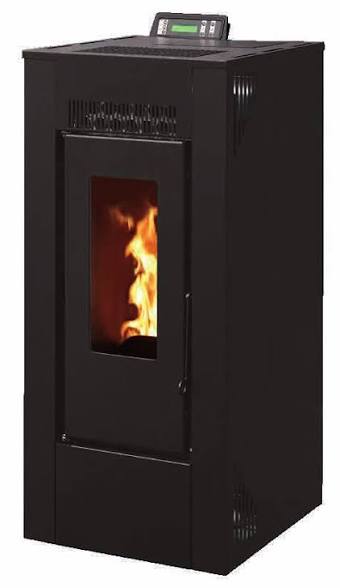
J'ai d'abbord pensé à mettre un Netnamo comme certain fond, et puis j'ai découvert que c'etait facilement intégrable à HA pour quelques euro, what else ...
1 Partie Hardware:
Mon poêle est géré par une carte Duepi EVO VM88 LCD
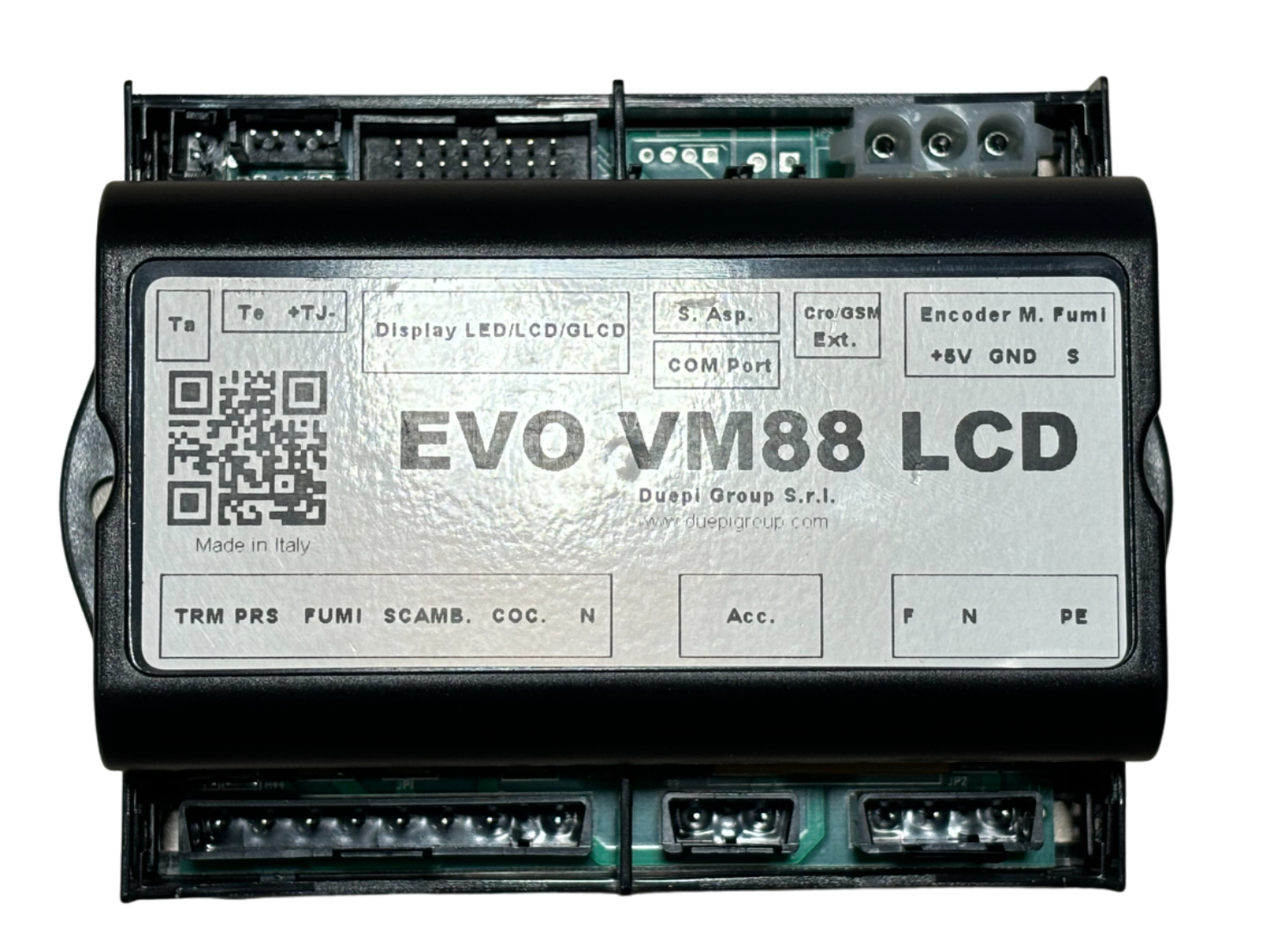
il dispose d'un port de communication en façade arriere,
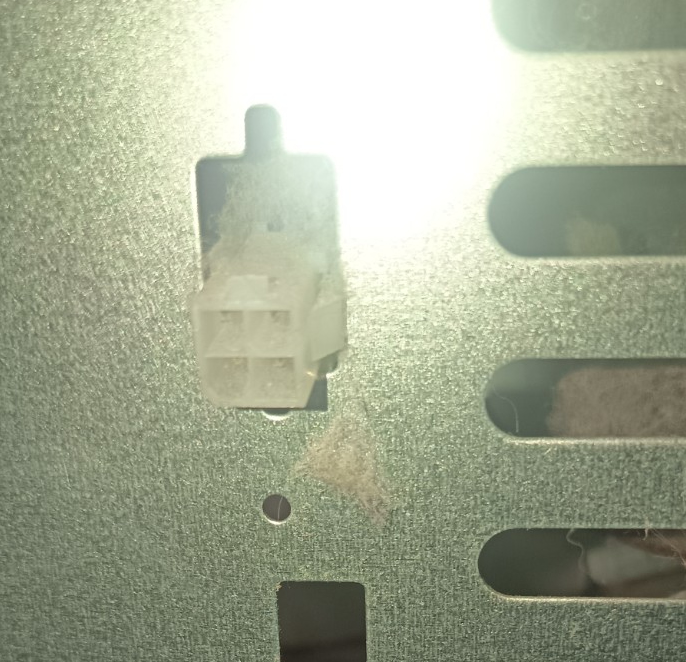
qui permet de brancher un PC (pour l'installateur) et/ou le module wifi ( DUEPI WIFI BOX ) optionnel (il se trouve en ligne pour un cout neuf d'environ 150€)
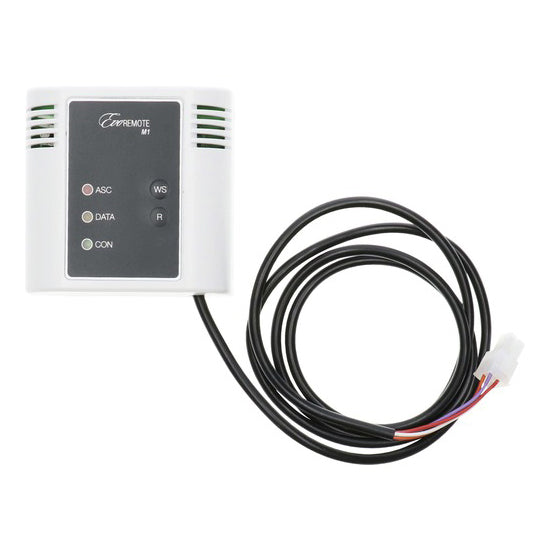
En interne le port est connecté à la cate au moyen de 4 fils:
Blanc => GND
Violet => +5V
Rouge => TX (+5V)
Orange => RX
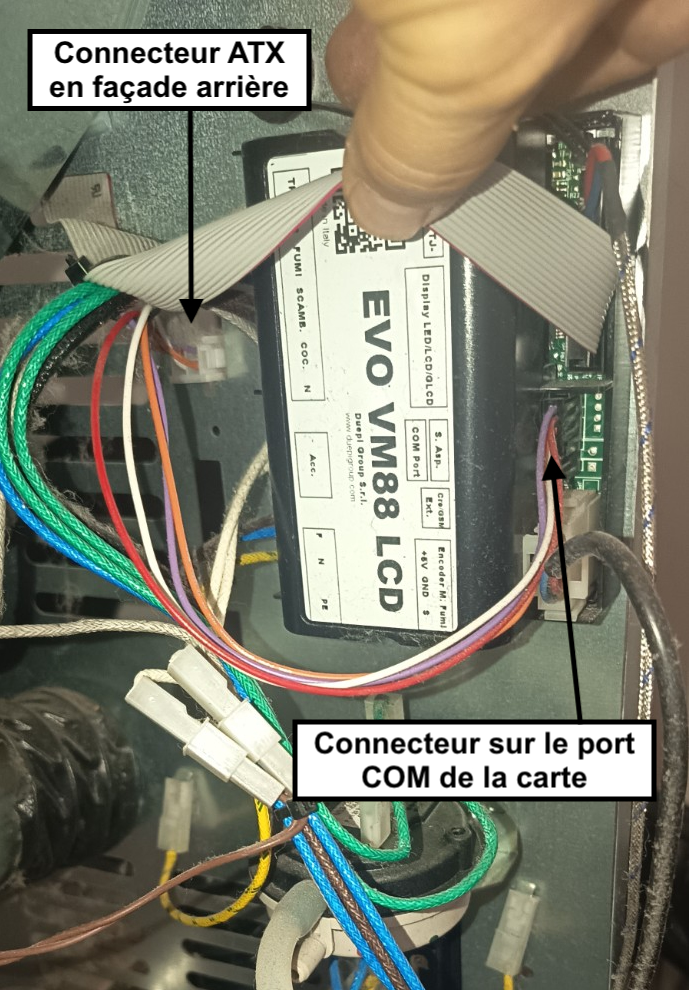
l'idée est donc de venir connecté un ESP32-C3 à ce port pour piloter le poele avec HA.
J'ai opté pour un kit ESP32-C3 super mini + Carte de développement à 10€ chez Amazon (mais vous pouvez faire moins chez aliexpress, si vous n'êtes pas pressé 
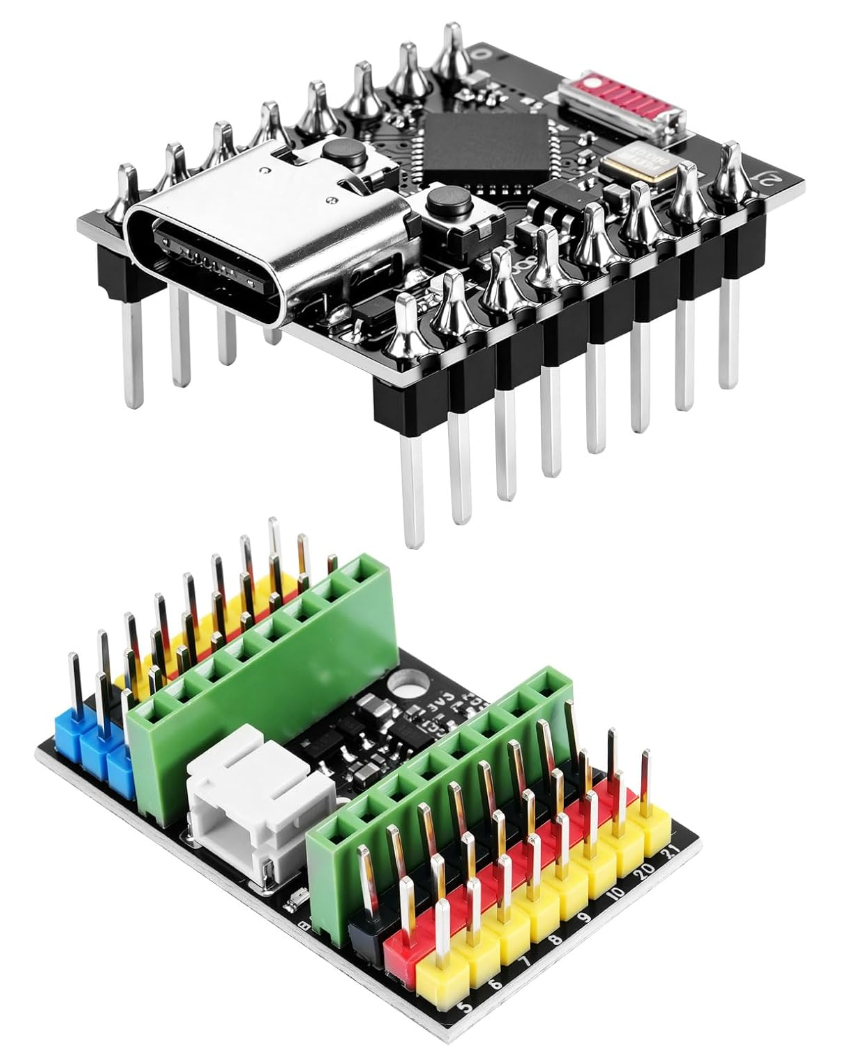
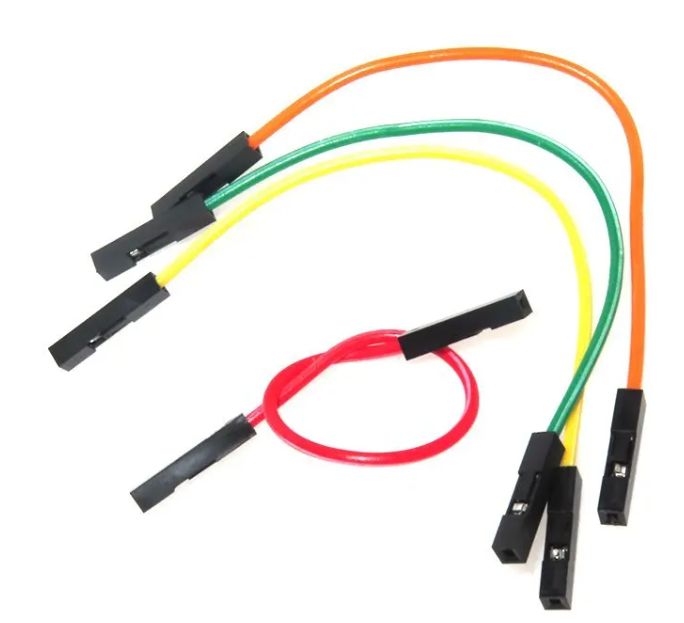
L'ESP32 sera directement alimenté en 5V par le port COM, mail il y'a un point de vigilance: le niveau TTL de TX est en 5V (cela depend des poele, car certain sont déja en 3,3V), il faut donc abaisser la tension en 3,3V pour ne pas cramer l'ESP32.
pour cela 2 solutions
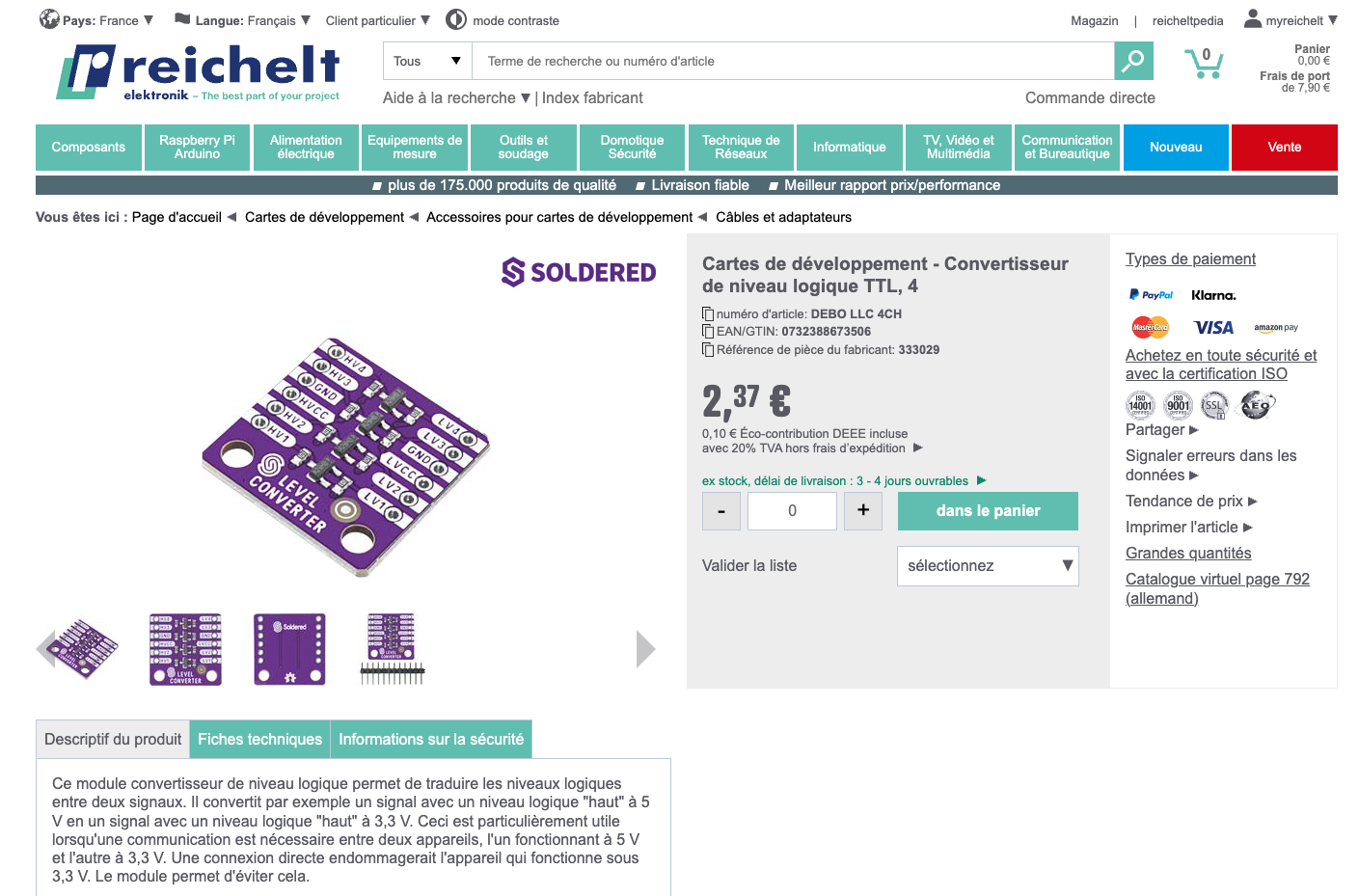
1 - acheter un level switcher, exemple:
2 - faire un PDT (pont diviseur de tension) avec des résistances, selon ce que vous avez en stock (chat GPT est votre amis)
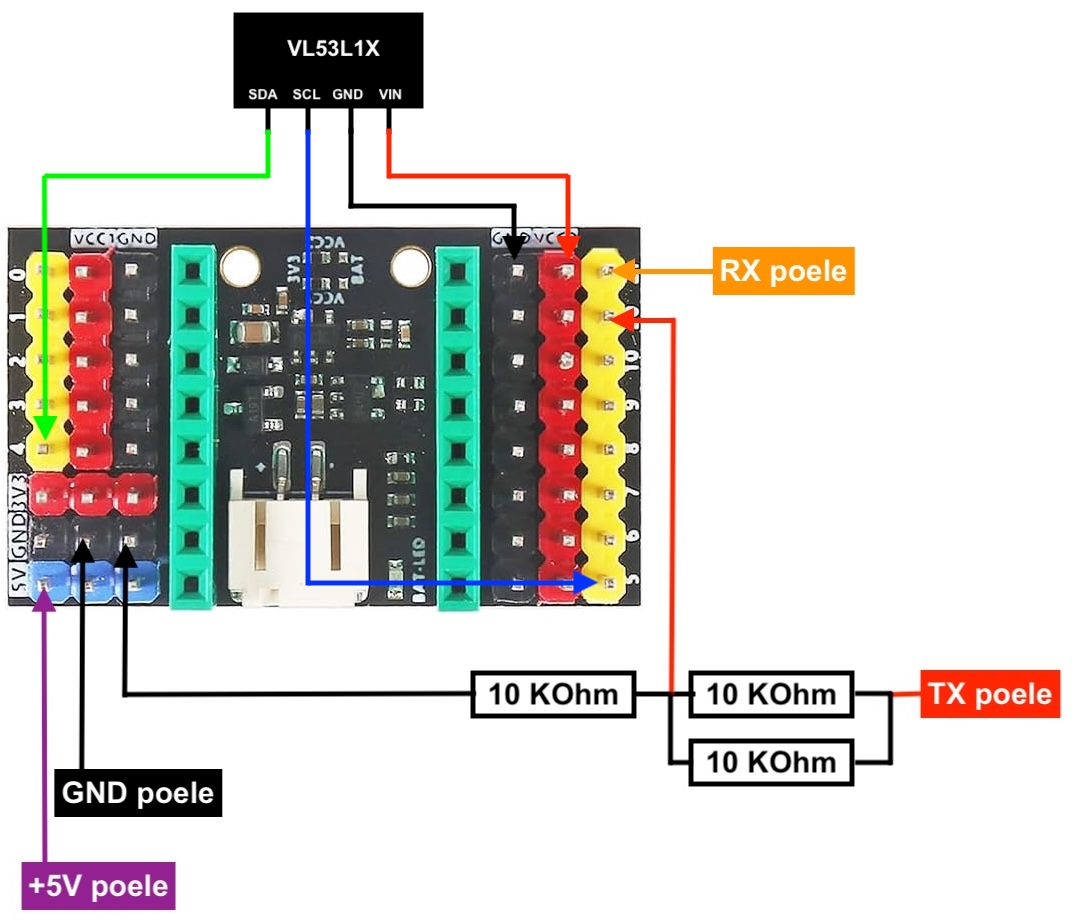
voici le cablage de la carte de dev
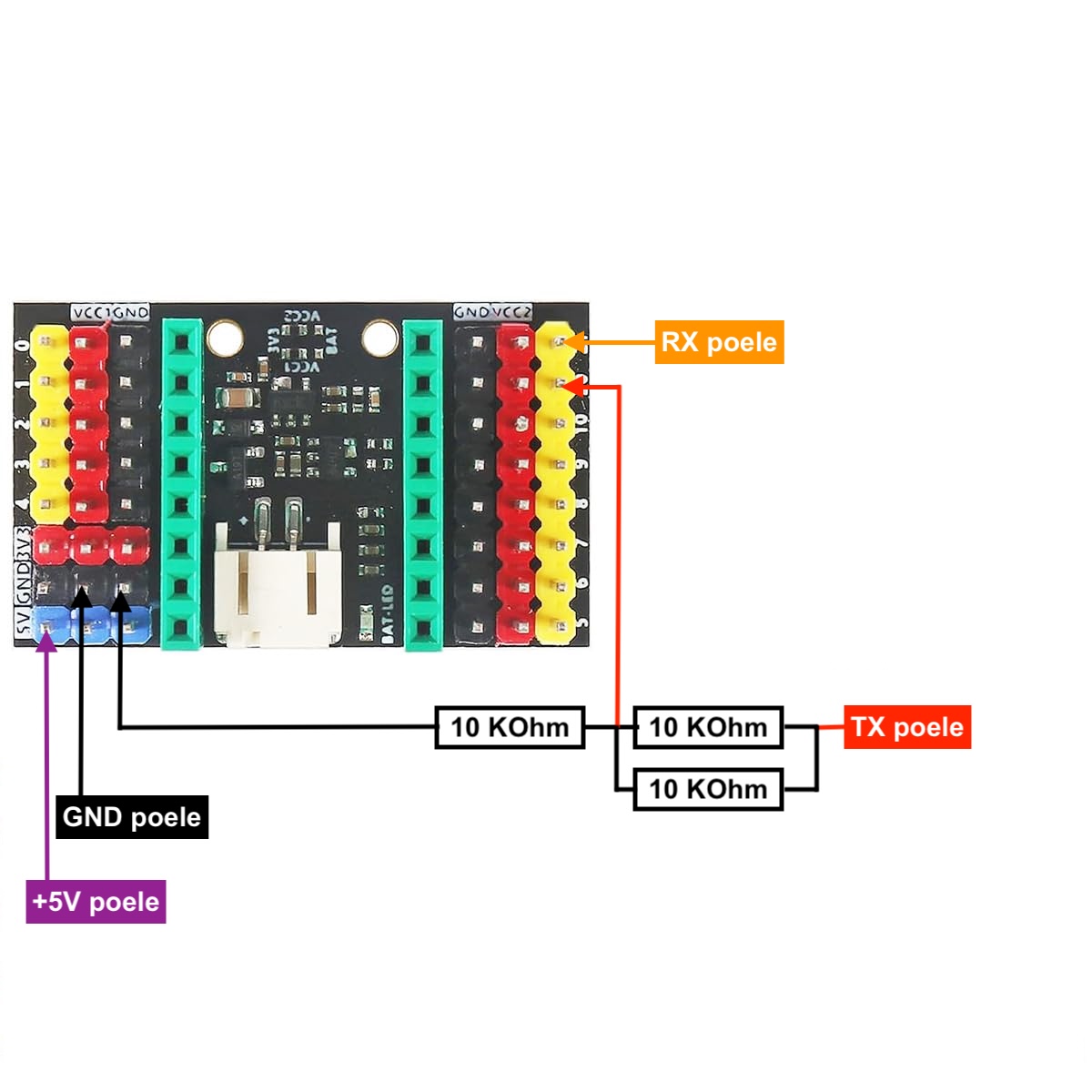
Note 1 : "GND Peole" en noir sur le schemas, correspond au fil blanc du port com.
Note 2 : j'ai fais avec ce que j'avais comme résistance (des 10 K ohm) en stock, j'en ai monté deux en // (pour obtenir 5 Kohm) plutôt que 2 en serie (20 Kohm), cela revient au même en terme de tension, on à 3,3V mais la resistance globale étant plus faible en // on a moin de risque de perturber le signal du port série.
Note 3 : les GND du port com, du PDT, et de L'ESP32 doivent etre connecté ensemble, ce qui est fait d'office avec la carte dev
Note 4 : Il n'y a pas de PDT sur RX, car dans ce cas c'est l'ESP32 qui envera du 3,3V vers la VM88, donc pas de problèmes
voici le PDT:
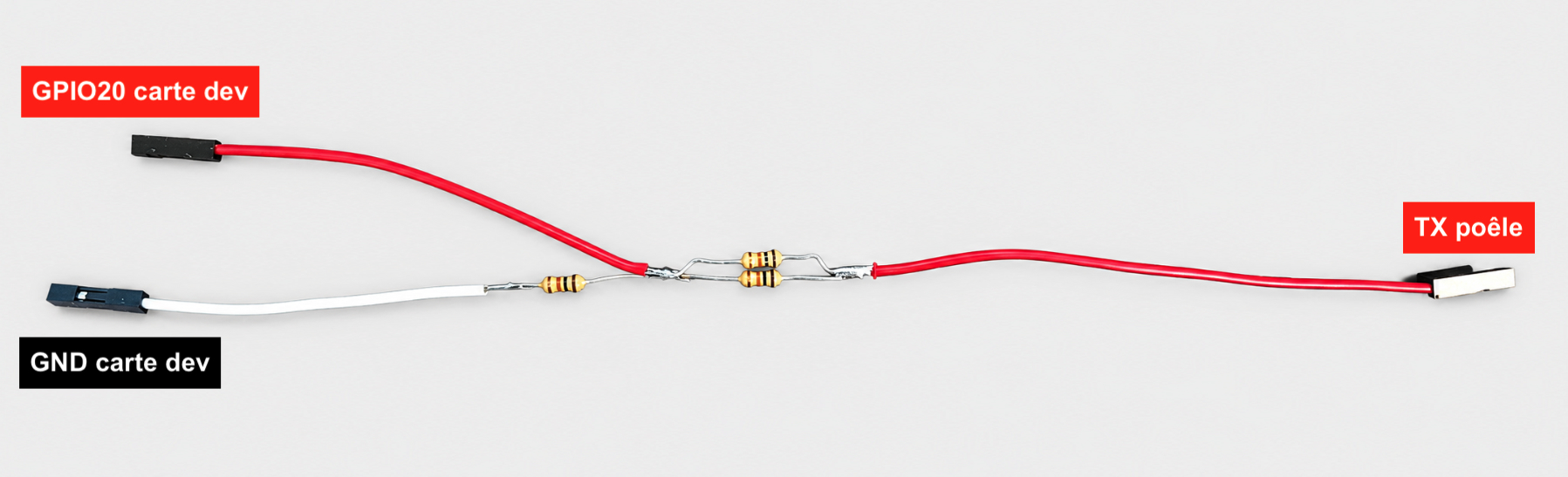
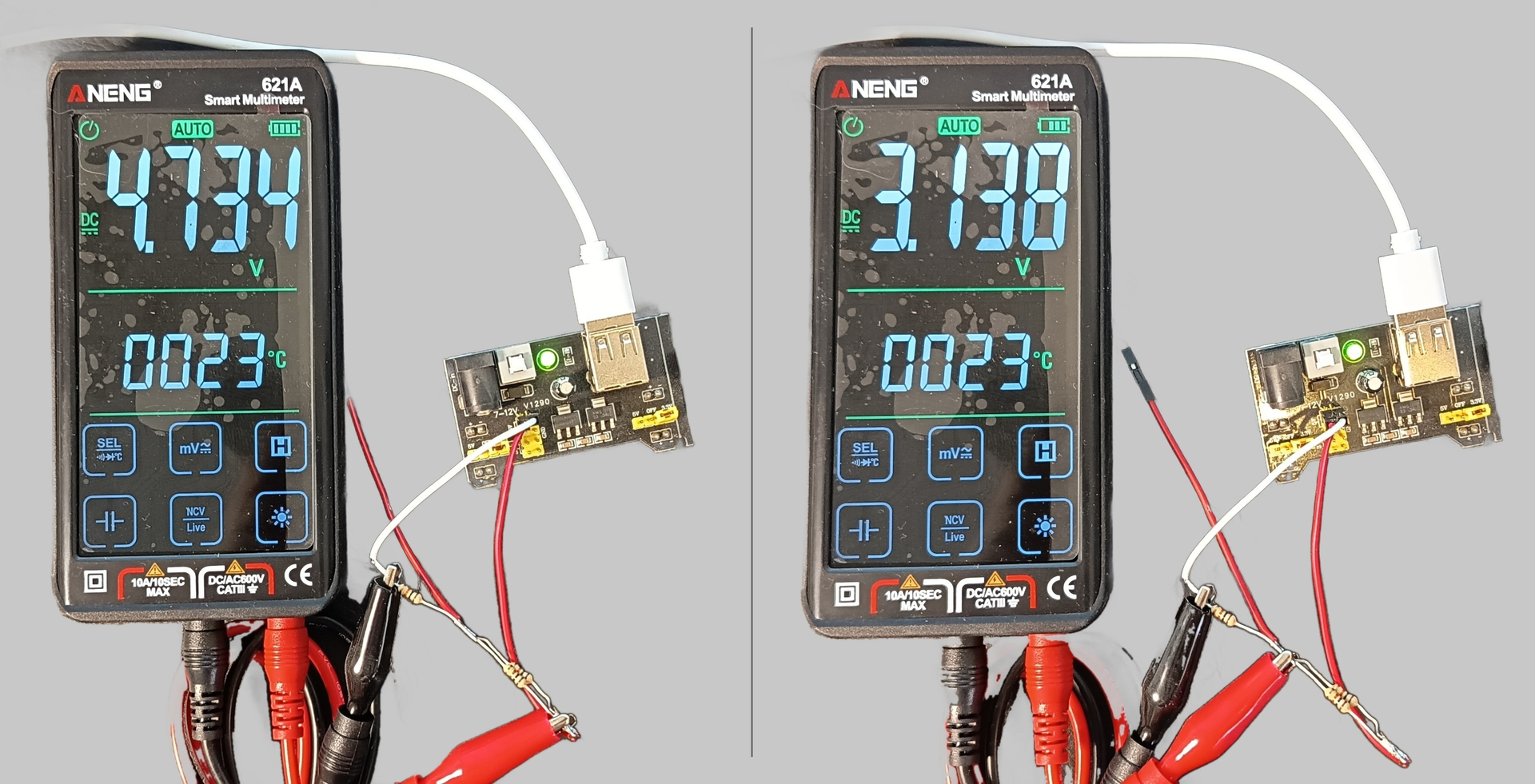
et voici une mesure de tension, on à bien +/- 3,3v en appliqauant +/- 5V
Pour finir, un ptit bout de gaine thermo pour faire propre et eviter les contact accidentel

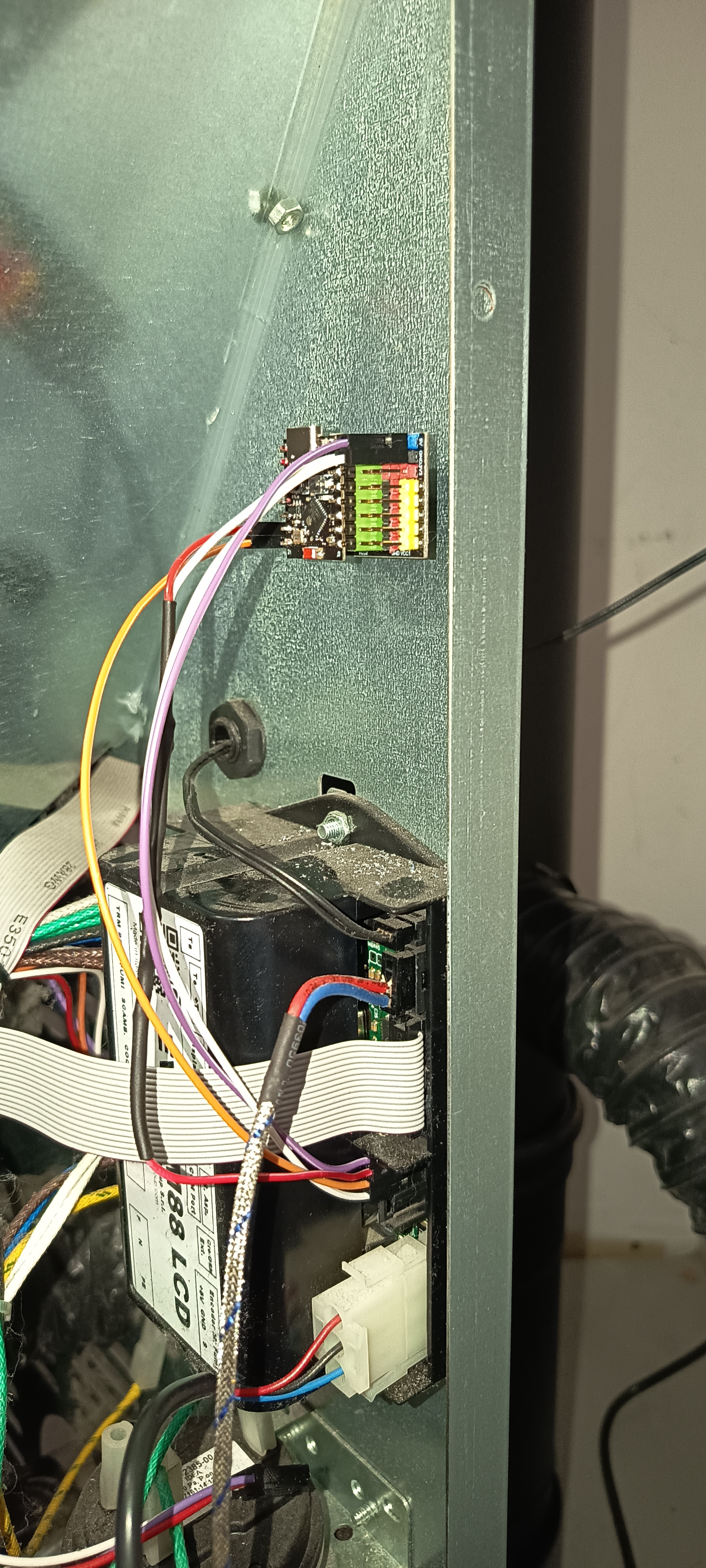
Une fois programmé (voir ci-dessous), l'ensemble est ensuite fixé dans le pôele et cablé à la place du connecteur d'origine (celuis qui vas en façade)
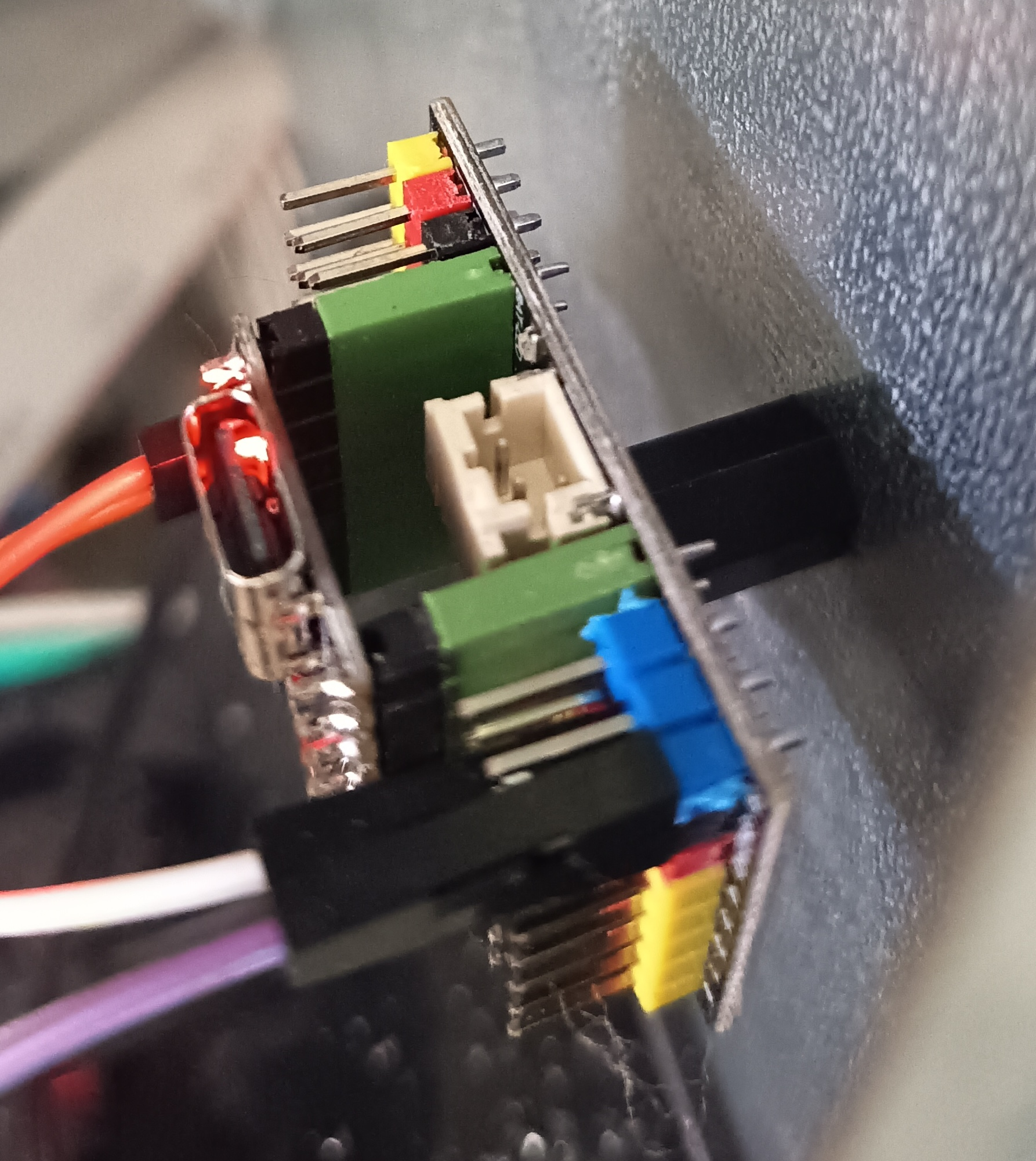
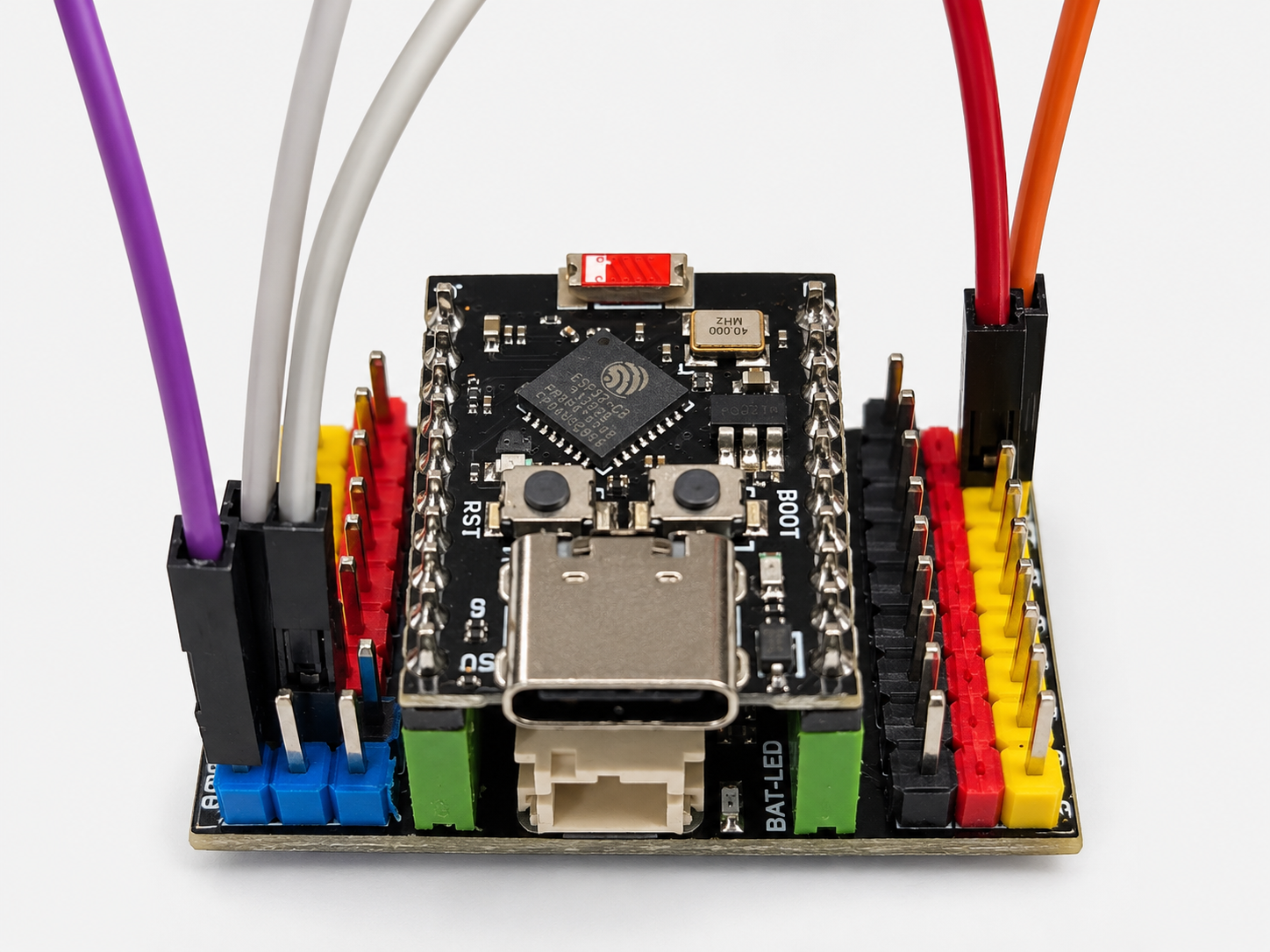
2 Partie Sofware:
Je pars du principe que vous maitriser ESPHome et la prog d'ESP32
J'utilise le package tout fait GitHub - mvroosmalen1970/ESPHome-Duepi: An script for the ESPHome flashed ESP devices to create a climate sensor in Home Assistent for DUEPI controlled pellet stoves · GitHub qui integre déja tout ce qu'il faut pour notre besoin.
voici le YAML de l'ESP32
esphome:
  name: poele
  friendly_name: Poêle

esp32:
  board: esp32-c3-devkitm-1
  framework:
    type: esp-idf

logger:
  level: DEBUG
  hardware_uart: USB_SERIAL_JTAG

api:

ota:
  - platform: esphome

wifi:
  ssid: votre_ssid
  password: votre_mdp

  # Point d'accès de secours si le Wi-Fi ne fonctionne pas
  ap:
    ssid: "Poele Fallback"
    password: "12345678"

captive_portal:

web_server:
  port: 80
  # affichage des infos de debug pour la liaison serie
  include_internal: true

substitutions:
  min_temp: "10"
  max_temp: "35"
  temp_unit: "°C"

  # ESP32-C3 Super Mini
  # TX ESP -> RX VM88 (orange)
  tx_pin_esp: "21"

  # RX ESP <- TX VM88 (rouge via pont diviseur)
  rx_pin_esp: "20"

packages:
  duepi:
    url: https://github.com/mvroosmalen1970/ESPHome-Duepi.git
    file: components/packages.yaml
    ref: main
    refresh: 0d

sensor:
  - platform: wifi_signal
    name: "Signal WiFi"
    update_interval: 30s

  - platform: internal_temperature
    name: "Temperature ESP32"

button:
  - platform: restart
    name: "Redémarrer ESP32"

text_sensor:
  - platform: wifi_info
    ip_address:
      name: IP Address
      id: wifi_info_ip_address
    power_save_mode:
      name: Power Save Mode
      id: wifi_info_power_save_mode
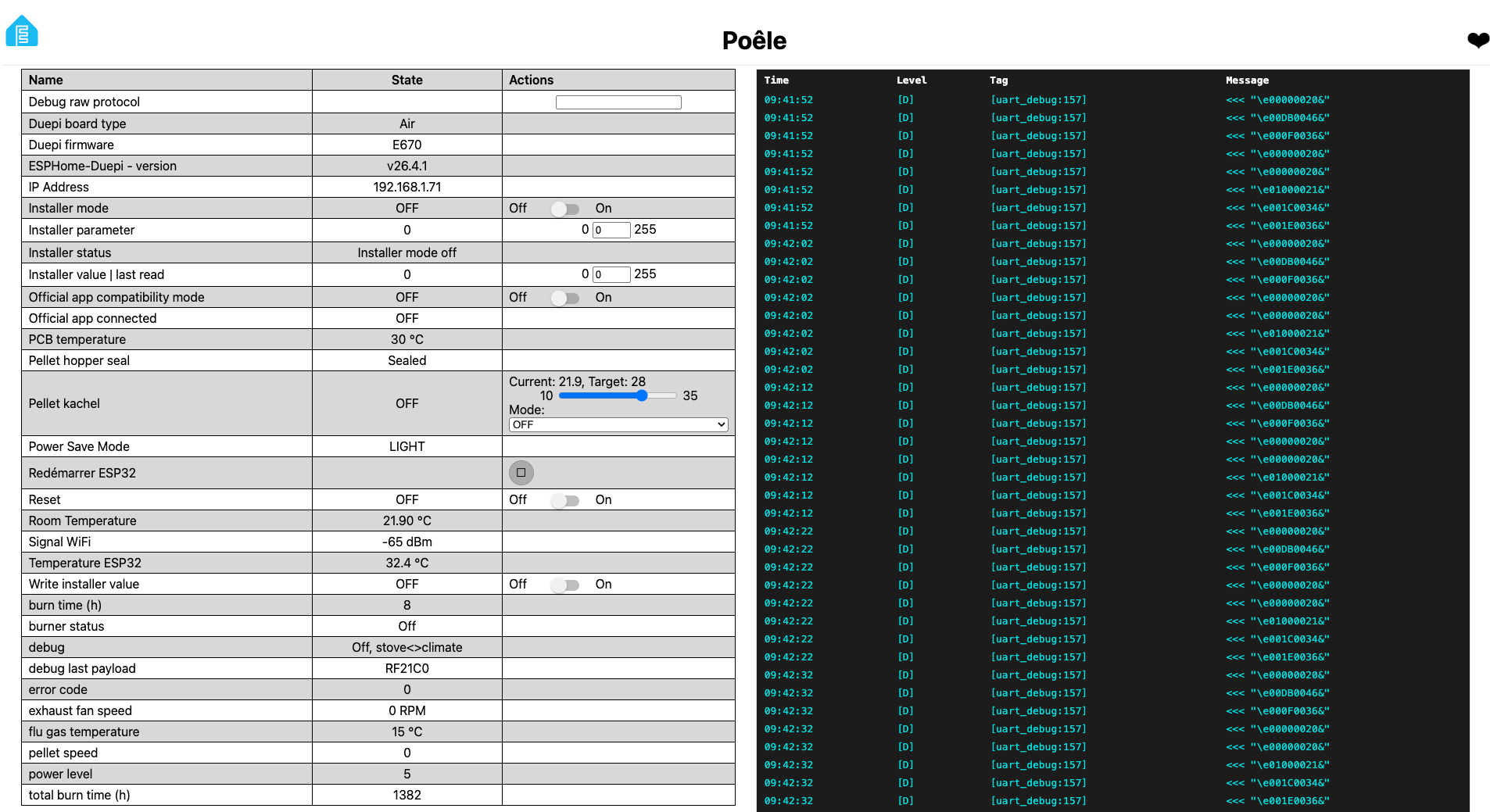
Une fois live votre ESP32 devrait remonter les infos suivantes (pas besoin, de mettre le poel en chauffe, juste sous tention)
3 - Carte Home Assistant
Voici la cate que j'ai créer pour le poêle
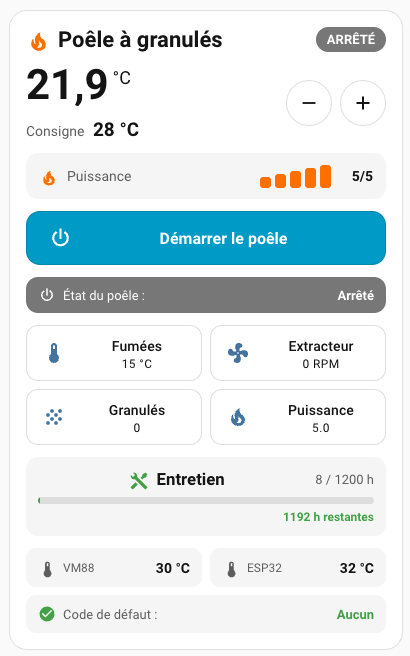
Note 1: la température affiché et celle de la sonde d'ambiance su poêle, mais je compte changer pour une sonde d'ambiance ailleurs dans la piece
Note 2: la partie entretient ce base sur le paramètre PR45 qui est le seuil d'entretient (nombre d'heure avant entretien / 10), mais c'est peut-etre à adapter en fonction de votre carte electronique...
Note 3: cette carte HA utilise button-card ( custom:button-card documentation )
voici le YAML
type: custom:button-card
entity: climate.poele
show_name: false
show_icon: false
show_state: false
styles:
card:
- padding: 16px
- border-radius: 18px
grid:
- grid-template-areas: |
"title status"
"temp controls"
"target controls"
"powerlevel powerlevel"
"power power"
"burner burner"
"metrics metrics"
"maintenance maintenance"
"diagnostic diagnostic"
- grid-template-columns: 1fr auto
- grid-template-rows: auto auto auto auto auto auto auto auto auto
- row-gap: 12px
custom_fields:
title:
- justify-self: start
- align-self: center
status:
- justify-self: end
- align-self: center
temp:
- justify-self: start
- align-self: center
target:
- justify-self: start
- align-self: center
controls:
- justify-self: end
- align-self: center
powerlevel:
- width: 100%
power:
- width: 100%
burner:
- width: 100%
metrics:
- width: 100%
maintenance:
- width: 100%
diagnostic:
- width: 100%
custom_fields:
title: |
[[[
return `
<div style="
display:flex;
align-items:center;
gap:7px;
font-size:22px;
font-weight:600;
">
<ha-icon
icon="mdi:fire"
style="
width:25px;
height:25px;
color:#ff6f00;
">
</ha-icon>
<span>Poêle à granulés</span>
</div>
`;
]]]
status: |
[[[
const action = entity.attributes.hvac_action || entity.state;
const burner = (states['sensor.poele_etat']?.state || '').toLowerCase();
let label = 'INCONNU';
let color = '#777';
if (burner.includes('cooldown')) {
label = 'REFROIDISSEMENT';
color = '#2196f3';
} else if (burner.includes('ignition')) {
label = 'DÉMARRAGE';
color = '#ff9800';
} else if (entity.state === 'off' || action === 'off') {
label = 'ARRÊTÉ';
color = '#777';
} else if (action === 'heating') {
label = 'EN CHAUFFE';
color = '#ff6f00';
} else if (action === 'idle') {
label = 'CONSIGNE ATTEINTE';
color = '#43a047';
}
return `
<div style="
background:${color};
color:white;
padding:5px 11px;
border-radius:14px;
font-size:13px;
font-weight:600;
white-space:nowrap;
">
${label}
</div>
`;
]]]
temp: |
[[[
const raw =
parseFloat(
states['sensor.poele_temperature_ambiante']?.state
);
const t =
Number.isFinite(raw)
? raw.toFixed(1).replace('.', ',')
: '--';
return `
<div style="
display:flex;
align-items:flex-start;
white-space:nowrap;
">
<span style="
font-size:42px;
line-height:1;
font-weight:600;
">
${t}
</span>
<span style="
font-size:18px;
margin-left:4px;
margin-top:3px;
">
°C
</span>
</div>
`;
]]]
target:
card:
type: custom:button-card
entity: climate.poele
show_name: false
show_icon: false
show_state: false
styles:
card:
- box-shadow: none
- background: none
- border: none
- padding: 0
custom_fields:
value: |
[[[
const t =
entity.attributes.temperature ?? '--';
return `
<div style="
font-size:14px;
color:var(--secondary-text-color);
white-space:nowrap;
">
Consigne
<strong style="
margin-left:5px;
font-size:19px;
color:var(--primary-text-color);
">
${t} °C
</strong>
</div>
`;
]]]
controls:
card:
type: horizontal-stack
cards:
- type: custom:button-card
icon: mdi:minus
show_name: false
tap_action:
action: call-service
service: climate.set_temperature
target:
entity_id: climate.poele
data:
temperature: |
[[[
return (
states['climate.poele']
.attributes.temperature || 20
) - 1;
]]]
styles:
card:
- width: 46px
- height: 46px
- padding: 8px
- border-radius: 50%
icon:
- width: 22px
- type: custom:button-card
icon: mdi:plus
show_name: false
tap_action:
action: call-service
service: climate.set_temperature
target:
entity_id: climate.poele
data:
temperature: |
[[[
return (
states['climate.poele']
.attributes.temperature || 20
) + 1;
]]]
styles:
card:
- width: 46px
- height: 46px
- padding: 8px
- border-radius: 50%
icon:
- width: 22px
powerlevel: |
[[[
const raw =
parseInt(
states['sensor.poele_puissance']?.state
);
const power =
Number.isFinite(raw) ? raw : 0;
let bars = '';
for (let i = 1; i <= 5; i++) {
const active = i <= power;
bars += `
<span style="
display:block;
width:11px;
height:${8 + i * 3}px;
border-radius:3px;
background:${
active
? '#ff6f00'
: 'rgba(127,127,127,0.20)'
};
"></span>
`;
}
return `
<div style="
display:flex;
align-items:center;
justify-content:space-between;
width:100%;
box-sizing:border-box;
padding:11px 13px;
border-radius:12px;
background:rgba(127,127,127,0.08);
">
<div style="
display:flex;
align-items:center;
gap:8px;
">
<ha-icon
icon="mdi:fire"
style="
width:20px;
height:20px;
color:#ff6f00;
">
</ha-icon>
<span style="
font-size:14px;
color:var(--secondary-text-color);
">
Puissance
</span>
</div>
<div style="
display:flex;
align-items:center;
gap:12px;
">
<div style="
display:flex;
align-items:flex-end;
gap:4px;
height:24px;
">
${bars}
</div>
<strong style="
min-width:30px;
text-align:right;
font-size:14px;
">
${power > 0 ? power + '/5' : '—'}
</strong>
</div>
</div>
`;
]]]
power:
card:
type: custom:button-card
entity: climate.poele
icon: mdi:power
name: |
[[[
return entity.state === 'off'
? 'Démarrer le poêle'
: 'Arrêter le poêle';
]]]
tap_action:
action: call-service
service: |
[[[
return entity.state === 'off'
? 'climate.turn_on'
: 'climate.turn_off';
]]]
target:
entity_id: climate.poele
styles:
card:
- height: 54px
- padding: 0 16px
- border-radius: 14px
- color: white
- background: |
[[[
return entity.state === 'off'
? 'var(--primary-color)'
: '#b71c1c';
]]]
grid:
- grid-template-areas: "\"i n\""
- grid-template-columns: 35px 1fr
icon:
- width: 25px
- color: white
name:
- font-size: 16px
- font-weight: 600
- justify-self: center
burner: |
[[[
const raw =
states['sensor.poele_etat']?.state || 'Inconnu';
const s = raw.toLowerCase();
let label = raw;
let color = '#777';
let icon = 'mdi:information-outline';
if (s === 'off') {
label = 'Arrêté';
color = '#777';
icon = 'mdi:power';
} else if (s.includes('load wood')) {
label = 'Chargement granulés';
color = '#ff9800';
icon = 'mdi:grain';
} else if (s.includes('fire on and vent')) {
label = 'Allumage + ventilation';
color = '#fb8c00';
icon = 'mdi:weather-windy';
} else if (s.includes('e693')) {
label = 'Préchauffage';
color = '#f57c00';
icon = 'mdi:fire';
} else if (
s.includes('ignition') &&
s.includes('fire on')
) {
label = 'Allumage';
color = '#ff9800';
icon = 'mdi:fire';
} else if (s.includes('stove on')) {
label = 'En fonctionnement';
color = '#46eb34';
icon = 'mdi:fire';
} else if (s.includes('cooldown sequence 1')) {
label = 'Refroidissement · phase 1';
color = '#2196f3';
icon = 'mdi:fan';
} else if (s.includes('cooldown sequence 2')) {
label = 'Refroidissement · phase 2';
color = '#1976d2';
icon = 'mdi:fan';
} else if (s.includes('cool')) {
label = 'Refroidissement';
color = '#2196f3';
icon = 'mdi:fan';
}
return `
<div style="
width:100%;
box-sizing:border-box;
display:flex;
align-items:center;
justify-content:space-between;
gap:12px;
padding:9px 12px;
border-radius:12px;
background:${color};
color:white;
">
<div style="
display:flex;
align-items:center;
gap:7px;
font-size:13px;
">
<ha-icon
icon="${icon}"
style="
width:18px;
height:18px;
color:white;
">
</ha-icon>
<span>
État du poêle :
</span>
</div>
<strong style="
font-size:13px;
text-align:right;
">
${label}
</strong>
</div>
`;
]]]
metrics:
card:
type: grid
columns: 2
square: false
cards:
- type: tile
entity: sensor.poele_temperature_fumees
name: Fumées
icon: mdi:thermometer
- type: tile
entity: sensor.poele_vitesse_extracteur
name: Extracteur
icon: mdi:fan
- type: tile
entity: sensor.poele_debit_granules
name: Granulés
icon: mdi:grain
- type: tile
entity: sensor.poele_puissance
name: Puissance
icon: mdi:fire
maintenance: |
[[[
const raw =
parseFloat(
states['sensor.poele_heures_depuis_entretien']?.state
);
const hours =
Number.isFinite(raw) ? raw : 0;
const threshold = 1200;
const percent =
Math.min(
100,
Math.max(
0,
(hours / threshold) * 100
)
);
const remaining =
Math.max(
0,
threshold - hours
);
let color = '#43a047';
let message =
`${Math.round(remaining)} h restantes`;
if (percent >= 100) {
color = '#d32f2f';
message = 'Entretien à effectuer';
} else if (percent >= 80) {
color = '#ff9800';
}
return `
<div style="
padding:12px;
border-radius:12px;
background:rgba(127,127,127,0.08);
">
<div style="
display:flex;
align-items:center;
margin-bottom:8px;
">
<ha-icon
icon="mdi:tools"
style="
width:20px;
height:20px;
margin-right:8px;
color:${color};
">
</ha-icon>
<strong>
Entretien
</strong>
<span style="
margin-left:auto;
font-size:13px;
color:var(--secondary-text-color);
">
${Math.round(hours)} / ${threshold} h
</span>
</div>
<div style="
width:100%;
height:7px;
border-radius:5px;
background:rgba(127,127,127,0.20);
overflow:hidden;
">
<div style="
width:${percent}%;
height:100%;
background:${color};
border-radius:5px;
">
</div>
</div>
<div style="
margin-top:6px;
text-align:right;
font-size:12px;
color:${color};
font-weight:600;
">
${message}
</div>
</div>
`;
]]]
diagnostic: |
[[[
const vm88 =
parseFloat(
states['sensor.poele_temperature_carte']?.state
);
const esp32 =
parseFloat(
states['sensor.salon_poele_temperature_esp32']?.state
);
const errorRaw =
states['sensor.poele_code_erreur']?.state ?? 'unknown';
const error =
parseInt(errorRaw);
const vm =
Number.isFinite(vm88)
? vm88.toFixed(0) + ' °C'
: '--';
const esp =
Number.isFinite(esp32)
? esp32.toFixed(0) + ' °C'
: '--';
const ok =
Number.isFinite(error) && error === 0;
let errorText;
let errorColor;
if (ok) {
errorText = 'Aucun';
errorColor = '#43a047';
} else if (
errorRaw === 'unknown' ||
errorRaw === 'unavailable'
) {
errorText = 'Inconnu';
errorColor = '#777';
} else {
errorText = errorRaw;
errorColor = '#d32f2f';
}
return `
<div>
<!-- TEMPÉRATURES -->
<div style="
display:grid;
grid-template-columns:1fr 1fr;
gap:8px;
">
<div style="
display:flex;
align-items:center;
justify-content:space-between;
gap:8px;
padding:10px 12px;
border-radius:10px;
background:rgba(127,127,127,0.08);
">
<div style="
display:flex;
align-items:center;
gap:6px;
">
<ha-icon
icon="mdi:thermometer"
style="
width:19px;
height:19px;
color:var(--secondary-text-color);
">
</ha-icon>
<span style="
font-size:12px;
color:var(--secondary-text-color);
">
VM88
</span>
</div>
<strong style="
font-size:14px;
white-space:nowrap;
">
${vm}
</strong>
</div>
<div style="
display:flex;
align-items:center;
justify-content:space-between;
gap:8px;
padding:10px 12px;
border-radius:10px;
background:rgba(127,127,127,0.08);
">
<div style="
display:flex;
align-items:center;
gap:6px;
">
<ha-icon
icon="mdi:thermometer"
style="
width:19px;
height:19px;
color:var(--secondary-text-color);
">
</ha-icon>
<span style="
font-size:12px;
color:var(--secondary-text-color);
">
ESP32
</span>
</div>
<strong style="
font-size:14px;
white-space:nowrap;
">
${esp}
</strong>
</div>
</div>
<!-- CODE DE DÉFAUT -->
<div style="
margin-top:8px;
display:flex;
align-items:center;
justify-content:space-between;
gap:12px;
padding:10px 12px;
border-radius:10px;
background:rgba(127,127,127,0.08);
font-size:13px;
">
<div style="
display:flex;
align-items:center;
gap:7px;
">
<ha-icon
icon="${ok ? 'mdi:check-circle' : 'mdi:alert-circle'}"
style="
width:18px;
height:18px;
color:${errorColor};
">
</ha-icon>
<span style="
color:var(--secondary-text-color);
">
Code de défaut :
</span>
</div>
<strong style="
color:${errorColor};
text-align:right;
">
${errorText}
</strong>
</div>
</div>
`;
]]]
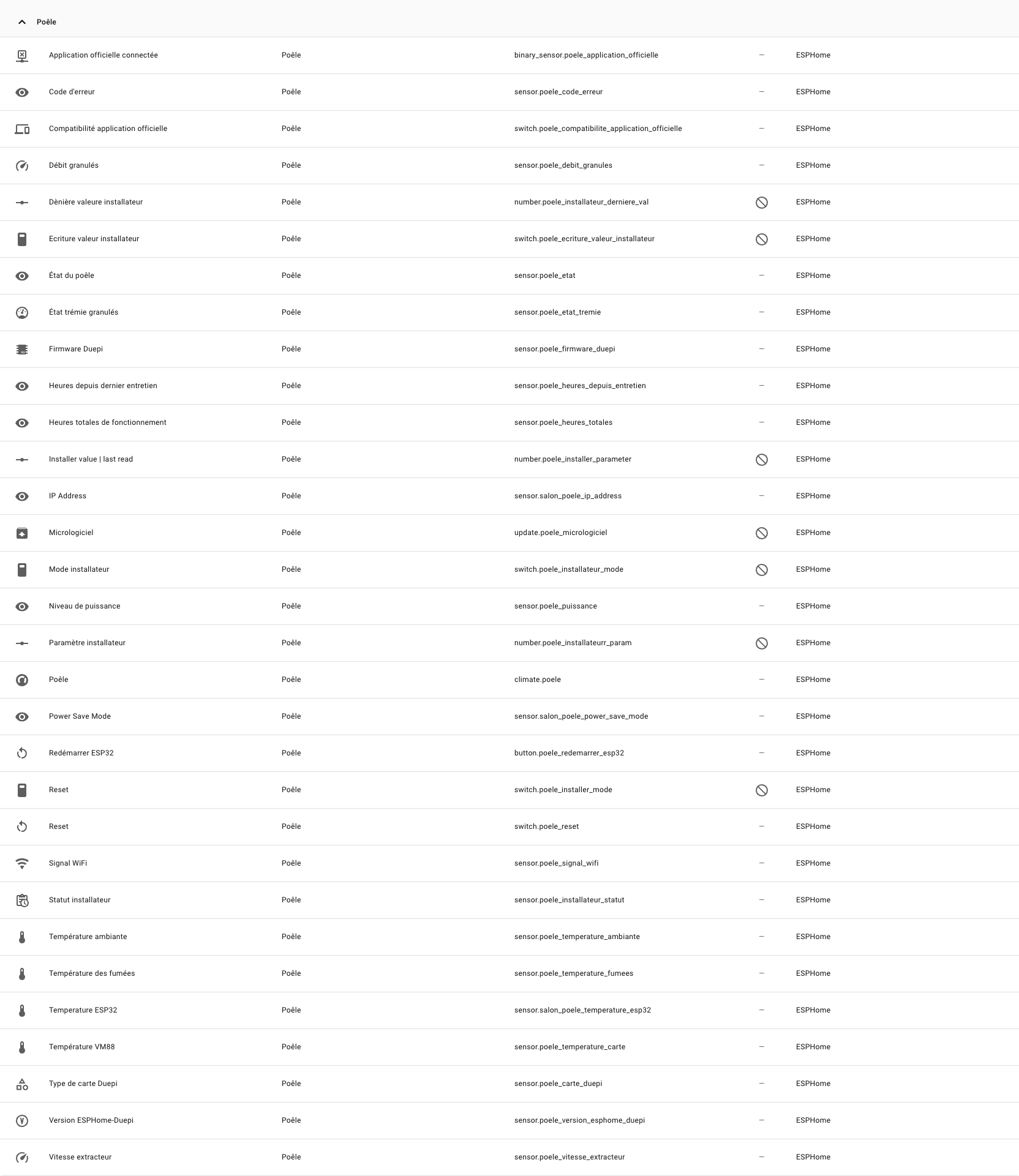
Note: j'ai renomé les entitée dans HA comme suis:
5 - Amélioration 1: mise ne place d'une jauge de remplissage de la temille
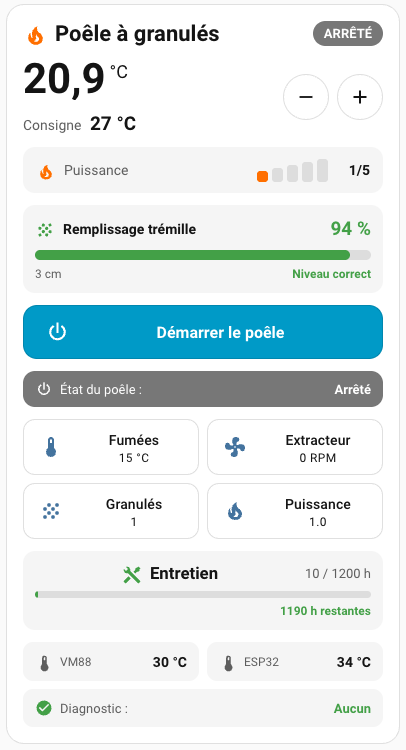
Mon Poêle étant bas de gamme, il ne dispose pas d'une mesure de remplissage de la tremille, il se contente juste de passer en erreur (et de bipper non stop) quand il tourne à vide (probablement en analysant la fumée de combustion).
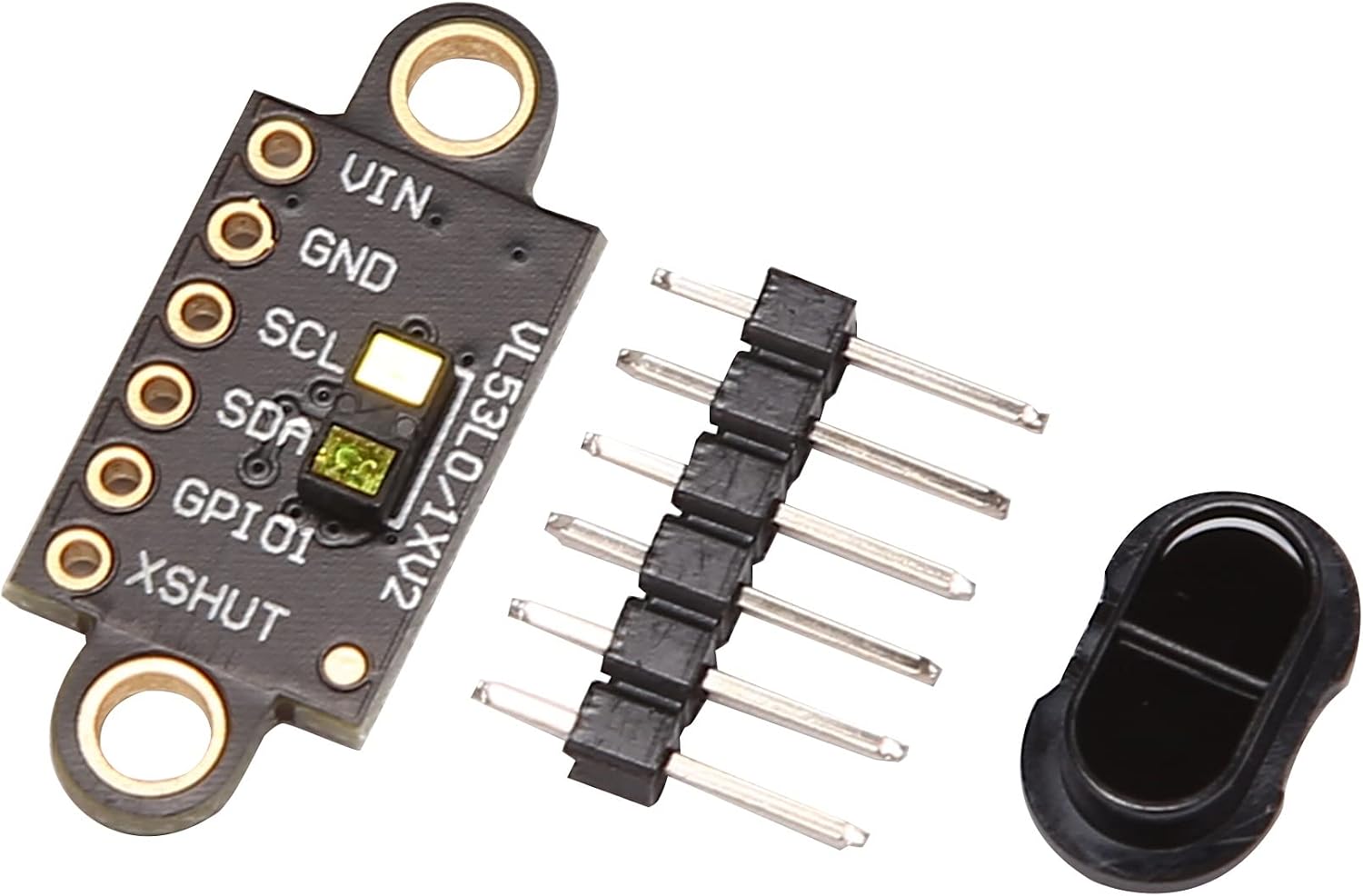
Pour pallier à cela et anticiper le remplissage de pellet, j'ai décidé de profiter de l'ESP32 pour integrer une jauge de remplissage en utilisant un télémetre laser VL53L1X (qui coute dans les 11 €)
Note:
Il faut bien acheter VL53L1X et non VL53L0X, car le 1x permer de reduire logicielement la largeur du faisseau, ce qui est indispensable dans une petite trémie:
VL53L0X à un angle de faiseau de 27° ce qui represente un surface circulaire à 50cm d'envion 25cm de diametre
VL53L1X à un angle de faiseau reductible à 15° ce qui represente un surface circulaire à 50cm d'envion 10,5cm de diametre
C'est justement en raison de l'angle important que je n'ai pas opté pour un télémetre à ultrason type HC-SR04 ou A01NYUB.
Coté cablage:
Seule 4 bornes seront utiles:
- VIN => Alim 3,3V dispo sur la carte dev
- GND => Masse commune carte dev
- SCL => Bus I2C cablé sur GPIO5
- SDA => Bus I2C cablé sur GPIO4
Voici les modifications à apporter au Yaml pour ce capteur
external_components:
  - source: github://m5k10/vl53l1x_sensor
    components: [vl53l1x_sensor]
    refresh: 1d

i2c:
    sda: GPIO4
    scl: GPIO5
    scan: true
    frequency: 100kHz

sensor:

  # Niveau de granulés - VL53L1X
  - platform: vl53l1x_sensor
    id: distance_granules
    filters:
      - median:
          window_size: 3
          send_every: 1
          send_first_at: 1
    name: "Poêle - Distance granulés"
    address: 0x29

    # Portée adaptée à la trémie de 400 mm
    distance_mode: SHORT
    timing_budget: 200ms
    update_interval: 30s

    # Réduction de l'angle du faiseau
    roi_size:
      x: 4
      y: 4

    # Diagnostic de la mesure
    range_status_sensor:
      name: "Poêle - Statut mesure granulés"

    avg_signal_rate_sensor:
      name: "Poêle - Signal granulés"

  - platform: template
    name: "Poêle - Niveau granulés"
    id: niveau_granules
    unit_of_measurement: "%"
    icon: mdi:storage-tank
    accuracy_decimals: 0
    state_class: measurement
    update_interval: 30s
    lambda: |-
      if (!id(distance_granules).has_state()) {
        return NAN;
      }

      const float hauteur_tremie = 0.40f;
      const float distance = id(distance_granules).state;

      if (isnan(distance)) {
        return NAN;
      }

      // Calibration : 0 m = 100 %, 0,40 m = 0 %
      float niveau = (hauteur_tremie - distance) / hauteur_tremie * 100.0f;

      if (niveau < 0.0f) niveau = 0.0f;
      if (niveau > 100.0f) niveau = 100.0f;

      return niveau;
Note: il vous faudra adapter la constante hauteur_tremie du lamaba à la hauteur de votre trémille (40cm => 0.40f)
Les 4 nouvelle entitée générée (je les ai renomée) sont
- sensor.poele_distance_granules => mesure en m, renvoyée par le capteur
- sensor.poele_signal_granules => signal infrarouge moyen relevé
- sensor.poele_statut_mesure_granules => statut de la mesure (0 => valide, les autres codes sont detaillée sur GitHub - m5k10/vl53l1x_sensor: ESPHome component for vl53l1x time-of-flight distance sensor. · GitHub)
- sensor.poele_niveau_granules, le % de remplissage basé sur la hauteur (cela ne tien pas compte du volume car chaque tremille est différente)
Voici le YAML de la carte modifiée pour intégrer tout cela
type: custom:button-card
entity: climate.poele
show_name: false
show_icon: false
show_state: false
triggers_update:
- climate.poele
- sensor.poele_etat
- sensor.poele_temperature_ambiante
- sensor.poele_puissance
- sensor.poele_distance_granules
- sensor.poele_statut_mesure_granules
- sensor.poele_code_erreur
- sensor.poele_temperature_carte
- sensor.salon_poele_temperature_esp32
- sensor.poele_heures_depuis_entretien
styles:
card:
- padding: 16px
- border-radius: 18px
grid:
- grid-template-areas: |
"title status"
"temp controls"
"target controls"
"powerlevel powerlevel"
"pellets pellets"
"power power"
"burner burner"
"metrics metrics"
"maintenance maintenance"
"diagnostic diagnostic"
- grid-template-columns: 1fr auto
- grid-template-rows: repeat(10, auto)
- row-gap: 12px
custom_fields:
title:
- justify-self: start
- align-self: center
status:
- justify-self: end
- align-self: center
temp:
- justify-self: start
- align-self: center
target:
- justify-self: start
- align-self: center
controls:
- justify-self: end
- align-self: center
powerlevel:
- width: 100%
pellets:
- width: 100%
power:
- width: 100%
burner:
- width: 100%
metrics:
- width: 100%
maintenance:
- width: 100%
diagnostic:
- width: 100%
custom_fields:
title: |
[[[
return `
<div style="
display:flex;
align-items:center;
gap:7px;
font-size:22px;
font-weight:600;
">
<ha-icon
icon="mdi:fire"
style="
width:25px;
height:25px;
color:#ff6f00;
">
</ha-icon>
<span>Poêle à granulés</span>
</div>
`;
]]]
status: |
[[[
const action = entity.attributes.hvac_action || entity.state;
const burner = (states['sensor.poele_etat']?.state || '').toLowerCase();
let label = 'INCONNU';
let color = '#777';
if (burner.includes('cooldown')) {
label = 'REFROIDISSEMENT';
color = '#2196f3';
} else if (burner.includes('ignition')) {
label = 'DÉMARRAGE';
color = '#ff9800';
} else if (entity.state === 'off' || action === 'off') {
label = 'ARRÊTÉ';
color = '#777';
} else if (action === 'heating') {
label = 'EN CHAUFFE';
color = '#ff6f00';
} else if (action === 'idle') {
label = 'CONSIGNE ATTEINTE';
color = '#43a047';
}
return `
<div style="
background:${color};
color:white;
padding:5px 11px;
border-radius:14px;
font-size:13px;
font-weight:600;
white-space:nowrap;
">
${label}
</div>
`;
]]]
temp: |
[[[
const raw =
parseFloat(
states['sensor.poele_temperature_ambiante']?.state
);
const t =
Number.isFinite(raw)
? raw.toFixed(1).replace('.', ',')
: '--';
return `
<div style="
display:flex;
align-items:flex-start;
white-space:nowrap;
">
<span style="
font-size:42px;
line-height:1;
font-weight:600;
">
${t}
</span>
<span style="
font-size:18px;
margin-left:4px;
margin-top:3px;
">
°C
</span>
</div>
`;
]]]
target:
card:
type: custom:button-card
entity: climate.poele
show_name: false
show_icon: false
show_state: false
styles:
card:
- box-shadow: none
- background: none
- border: none
- padding: 0
custom_fields:
value: |
[[[
const t =
entity.attributes.temperature ?? '--';
return `
<div style="
font-size:14px;
color:var(--secondary-text-color);
white-space:nowrap;
">
Consigne
<strong style="
margin-left:5px;
font-size:19px;
color:var(--primary-text-color);
">
${t} °C
</strong>
</div>
`;
]]]
controls:
card:
type: horizontal-stack
cards:
- type: custom:button-card
icon: mdi:minus
show_name: false
tap_action:
action: call-service
service: climate.set_temperature
target:
entity_id: climate.poele
data:
temperature: |
[[[
return (
states['climate.poele']
.attributes.temperature || 20
) - 1;
]]]
styles:
card:
- width: 46px
- height: 46px
- padding: 8px
- border-radius: 50%
icon:
- width: 22px
- type: custom:button-card
icon: mdi:plus
show_name: false
tap_action:
action: call-service
service: climate.set_temperature
target:
entity_id: climate.poele
data:
temperature: |
[[[
return (
states['climate.poele']
.attributes.temperature || 20
) + 1;
]]]
styles:
card:
- width: 46px
- height: 46px
- padding: 8px
- border-radius: 50%
icon:
- width: 22px
powerlevel: |
[[[
const raw =
parseInt(
states['sensor.poele_puissance']?.state
);
const power =
Number.isFinite(raw) ? raw : 0;
let bars = '';
for (let i = 1; i <= 5; i++) {
const active = i <= power;
bars += `
<span style="
display:block;
width:11px;
height:${8 + i * 3}px;
border-radius:3px;
background:${
active
? '#ff6f00'
: 'rgba(127,127,127,0.20)'
};
"></span>
`;
}
return `
<div style="
display:flex;
align-items:center;
justify-content:space-between;
width:100%;
box-sizing:border-box;
padding:11px 13px;
border-radius:12px;
background:rgba(127,127,127,0.08);
">
<div style="
display:flex;
align-items:center;
gap:8px;
">
<ha-icon
icon="mdi:fire"
style="
width:20px;
height:20px;
color:#ff6f00;
">
</ha-icon>
<span style="
font-size:14px;
color:var(--secondary-text-color);
">
Puissance
</span>
</div>
<div style="
display:flex;
align-items:center;
gap:12px;
">
<div style="
display:flex;
align-items:flex-end;
gap:4px;
height:24px;
">
${bars}
</div>
<strong style="
min-width:30px;
text-align:right;
font-size:14px;
">
${power > 0 ? power + '/5' : '—'}
</strong>
</div>
</div>
`;
]]]
pellets: |
[[[
const distanceEntity =
states['sensor.poele_distance_granules'];
const statusEntity =
states['sensor.poele_statut_mesure_granules'];
const raw = distanceEntity?.state;
const distance = Number(raw);
const statusRaw = statusEntity?.state;
const status = Number(statusRaw);
const valid =
raw !== undefined &&
raw !== 'unknown' &&
raw !== 'unavailable' &&
Number.isFinite(distance) &&
distance >= 0 &&
distance <= 0.45 &&
statusRaw !== undefined &&
statusRaw !== 'unknown' &&
statusRaw !== 'unavailable' &&
status === 0;
let percent = 0;
let color = '#777';
let label = 'Mesure indisponible';
if (valid) {
percent = Math.max(
0,
Math.min(
100,
(1 - distance / 0.40) * 100
)
);
if (percent <= 10) {
color = '#d32f2f';
label = 'Remplissage urgent';
} else if (percent <= 20) {
color = '#ff9800';
label = 'Niveau faible';
} else {
color = '#43a047';
label = 'Niveau correct';
}
}
return `
<div style="
width:100%;
box-sizing:border-box;
padding:12px;
border-radius:12px;
background:rgba(127,127,127,0.08);
">
<div style="
display:flex;
align-items:center;
justify-content:space-between;
gap:8px;
margin-bottom:10px;
">
<div style="
display:flex;
align-items:center;
gap:8px;
">
<ha-icon
icon="mdi:grain"
style="
width:20px;
height:20px;
color:${color};
">
</ha-icon>
<strong style="
font-size:14px;
">
Remplissage trémille
</strong>
</div>
<strong style="
font-size:19px;
color:${color};
white-space:nowrap;
">
${valid ? Math.round(percent) + ' %' : '—'}
</strong>
</div>
<div style="
width:100%;
height:10px;
border-radius:6px;
background:rgba(127,127,127,0.20);
overflow:hidden;
">
<div style="
width:${valid ? percent : 0}%;
height:100%;
background:${color};
border-radius:6px;
transition:width 0.5s ease;
"></div>
</div>
<div style="
display:flex;
justify-content:space-between;
align-items:center;
gap:8px;
margin-top:7px;
font-size:12px;
">
<span style="
color:var(--secondary-text-color);
">
${
valid
? Math.round(distance * 100) + ' cm'
: 'Distance inconnue'
}
</span>
<span style="
color:${color};
font-weight:600;
text-align:right;
">
${label}
</span>
</div>
</div>
`;
]]]
power:
card:
type: custom:button-card
entity: climate.poele
icon: mdi:power
name: |
[[[
return entity.state === 'off'
? 'Démarrer le poêle'
: 'Arrêter le poêle';
]]]
tap_action:
action: call-service
service: |
[[[
return entity.state === 'off'
? 'climate.turn_on'
: 'climate.turn_off';
]]]
target:
entity_id: climate.poele
styles:
card:
- height: 54px
- padding: 0 16px
- border-radius: 14px
- color: white
- background: |
[[[
return entity.state === 'off'
? 'var(--primary-color)'
: '#b71c1c';
]]]
grid:
- grid-template-areas: "\"i n\""
- grid-template-columns: 35px 1fr
icon:
- width: 25px
- color: white
name:
- font-size: 16px
- font-weight: 600
- justify-self: center
burner: |
[[[
const raw =
states['sensor.poele_etat']?.state || 'Inconnu';
const s = raw.toLowerCase();
let label = raw;
let color = '#777';
let icon = 'mdi:information-outline';
if (s === 'off') {
label = 'Arrêté';
color = '#777';
icon = 'mdi:power';
} else if (s.includes('out of pellets')) {
label = 'Granulés épuisés';
color = '#d32f2f';
icon = 'mdi:alert-circle';
} else if (s.includes('load wood')) {
label = 'Chargement granulés';
color = '#ff9800';
icon = 'mdi:grain';
} else if (s.includes('fire on and vent')) {
label = 'Allumage + ventilation';
color = '#fb8c00';
icon = 'mdi:weather-windy';
} else if (s.includes('e693')) {
label = 'Préchauffage';
color = '#f57c00';
icon = 'mdi:fire';
} else if (
s.includes('ignition') &&
s.includes('fire on')
) {
label = 'Allumage';
color = '#ff9800';
icon = 'mdi:fire';
} else if (s.includes('stove on')) {
label = 'En fonctionnement';
color = '#46eb34';
icon = 'mdi:fire';
} else if (s.includes('cooldown sequence 1')) {
label = 'Refroidissement · phase 1';
color = '#2196f3';
icon = 'mdi:fan';
} else if (s.includes('cooldown sequence 2')) {
label = 'Refroidissement · phase 2';
color = '#1976d2';
icon = 'mdi:fan';
} else if (s.includes('cool')) {
label = 'Refroidissement';
color = '#2196f3';
icon = 'mdi:fan';
}
return `
<div style="
width:100%;
box-sizing:border-box;
display:flex;
align-items:center;
justify-content:space-between;
gap:12px;
padding:9px 12px;
border-radius:12px;
background:${color};
color:white;
">
<div style="
display:flex;
align-items:center;
gap:7px;
font-size:13px;
">
<ha-icon
icon="${icon}"
style="
width:18px;
height:18px;
color:white;
">
</ha-icon>
<span>
État du poêle :
</span>
</div>
<strong style="
font-size:13px;
text-align:right;
">
${label}
</strong>
</div>
`;
]]]
metrics:
card:
type: grid
columns: 2
square: false
cards:
- type: tile
entity: sensor.poele_temperature_fumees
name: Fumées
icon: mdi:thermometer
- type: tile
entity: sensor.poele_vitesse_extracteur
name: Extracteur
icon: mdi:fan
- type: tile
entity: sensor.poele_debit_granules
name: Granulés
icon: mdi:grain
- type: tile
entity: sensor.poele_puissance
name: Puissance
icon: mdi:fire
maintenance: |
[[[
const raw =
parseFloat(
states['sensor.poele_heures_depuis_entretien']?.state
);
const hours =
Number.isFinite(raw) ? raw : 0;
const threshold = 1200;
const percent =
Math.min(
100,
Math.max(
0,
(hours / threshold) * 100
)
);
const remaining =
Math.max(
0,
threshold - hours
);
let color = '#43a047';
let message =
`${Math.round(remaining)} h restantes`;
if (percent >= 100) {
color = '#d32f2f';
message = 'Entretien à effectuer';
} else if (percent >= 80) {
color = '#ff9800';
}
return `
<div style="
padding:12px;
border-radius:12px;
background:rgba(127,127,127,0.08);
">
<div style="
display:flex;
align-items:center;
margin-bottom:8px;
">
<ha-icon
icon="mdi:tools"
style="
width:20px;
height:20px;
margin-right:8px;
color:${color};
">
</ha-icon>
<strong>
Entretien
</strong>
<span style="
margin-left:auto;
font-size:13px;
color:var(--secondary-text-color);
">
${Math.round(hours)} / ${threshold} h
</span>
</div>
<div style="
width:100%;
height:7px;
border-radius:5px;
background:rgba(127,127,127,0.20);
overflow:hidden;
">
<div style="
width:${percent}%;
height:100%;
background:${color};
border-radius:5px;
"></div>
</div>
<div style="
margin-top:6px;
text-align:right;
font-size:12px;
color:${color};
font-weight:600;
">
${message}
</div>
</div>
`;
]]]
diagnostic: |
[[[
const vm88 =
parseFloat(
states['sensor.poele_temperature_carte']?.state
);
const esp32 =
parseFloat(
states['sensor.salon_poele_temperature_esp32']?.state
);
const errorRaw =
states['sensor.poele_code_erreur']?.state ?? 'unknown';
const error =
parseInt(errorRaw);
const distanceRaw =
states['sensor.poele_distance_granules']?.state;
const distance =
Number(distanceRaw);
const statusRaw =
states['sensor.poele_statut_mesure_granules']?.state;
const measurementStatus =
Number(statusRaw);
const distanceValid =
distanceRaw !== undefined &&
distanceRaw !== 'unknown' &&
distanceRaw !== 'unavailable' &&
Number.isFinite(distance) &&
distance >= 0 &&
distance <= 0.45 &&
statusRaw !== undefined &&
statusRaw !== 'unknown' &&
statusRaw !== 'unavailable' &&
measurementStatus === 0;
const pelletsPercent =
distanceValid
? Math.max(
0,
Math.min(
100,
(1 - distance / 0.40) * 100
)
)
: null;
const vm =
Number.isFinite(vm88)
? vm88.toFixed(0) + ' °C'
: '--';
const esp =
Number.isFinite(esp32)
? esp32.toFixed(0) + ' °C'
: '--';
const ok =
Number.isFinite(error) && error === 0;
let errorText;
let errorColor;
let errorIcon = 'mdi:check-circle';
if (!ok && Number.isFinite(error)) {
errorText =
error === 5
? '05 - Granulés épuisés'
: String(error).padStart(2, '0');
errorColor = '#d32f2f';
errorIcon = 'mdi:alert-circle';
} else if (
errorRaw === 'unknown' ||
errorRaw === 'unavailable'
) {
errorText = 'État du poêle inconnu';
errorColor = '#777';
errorIcon = 'mdi:help-circle';
} else if (!distanceValid) {
errorText = 'Capteur granulés : mesure invalide';
errorColor = '#ff9800';
errorIcon = 'mdi:alert-circle-outline';
} else if (pelletsPercent <= 10) {
errorText = 'Granulés : remplissage urgent';
errorColor = '#d32f2f';
errorIcon = 'mdi:alert-circle';
} else if (pelletsPercent <= 20) {
errorText = 'Granulés : niveau faible';
errorColor = '#ff9800';
errorIcon = 'mdi:alert';
} else {
errorText = 'Aucun';
errorColor = '#43a047';
errorIcon = 'mdi:check-circle';
}
return `
<div>
<!-- TEMPÉRATURES -->
<div style="
display:grid;
grid-template-columns:1fr 1fr;
gap:8px;
">
<div style="
display:flex;
align-items:center;
justify-content:space-between;
gap:8px;
padding:10px 12px;
border-radius:10px;
background:rgba(127,127,127,0.08);
">
<div style="
display:flex;
align-items:center;
gap:6px;
">
<ha-icon
icon="mdi:thermometer"
style="
width:19px;
height:19px;
color:var(--secondary-text-color);
">
</ha-icon>
<span style="
font-size:12px;
color:var(--secondary-text-color);
">
VM88
</span>
</div>
<strong style="
font-size:14px;
white-space:nowrap;
">
${vm}
</strong>
</div>
<div style="
display:flex;
align-items:center;
justify-content:space-between;
gap:8px;
padding:10px 12px;
border-radius:10px;
background:rgba(127,127,127,0.08);
">
<div style="
display:flex;
align-items:center;
gap:6px;
">
<ha-icon
icon="mdi:thermometer"
style="
width:19px;
height:19px;
color:var(--secondary-text-color);
">
</ha-icon>
<span style="
font-size:12px;
color:var(--secondary-text-color);
">
ESP32
</span>
</div>
<strong style="
font-size:14px;
white-space:nowrap;
">
${esp}
</strong>
</div>
</div>
<!-- DIAGNOSTIC -->
<div style="
margin-top:8px;
display:flex;
align-items:center;
justify-content:space-between;
gap:12px;
padding:10px 12px;
border-radius:10px;
background:rgba(127,127,127,0.08);
font-size:13px;
">
<div style="
display:flex;
align-items:center;
gap:7px;
">
<ha-icon
icon="${errorIcon}"
style="
width:18px;
height:18px;
color:${errorColor};
">
</ha-icon>
<span style="
color:var(--secondary-text-color);
">
Diagnostic :
</span>
</div>
<strong style="
color:${errorColor};
text-align:right;
">
${errorText}
</strong>
</div>
</div>
`;
]]]
Note: ligne 385 il faut égualement adapter 0.40 à la hauteur de votre tremille
Ce qui donne:
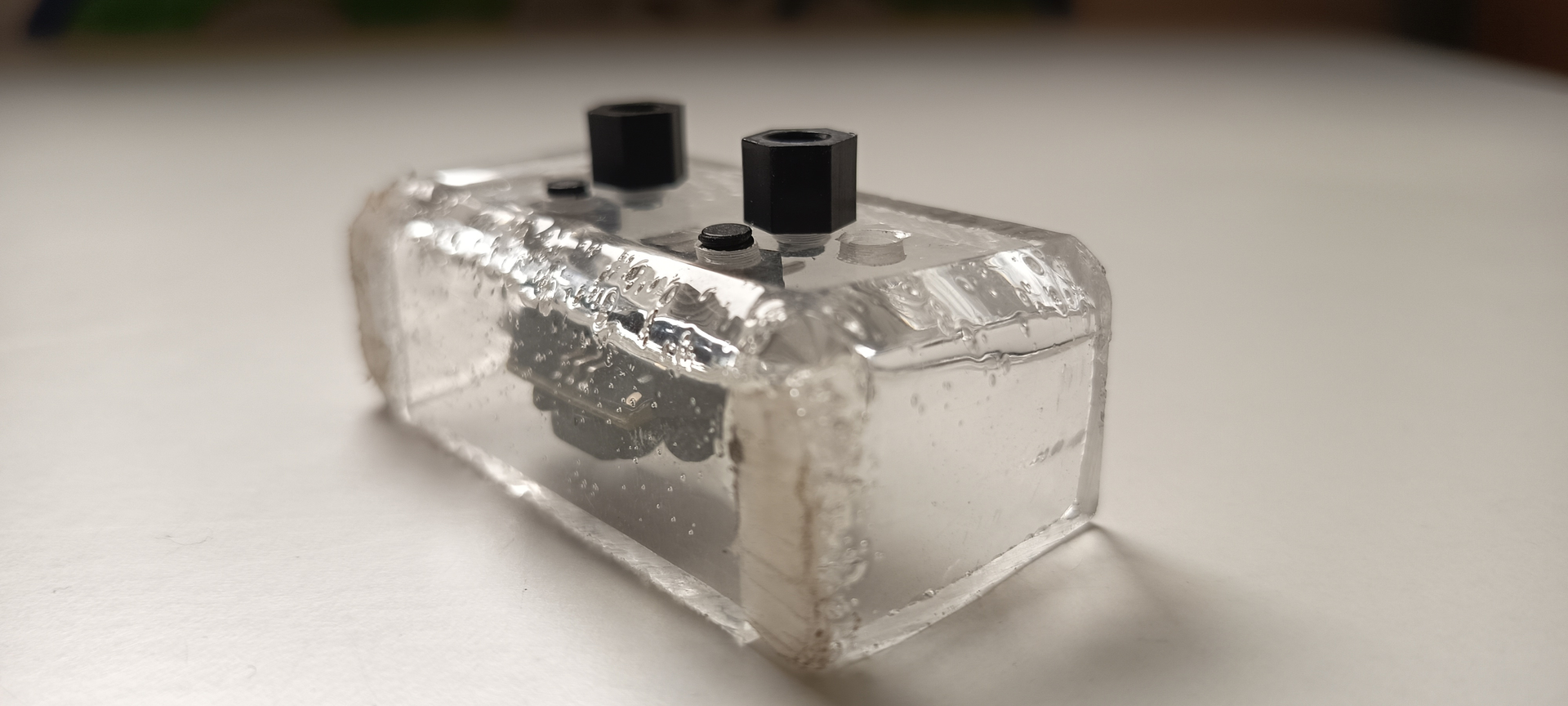
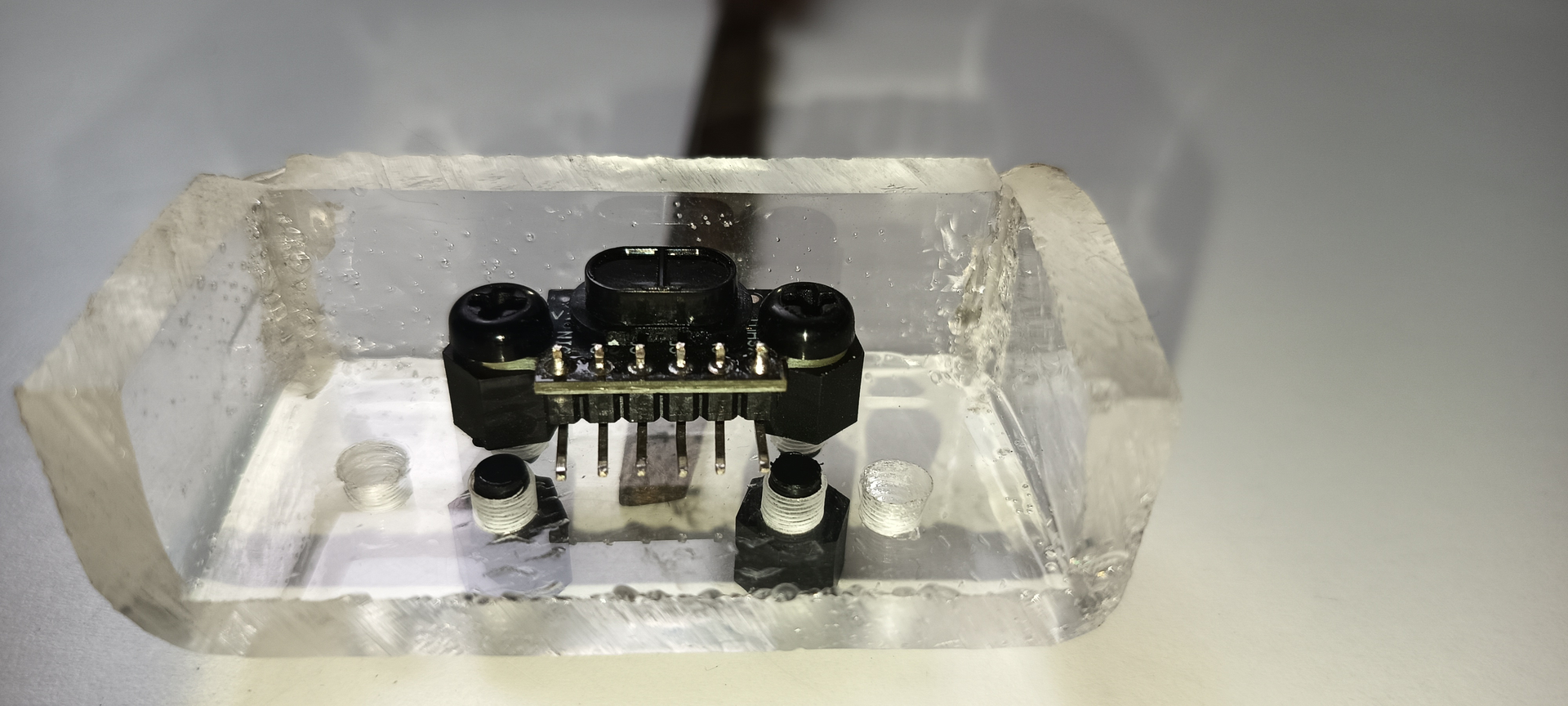
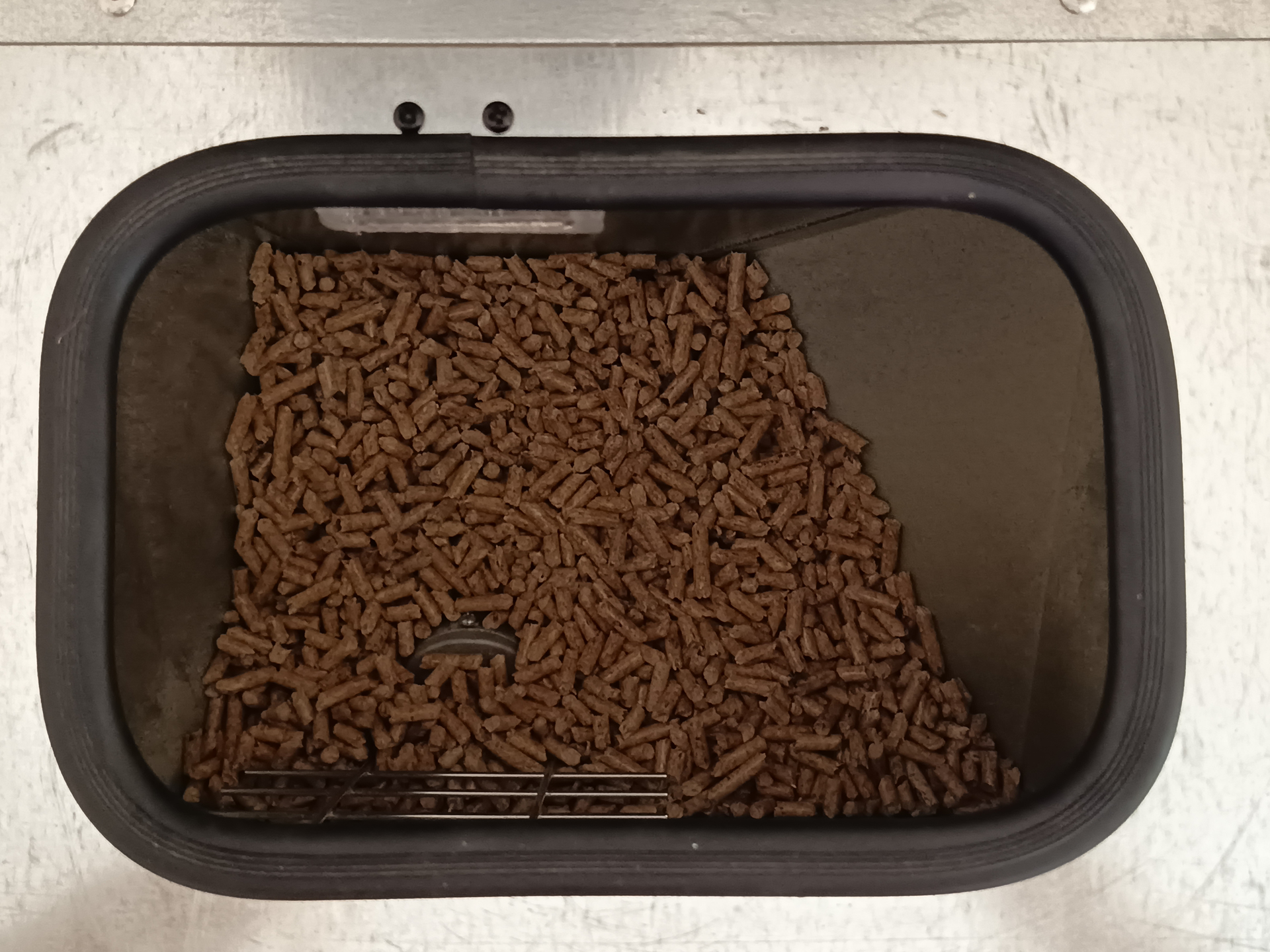
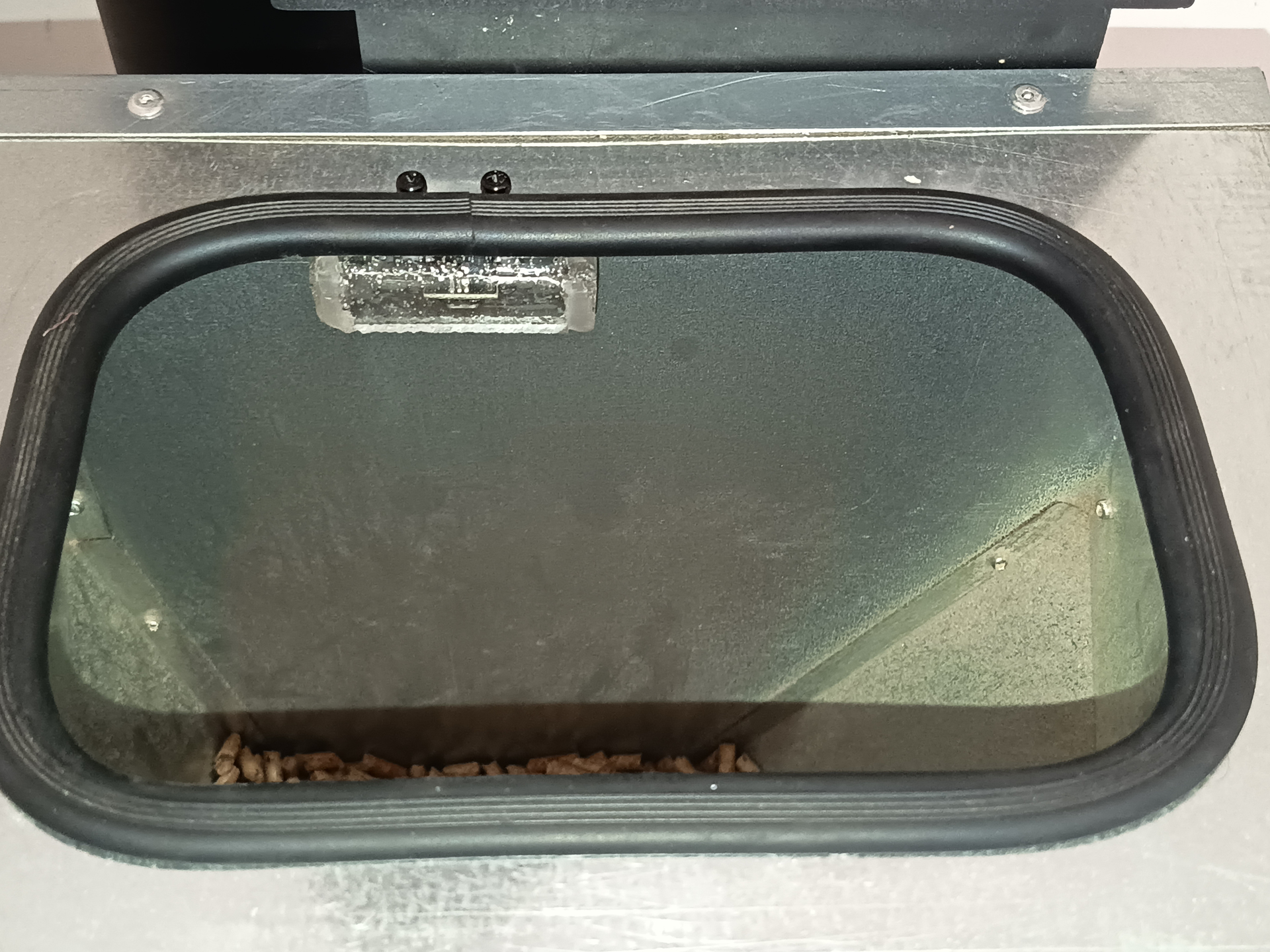
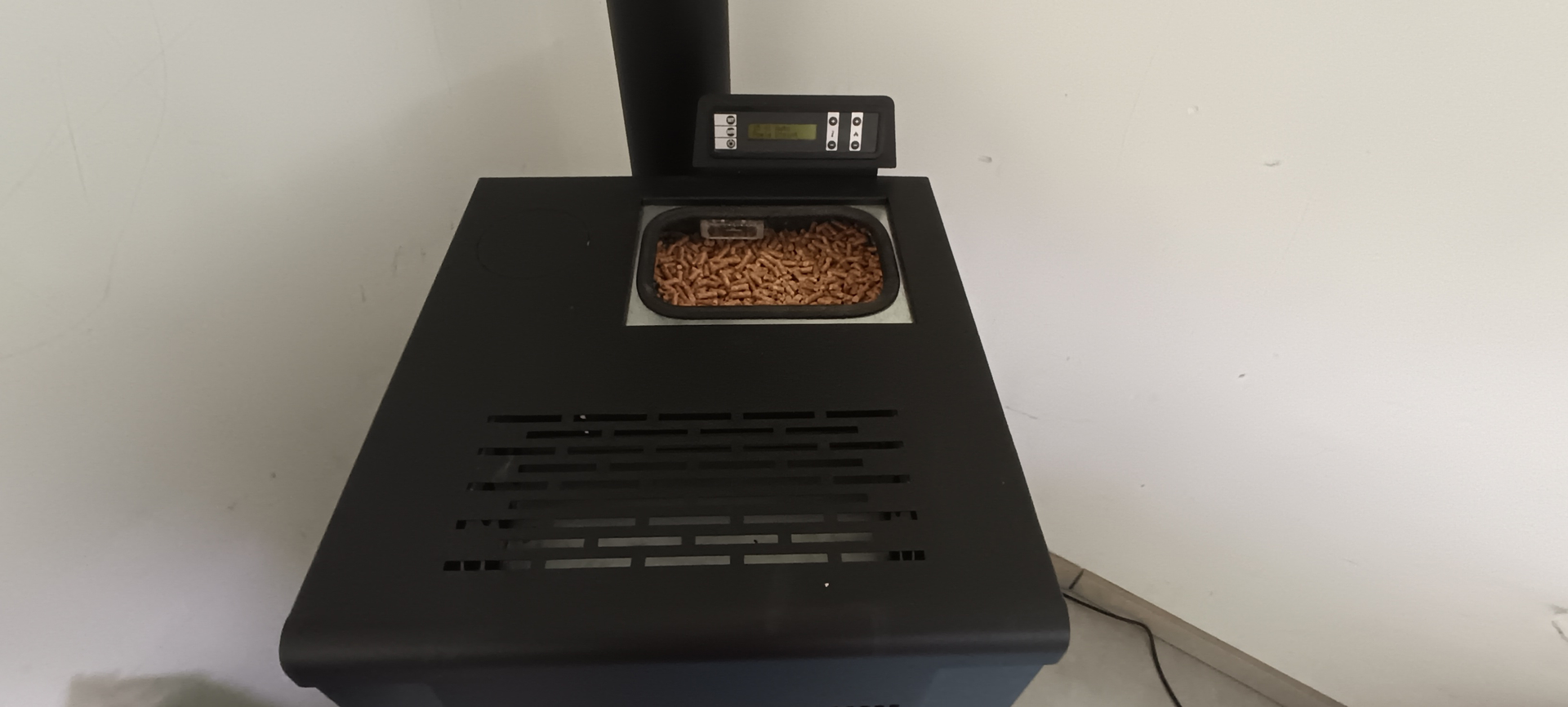
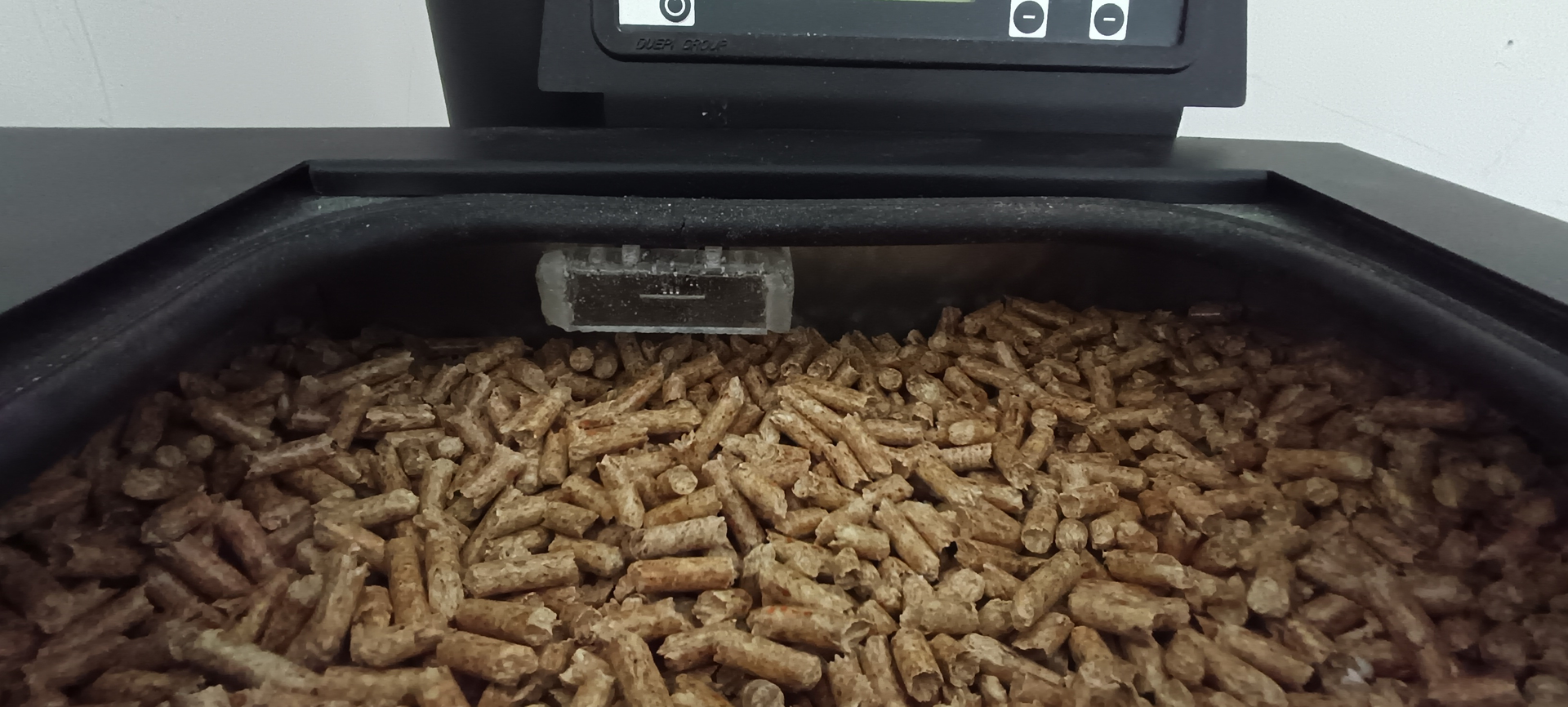
Et voici pour finir quelques photos du capteur en place, j'ai fais une petite protection avec une chutte de plexy et je l'ai installé à la verticale de la vis sans fin, c'est pour cela qu'il est excenté


6 - Amélioration futures
- Gérer la commande de puissance dans la carte HA