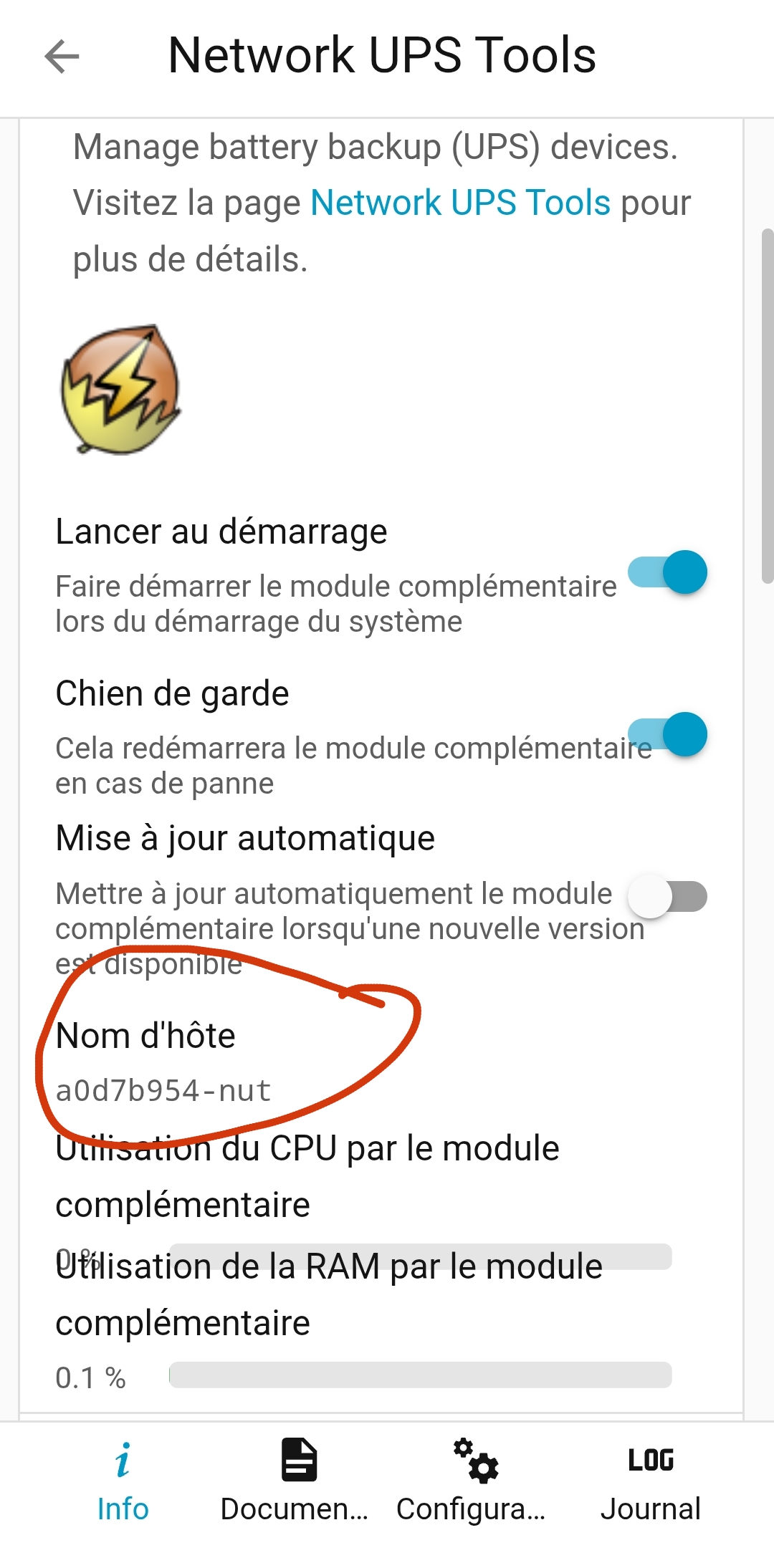
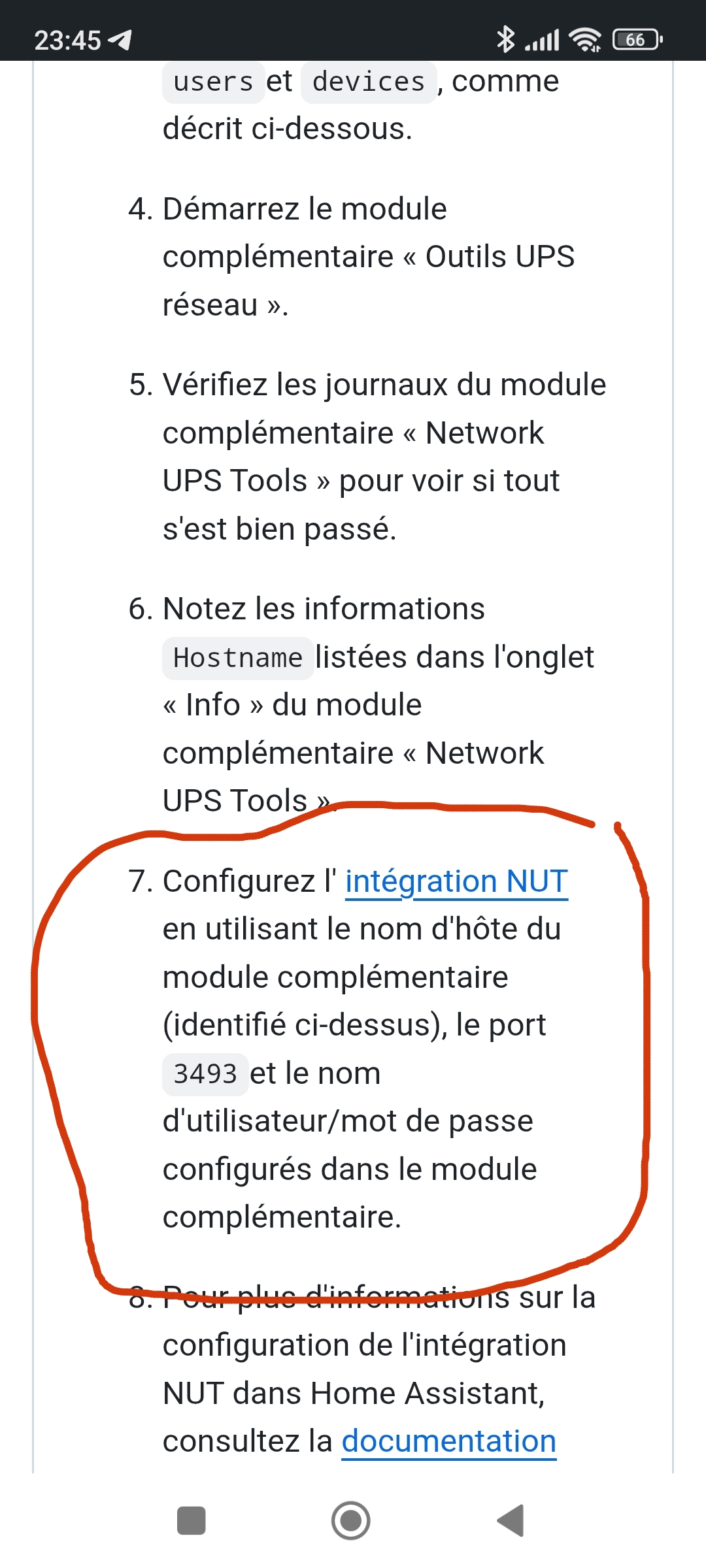
Bonjour à tous,
J’ai branché mon UPS Eaton 650 pro en USB sur mon mini PC Proxmox.
Je tente en vain de remonter les infos dans HA malgré quelques lectures de topic en FR et EN.
Voici mon process :
- Activation de l’USB dans ma VM HA sur Proxmox, onduleur reconnu :
Bus 001 Device 002: ID 0463:ffff MGE UPS Systems UPS
Device Descriptor:
  bLength                18
  bDescriptorType         1
  bcdUSB               1.10
  bDeviceClass            0
  bDeviceSubClass         0
  bDeviceProtocol         0
  bMaxPacketSize0         8
  idVendor           0x0463 MGE UPS Systems
  idProduct          0xffff UPS
  bcdDevice            1.00
  iManufacturer           1 EATON
  iProduct                2 Ellipse PRO
  iSerial                 4 G354R28218
  bNumConfigurations      1
  Configuration Descriptor:
    bLength                 9
    bDescriptorType         2
    wTotalLength       0x0022
    bNumInterfaces          1
    bConfigurationValue     1
    iConfiguration          0
    bmAttributes         0xa0
      (Bus Powered)
      Remote Wakeup
    MaxPower               20mA
    Interface Descriptor:
      bLength                 9
      bDescriptorType         4
      bInterfaceNumber        0
      bAlternateSetting       0
      bNumEndpoints           1
      bInterfaceClass         3 Human Interface Device
      bInterfaceSubClass      0
      bInterfaceProtocol      0
      iInterface              0
        HID Device Descriptor:
          bLength                 9
          bDescriptorType        33
          bcdHID               1.10
          bCountryCode           33 US
          bNumDescriptors         1
          bDescriptorType        34 Report
          wDescriptorLength    1173
         Report Descriptors:
           ** UNAVAILABLE **
      Endpoint Descriptor:
        bLength                 7
        bDescriptorType         5
        bEndpointAddress     0x81  EP 1 IN
        bmAttributes            3
          Transfer Type            Interrupt
          Synch Type               None
          Usage Type               Data
        wMaxPacketSize     0x0008  1x 8 bytes
        bInterval              20
Device Status:     0x0001
  Self Powered
- Installation de l’add-on NUT, elle démarre, voici le log :
s6-rc: info: service legacy-services successfully stopped
s6-rc: info: service legacy-cont-init: stopping
s6-rc: info: service legacy-cont-init successfully stopped
s6-rc: info: service fix-attrs: stopping
s6-rc: info: service base-addon-timezone: stopping
s6-rc: info: service base-addon-log-level: stopping
s6-rc: info: service fix-attrs successfully stopped
s6-rc: info: service base-addon-timezone successfully stopped
s6-rc: info: service base-addon-log-level successfully stopped
s6-rc: info: service base-addon-banner: stopping
s6-rc: info: service base-addon-banner successfully stopped
s6-rc: info: service s6rc-oneshot-runner: stopping
s6-rc: info: service s6rc-oneshot-runner successfully stopped
s6-rc: info: service s6rc-oneshot-runner: starting
s6-rc: info: service s6rc-oneshot-runner successfully started
s6-rc: info: service base-addon-banner: starting
Add-on: Network UPS Tools
Manage battery backup (UPS) devices
Add-on version: 0.17.0
You are running the latest version of this add-on.
System: Home Assistant OS 16.3 (amd64 / qemux86-64)
Home Assistant Core: 2025.11.3
Home Assistant Supervisor: 2025.11.5
Please, share the above information when looking for help
or support in, e.g., GitHub, forums or the Discord chat.
s6-rc: info: service base-addon-banner successfully started
s6-rc: info: service fix-attrs: starting
s6-rc: info: service base-addon-timezone: starting
s6-rc: info: service base-addon-log-level: starting
s6-rc: info: service fix-attrs successfully started
[21:34:05] INFO: Configuring timezone (Europe/Brussels)...
s6-rc: info: service base-addon-log-level successfully started
s6-rc: info: service base-addon-timezone successfully started
s6-rc: info: service legacy-cont-init: starting
cont-init: info: running /etc/cont-init.d/nut.sh
[21:34:06] INFO: Setting mode to netserver...
[21:34:06] INFO: Connected USB devices:
Bus 001 Device 001: ID 1d6b:0002 Linux Foundation 2.0 root hub
Bus 002 Device 001: ID 1d6b:0001 Linux Foundation 1.1 root hub
Bus 003 Device 001: ID 1d6b:0002 Linux Foundation 2.0 root hub
Bus 003 Device 002: ID 0627:0001 Adomax Technology Co., Ltd QEMU Tablet
Bus 004 Device 001: ID 1d6b:0001 Linux Foundation 1.1 root hub
Bus 005 Device 001: ID 1d6b:0001 Linux Foundation 1.1 root hub
Bus 006 Device 001: ID 1d6b:0001 Linux Foundation 1.1 root hub
Bus 007 Device 001: ID 1d6b:0001 Linux Foundation 1.1 root hub
Bus 008 Device 001: ID 1d6b:0001 Linux Foundation 1.1 root hub
Bus 009 Device 001: ID 1d6b:0002 Linux Foundation 2.0 root hub
Bus 009 Device 002: ID 0463:ffff MGE UPS Systems UPS
Bus 010 Device 001: ID 1d6b:0003 Linux Foundation 3.0 root hub
[21:34:06] INFO: Generating /etc/nut/upsd.users...
[21:34:06] INFO: Configuring user: admin
[21:34:06] INFO: Password is NOT in the Have I Been Pwned database! Nice!
[21:34:06] INFO: Configuring Device named myups...
[21:34:06] INFO: Starting the UPS drivers...
Using subdriver: MGE HID 1.46
Network UPS Tools - Generic HID driver 0.52 (2.8.1)
USB communication driver (libusb 1.0) 0.46
WARNING: Needed to fix group access to filesystem socket of this driver, but failed; run he driver with more debugging to see how exactly.
Consumers of the socket, such as upsd data server, can fail to interact with the driver and represent the device: /run/nut/usbhid-ups-myups
Network UPS Tools - UPS driver controller 2.8.1
[21:34:12] WARNING: UPS Shutdown will shutdown the host
cont-init: info: /etc/cont-init.d/nut.sh exited 0
cont-init: info: running /etc/cont-init.d/nutclient.sh
cont-init: info: /etc/cont-init.d/nutclient.sh exited 0
s6-rc: info: service legacy-cont-init successfully started
s6-rc: info: service legacy-services: starting
services-up: info: copying legacy longrun upsd (no readiness notification)
services-up: info: copying legacy longrun upsmon (no readiness notification)
[21:34:13] INFO: Starting the UPS information server...
0.000000 fopen /run/nut/upsd.pid: No such file or directory
0.000013 Could not find PID file '/run/nut/upsd.pid' to see if previous upsd instance is already running!
0.000220 [D1] debug level is '1'
0.000309 listening on 0.0.0.0 port 3493
0.000396 [D1] Succeeded to become_user(root): now UID=0 GID=0
0.000415 [D1] chdired into statepath /run/nut for driver sockets
0.000498 Connected to UPS [myups]: usbhid-ups-myups
0.000522 Found 1 UPS defined in ups.conf
0.000927 Running as foreground process, not saving a PID file
0.000952 upsnotify: notify about state 2 with libsystemd: was requested, but not running as a service unit now, will not spam more about it
0.000972 upsnotify: failed to notify about state 2: no notification tech defined, will not spam more about it
0.000985 upsnotify: logged the systemd watchdog situation once, will not spam more about it
s6-rc: info: service legacy-services successfully started
[21:34:13] INFO: Starting the UPS monitor and shutdown controller...
0.000000 fopen /run/nut/upsmon.pid: No such file or directory
0.000016 Could not find PID file to see if previous upsmon instance is already running!
0.000261 Using power down flag file /etc/killpower
0.000431 UPS: myups@localhost (primary) (power value 1)
0.000525 [D1] debug level is '1'
0.000578 Warning: running as one big root process by request (upsmon -p)
0.000648 [D1] Saving PID 326 into /run/nut/upsmon.pid
Init SSL without certificate database
0.002493 upsnotify: notify about state 2 with libsystemd: was requested, but not running as a service unit now, will not spam more about it
0.002504 upsnotify: failed to notify about state 2: no notification tech defined, will not spam more about it
0.002507 upsnotify: logged the systemd watchdog situation once, will not spam more about it
0.002509 [D1] Trying to connect to UPS [myups@localhost]
0.511156 User upsmonmaster@127.0.0.1 logged into UPS [myups]
0.003390 [D1] Logged into UPS myups@localhost``
- Installation de l’intégration NUT et c’est là que ça coince :
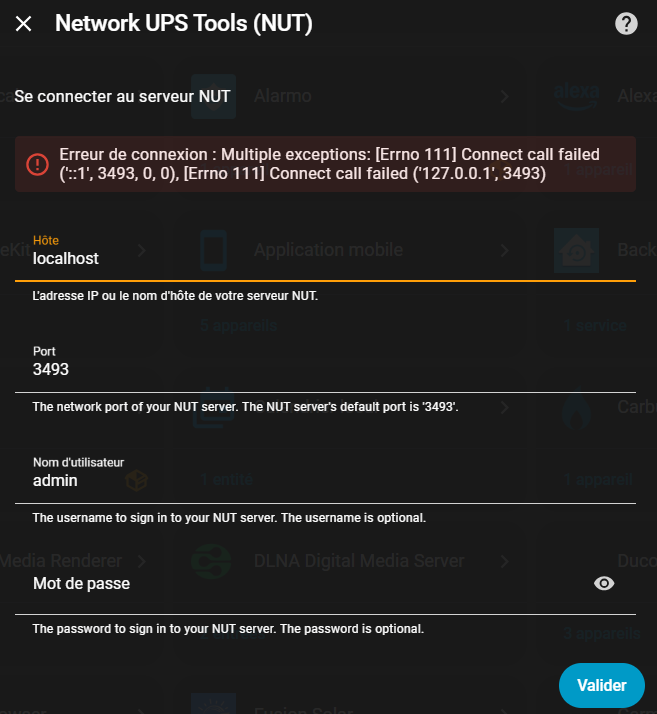
Merci déjà à ceux qui prendront la peine de me lire et de mon répondre 
Belle soirée à tous !
Ma configuration
|Version|core-2025.11.3|
| — | — |
|Type d’installation|Home Assistant OS|
|Développement|false|
|Supervisor|true|
|Docker|true|
|Architecture des conteneurs|amd64|
|Utilisateur|root|
|Environnement virtuel|false|
|Version de Python|3.13.9|
|Famille du système d’exploitation|Linux|
|Version du système d’exploitation|6.12.51-haos|
|Architecture du processeur|x86_64|
|Fuseau horaire|Europe/Brussels|
|Répertoire de configuration|/config|
| — | — |
|Type d’installation|Home Assistant OS|
|Développement|false|
|Supervisor|true|
|Docker|true|
|Architecture des conteneurs|amd64|
|Utilisateur|root|
|Environnement virtuel|false|
|Version de Python|3.13.9|
|Famille du système d’exploitation|Linux|
|Version du système d’exploitation|6.12.51-haos|
|Architecture du processeur|x86_64|
|Fuseau horaire|Europe/Brussels|
|Répertoire de configuration|/config|