Bonjour à tous,
J’ai décidement beaucoup de difficultés avec frigate. Ce n’est pas la 1ère fois que je demande de l’aide sur ce forum, à chaque fois vous me trouvez une solution.
Dernièrement j’ai stoppé frigate parce qu’il prenait trop ressource, mon mini pc était trop bruyant.
Aujourd’hui j’ai changé de caméra, j’ai pris une Reolink RLC 510WA et j’ai eu aucune difficulté à l’intégrer dans mon HA contrairement aux autres marques (Wansview)
J’ai donc voulu relancé Frigate et c’est maintenant que les problèmes reviennent !!!
mon fichier yml qui marchait avant et marche plus aujourd’hui
mqtt:
  enabled: false

cameras:
  cam-nord:
    ffmpeg:
      inputs:
        - path: rtsp://Cam2:xxxx@192.168.1.177:554/live/ch0 # <----- The stream you want to use for detection
          roles:
            - detect

    detect:
      enabled: false   # <---- disable detection until you have a working camera feed
      width: 1280
      height: 720

version: 0.15-1
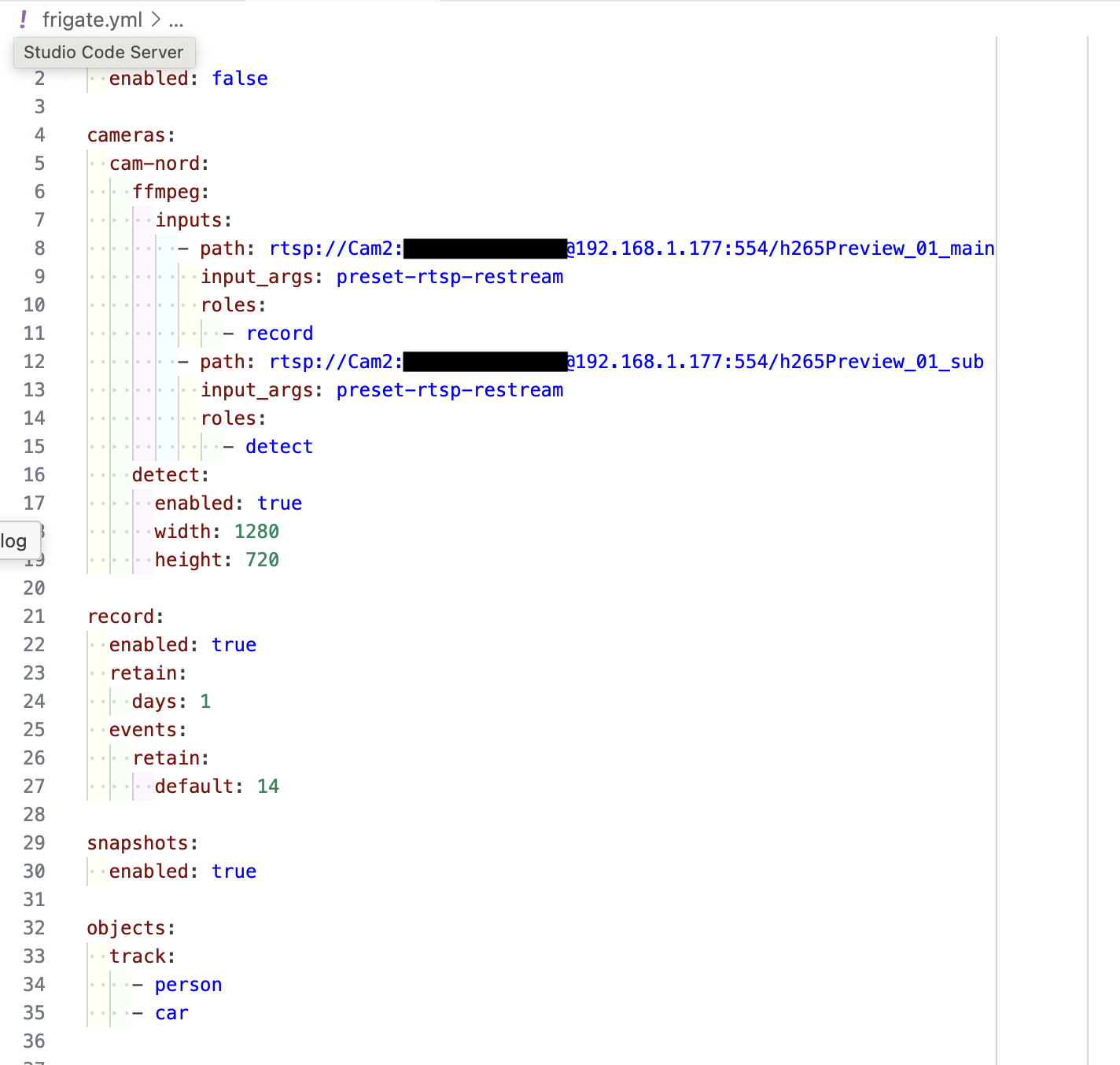
et ça c’est mon nouveau fichier yml trouvé ici GammaTroniques
mqtt:
  enabled: false
cameras:
  cam-nord:
    ffmpeg:
      inputs:
        - path: rtsp://Cam2:carocaroblan9!@192.168.1.177:554/h265Preview_01_main
          input_args: preset-rtsp-restream
          roles:
            - record
        - path: rtsp://Cam2:xxxx

@192.168.1.177:554/h265Preview_01_sub
          input_args: preset-rtsp-restream
          roles:
            - detect
    detect:
      enabled: true
      width: 1280
      height: 720

record:
  enabled: true
  retain:
    days: 1
  events:
    retain:
    default: 14
snapshots:
  enabled: true

objects:
  track:
  - person
  - car
Donc aucun des deux fichiers yml ne fonctionnent,
mon intégration frigate ne fonctionne pas
le module complémentaire ne fonctionne pas
et ça c’est le journal de Frigate
s6-rc: info: service s6rc-fdholder: starting
s6-rc: info: service s6rc-oneshot-runner: starting
s6-rc: info: service s6rc-oneshot-runner successfully started
s6-rc: info: service fix-attrs: starting
s6-rc: info: service s6rc-fdholder successfully started
s6-rc: info: service fix-attrs successfully started
s6-rc: info: service legacy-cont-init: starting
s6-rc: info: service legacy-cont-init successfully started
s6-rc: info: service prepare: starting
s6-rc: info: service log-prepare: starting
s6-rc: info: service log-prepare successfully started
s6-rc: info: service nginx-log: starting
s6-rc: info: service go2rtc-log: starting
s6-rc: info: service frigate-log: starting
s6-rc: info: service certsync-log: starting
s6-rc: info: service nginx-log successfully started
s6-rc: info: service go2rtc-log successfully started
s6-rc: info: service frigate-log successfully started
s6-rc: info: service certsync-log successfully started
s6-rc: info: service prepare successfully started
s6-rc: info: service go2rtc: starting
s6-rc: info: service go2rtc successfully started
s6-rc: info: service go2rtc-healthcheck: starting
s6-rc: info: service frigate: starting
s6-rc: info: service frigate successfully started
s6-rc: info: service nginx: starting
s6-rc: info: service go2rtc-healthcheck successfully started
2025-08-27 08:41:30.834830201  [INFO] Starting NGINX...
2025-08-27 08:41:30.847674213  [INFO] No TLS certificate found. Generating a self signed certificate...
2025-08-27 08:41:31.055274526  [INFO] Preparing Frigate...
2025-08-27 08:41:31.274631773  [INFO] Preparing new go2rtc config...
2025-08-27 08:41:31.303189307  [INFO] Got IP address from supervisor: 192.168.1.16
2025-08-27 08:41:31.332330611  [INFO] Got WebRTC port from supervisor: 8555
2025-08-27 08:41:31.442110009  [INFO] Starting Frigate...
2025-08-27 08:41:31.771970870  [INFO] Starting go2rtc...
2025-08-27 08:41:31.836912160  10:41:31.836 INF go2rtc platform=linux/amd64 revision=fa580c5 version=1.9.9
2025-08-27 08:41:31.836916853  10:41:31.836 INF config path=/dev/shm/go2rtc.yaml
2025-08-27 08:41:31.837287980  10:41:31.837 INF [rtsp] listen addr=:8554
2025-08-27 08:41:31.837388257  10:41:31.837 INF [api] listen addr=:1984
2025-08-27 08:41:31.837726255  10:41:31.837 INF [webrtc] listen addr=:8555
s6-rc: info: service nginx successfully started
s6-rc: info: service certsync: starting
2025-08-27 08:41:32.909780954  [INFO] Starting certsync...
s6-rc: info: service certsync successfully started
s6-rc: info: service legacy-services: starting
s6-rc: info: service legacy-services successfully started
2025-08-27 08:41:33.298436621  127.0.0.1 - - [27/Aug/2025:10:41:33 +0200] "" 400 0 "-" "-" "-"
2025-08-27 08:41:34.058978719  [2025-08-27 10:41:34] frigate.util.config            INFO    : Checking if frigate config needs migration...
2025-08-27 08:41:34.080845772  [2025-08-27 10:41:34] frigate.util.config            INFO    : frigate config does not need migration...
2025-08-27 08:41:34.231969923  [2025-08-27 10:41:34] frigate.util.services          INFO    : Automatically detected vaapi hwaccel for video decoding
2025-08-27 08:41:34.242152590  *************************************************************
2025-08-27 08:41:34.242154617  *************************************************************
2025-08-27 08:41:34.242156473  ***    Your config file is not valid!                     ***
2025-08-27 08:41:34.242158733  ***    Please check the docs at                           ***
2025-08-27 08:41:34.242159795  ***    https://docs.frigate.video/configuration/          ***
2025-08-27 08:41:34.242161182  *************************************************************
2025-08-27 08:41:34.242162227  *************************************************************
2025-08-27 08:41:34.242173988  ***    Config Validation Errors                           ***
2025-08-27 08:41:34.242175144  *************************************************************
2025-08-27 08:41:34.242175851
2025-08-27 08:41:34.251712934  Could not determine exact line number: 'name'
2025-08-27 08:41:34.251714669  Message : String should match pattern '^[a-zA-Z0-9_-]+$'
2025-08-27 08:41:34.251715514
2025-08-27 08:41:34.251716614  *************************************************************
2025-08-27 08:41:34.251717630  ***    End Config Validation Errors                       ***
2025-08-27 08:41:34.251718657  *************************************************************
2025-08-27 08:41:34.538088339  [INFO] Service Frigate exited with code 1 (by signal 0)
s6-rc: info: service legacy-services: stopping
s6-rc: info: service legacy-services successfully stopped
s6-rc: info: service go2rtc-healthcheck: stopping
s6-rc: info: service certsync: stopping
2025-08-27 08:41:34.544368490  [INFO] The go2rtc-healthcheck service exited with code 256 (by signal 15)
2025-08-27 08:41:34.545163271  [INFO] Service CERTSYNC exited with code 256 (by signal 15)
s6-rc: info: service go2rtc-healthcheck successfully stopped
s6-rc: info: service certsync successfully stopped
s6-rc: info: service nginx: stopping
s6-rc: info: service certsync-log: stopping
s6-rc: info: service certsync-log successfully stopped
2025-08-27 08:41:34.671834843  [INFO] Service NGINX exited with code 0 (by signal 0)
s6-rc: info: service nginx successfully stopped
s6-rc: info: service nginx-log: stopping
s6-rc: info: service frigate: stopping
s6-rc: info: service frigate successfully stopped
s6-rc: info: service go2rtc: stopping
s6-rc: info: service frigate-log: stopping
s6-rc: info: service nginx-log successfully stopped
2025-08-27 08:41:34.679772382  exit with signal: terminated
s6-rc: info: service frigate-log successfully stopped
2025-08-27 08:41:34.692813827  [INFO] The go2rtc service exited with code 0 (by signal 0)
s6-rc: info: service go2rtc successfully stopped
s6-rc: info: service prepare: stopping
s6-rc: info: service go2rtc-log: stopping
s6-rc: info: service prepare successfully stopped
s6-rc: info: service go2rtc-log successfully stopped
s6-rc: info: service log-prepare: stopping
s6-rc: info: service s6rc-fdholder: stopping
s6-rc: info: service log-prepare successfully stopped
s6-rc: info: service legacy-cont-init: stopping
s6-rc: info: service s6rc-fdholder successfully stopped
s6-rc: info: service legacy-cont-init successfully stopped
s6-rc: info: service fix-attrs: stopping
s6-rc: info: service fix-attrs successfully stopped
s6-rc: info: service s6rc-oneshot-runner: stopping
s6-rc: info: service s6rc-oneshot-runner successfully stopped
Merci pour votre aide
Bonjour, c’est un problème de copié-collé ou alors tu as effectivement un passage à la ligne dans ton fichier de configuration ?
Le problème vient de ton fichier dans tous les cas…
2025-08-27 08:41:34.242152590  *************************************************************
2025-08-27 08:41:34.242154617  *************************************************************
2025-08-27 08:41:34.242156473  ***    Your config file is not valid!                     ***
2025-08-27 08:41:34.242158733  ***    Please check the docs at                           ***
2025-08-27 08:41:34.242159795  ***    https://docs.frigate.video/configuration/          ***
2025-08-27 08:41:34.242161182  *************************************************************
2025-08-27 08:41:34.242162227  *************************************************************
2025-08-27 08:41:34.242173988  ***    Config Validation Errors                           ***
2025-08-27 08:41:34.242175144  *************************************************************
Edit : c’est probablement en modifiant ton fichier pour masquer ton mot de passe (que tu as laissé en clair deux lignes plus haut) que le passage à la ligne s’est fait…
Voici mon fichier de configuration (fonctionnel) avec 3 caméras :
mqtt:
  host: 192.168.68.xxx
  port: 1883
  user: mosquitto
  password: xxxxxxxxxxxx
  topic_prefix: frigate
  client_id: frigate
  stats_interval: 60

go2rtc:
  enabled: true
  webrtc:
    candidates:
      - 192.168.68.xxx:8555
  streams:
    sonnette:
      - "ffmpeg:rtsp://xxxxx:xxxxx@192.168.68.xxx:554/h264Preview_01_main#video=copy&audio=copy"
      - "rtsp://xxxxx:xxxxx@192.168.68.xxx:554/h264Preview_01_sub"
    garage: "rtsp://xxxxx:xxxxx@192.168.68.xxx:554/stream1"
    perron: "rtsp://xxxxx:xxxxx@192.168.68.xxx:554/stream1"
  rtsp:
    port: 8554
  ffmpeg:
    bin: ffmpeg
    volume: -af "volume=30dB"

ffmpeg:
  retry_interval: 30
  hwaccel_args: preset-vaapi
  input_args:
    - "-rtsp_transport"
    - "tcp"
    - "-fflags"
    - "+genpts+igndts"
    - "-use_wallclock_as_timestamps"
    - "1"
    - "-analyzeduration"
    - "10000000"
    - "-probesize"
    - "10000000"
  output_args:
    record: preset-record-generic-audio-copy

detectors:
  coral:
    type: edgetpu
    device: usb

database:
  path: /media/frigate/frigate.db

cameras:
  sonnette:
    ffmpeg:
      inputs:
        - path: rtsp://127.0.0.1:8554/sonnette
          input_args: preset-rtsp-restream
          roles:
            - detect
            - record
    detect:
      width: 800
      height: 600
      fps: 5
      enabled: false
    snapshots:
      enabled: true
      timestamp: true
      bounding_box: true
      retain:
        default: 2
    record:
      enabled: false
      retain:
        days: 3
        mode: motion
    objects:
      track:
        - person
      filters:
        person:
          min_score: 0.6
          threshold: 0.85
          min_area: 2500
          max_area: 100000
    zones:
      entree:
        coordinates: 0,0,800,0,800,400,0,400

  garage:
    ffmpeg:
      inputs:
        - path: rtsp://127.0.0.1:8554/garage
          roles:
            - detect
            - record
      output_args:
        record: preset-record-generic
    detect:
      width: 640
      height: 360
      fps: 5
      enabled: true
    snapshots:
      enabled: true
      timestamp: true
      bounding_box: true
      retain:
        default: 2
    record:
      enabled: true
      retain:
        days: 3
        mode: motion
    objects:
      track:
        - person
      filters:
        person:
          min_score: 0.6
          threshold: 0.85
          min_area: 5000
          max_area: 100000

  perron:
    ffmpeg:
      inputs:
        - path: rtsp://127.0.0.1:8554/perron
          input_args: -rtsp_transport tcp -fflags +genpts+igndts -use_wallclock_as_timestamps 1 -analyzeduration 30M -probesize 30M
          roles:
            - detect
            - record
      output_args:
        record: preset-record-generic
    detect:
      width: 640
      height: 360
      fps: 5
      enabled: true
    snapshots:
      enabled: true
      timestamp: true
      bounding_box: true
      retain:
        default: 2
    record:
      enabled: true
      retain:
        days: 3
        mode: motion
    objects:
      track:
        - person
      filters:
        person:
          min_score: 0.6
          threshold: 0.85
          min_area: 5000
          max_area: 100000

version: 0.15.1
Teste ça :
mqtt:
  enabled: false

cameras:
  cam-nord:
    ffmpeg:
      inputs:
        - path: rtsp://Cam2:xxxxx@192.168.1.177:554/h265Preview_01_main
          input_args: preset-rtsp-restream
          roles:
            - record
        - path: rtsp://Cam2:xxxxx@192.168.1.177:554/h265Preview_01_sub
          input_args: preset-rtsp-restream
          roles:
            - detect
    detect:
      enabled: true
      width: 1280
      height: 720

record:
  enabled: true
  retain:
    days: 1
  events:
    retain:
      default: 14

snapshots:
  enabled: true

objects:
  track:
    - person
    - car
Pense à remettre ton mot de passe…
merci pour ton aide,
j’ai fait un copier/coller de ton fichier
toujours rien, frigate ne veut pas se lancer
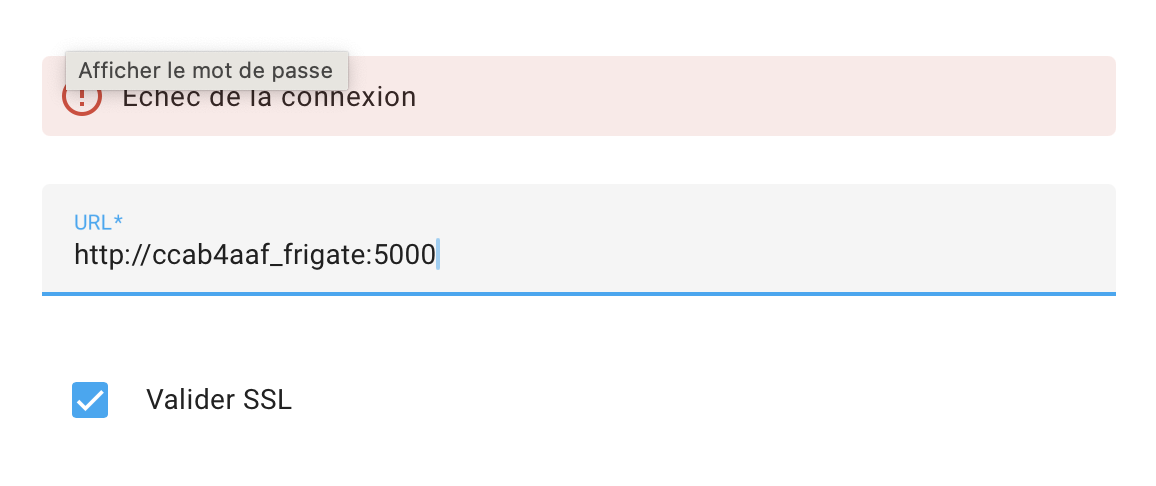
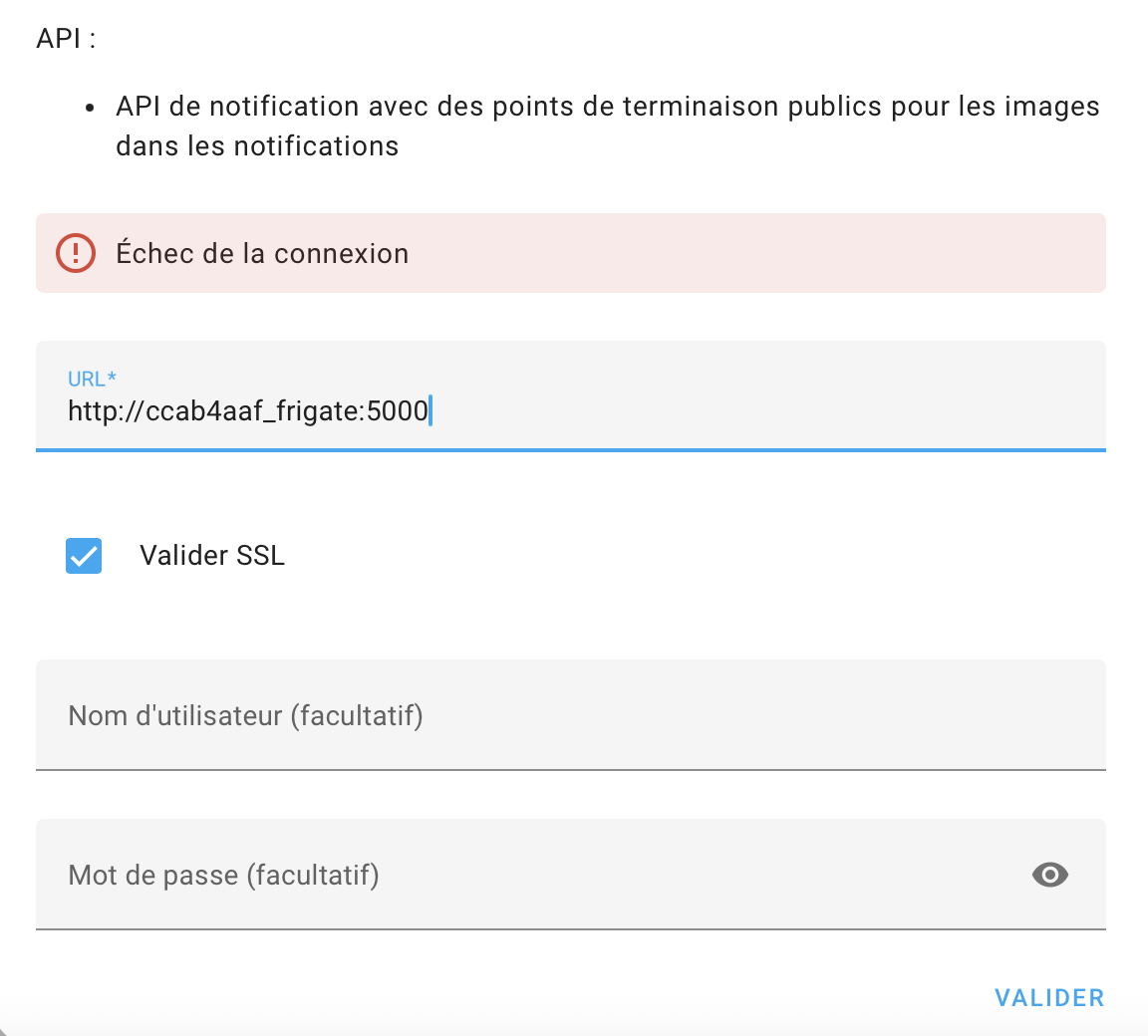
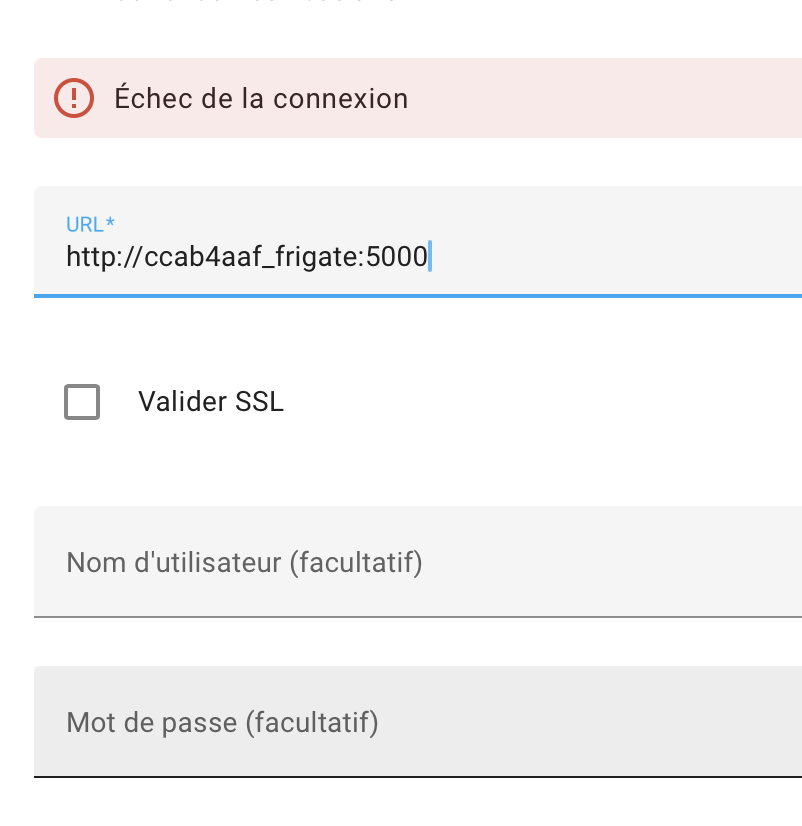
Est ce qu’il y un rapport avec ça, c’est normal ? Echec de connexion
Tu as bien installé le module complémentaire ET l’intégration ?
Peux tu remettre les logs ?
Est-ce que tu arrive à afficher frigate depuis l’URL de Home Assistant ? http://homeassistant:5000 ?
Puis décoche “Valider SSL” avec une URL en HTTP
les logs
s6-rc: info: service s6rc-fdholder: starting
s6-rc: info: service s6rc-oneshot-runner: starting
s6-rc: info: service s6rc-oneshot-runner successfully started
s6-rc: info: service fix-attrs: starting
s6-rc: info: service s6rc-fdholder successfully started
s6-rc: info: service fix-attrs successfully started
s6-rc: info: service legacy-cont-init: starting
s6-rc: info: service legacy-cont-init successfully started
s6-rc: info: service prepare: starting
s6-rc: info: service log-prepare: starting
s6-rc: info: service log-prepare successfully started
s6-rc: info: service nginx-log: starting
s6-rc: info: service go2rtc-log: starting
s6-rc: info: service frigate-log: starting
s6-rc: info: service certsync-log: starting
s6-rc: info: service nginx-log successfully started
s6-rc: info: service go2rtc-log successfully started
s6-rc: info: service frigate-log successfully started
s6-rc: info: service certsync-log successfully started
s6-rc: info: service prepare successfully started
s6-rc: info: service go2rtc: starting
s6-rc: info: service go2rtc successfully started
s6-rc: info: service go2rtc-healthcheck: starting
s6-rc: info: service frigate: starting
s6-rc: info: service frigate successfully started
s6-rc: info: service nginx: starting
s6-rc: info: service go2rtc-healthcheck successfully started
2025-08-27 08:41:30.834830201  [INFO] Starting NGINX...
2025-08-27 08:41:30.847674213  [INFO] No TLS certificate found. Generating a self signed certificate...
2025-08-27 08:41:31.055274526  [INFO] Preparing Frigate...
2025-08-27 08:41:31.274631773  [INFO] Preparing new go2rtc config...
2025-08-27 08:41:31.303189307  [INFO] Got IP address from supervisor: 192.168.1.16
2025-08-27 08:41:31.332330611  [INFO] Got WebRTC port from supervisor: 8555
2025-08-27 08:41:31.442110009  [INFO] Starting Frigate...
2025-08-27 08:41:31.771970870  [INFO] Starting go2rtc...
2025-08-27 08:41:31.836912160  10:41:31.836 INF go2rtc platform=linux/amd64 revision=fa580c5 version=1.9.9
2025-08-27 08:41:31.836916853  10:41:31.836 INF config path=/dev/shm/go2rtc.yaml
2025-08-27 08:41:31.837287980  10:41:31.837 INF [rtsp] listen addr=:8554
2025-08-27 08:41:31.837388257  10:41:31.837 INF [api] listen addr=:1984
2025-08-27 08:41:31.837726255  10:41:31.837 INF [webrtc] listen addr=:8555
s6-rc: info: service nginx successfully started
s6-rc: info: service certsync: starting
2025-08-27 08:41:32.909780954  [INFO] Starting certsync...
s6-rc: info: service certsync successfully started
s6-rc: info: service legacy-services: starting
s6-rc: info: service legacy-services successfully started
2025-08-27 08:41:33.298436621  127.0.0.1 - - [27/Aug/2025:10:41:33 +0200] "" 400 0 "-" "-" "-"
2025-08-27 08:41:34.058978719  [2025-08-27 10:41:34] frigate.util.config            INFO    : Checking if frigate config needs migration...
2025-08-27 08:41:34.080845772  [2025-08-27 10:41:34] frigate.util.config            INFO    : frigate config does not need migration...
2025-08-27 08:41:34.231969923  [2025-08-27 10:41:34] frigate.util.services          INFO    : Automatically detected vaapi hwaccel for video decoding
2025-08-27 08:41:34.242152590  *************************************************************
2025-08-27 08:41:34.242154617  *************************************************************
2025-08-27 08:41:34.242156473  ***    Your config file is not valid!                     ***
2025-08-27 08:41:34.242158733  ***    Please check the docs at                           ***
2025-08-27 08:41:34.242159795  ***    https://docs.frigate.video/configuration/          ***
2025-08-27 08:41:34.242161182  *************************************************************
2025-08-27 08:41:34.242162227  *************************************************************
2025-08-27 08:41:34.242173988  ***    Config Validation Errors                           ***
2025-08-27 08:41:34.242175144  *************************************************************
2025-08-27 08:41:34.242175851
2025-08-27 08:41:34.251712934  Could not determine exact line number: 'name'
2025-08-27 08:41:34.251714669  Message : String should match pattern '^[a-zA-Z0-9_-]+$'
2025-08-27 08:41:34.251715514
2025-08-27 08:41:34.251716614  *************************************************************
2025-08-27 08:41:34.251717630  ***    End Config Validation Errors                       ***
2025-08-27 08:41:34.251718657  *************************************************************
2025-08-27 08:41:34.538088339  [INFO] Service Frigate exited with code 1 (by signal 0)
s6-rc: info: service legacy-services: stopping
s6-rc: info: service legacy-services successfully stopped
s6-rc: info: service go2rtc-healthcheck: stopping
s6-rc: info: service certsync: stopping
2025-08-27 08:41:34.544368490  [INFO] The go2rtc-healthcheck service exited with code 256 (by signal 15)
2025-08-27 08:41:34.545163271  [INFO] Service CERTSYNC exited with code 256 (by signal 15)
s6-rc: info: service go2rtc-healthcheck successfully stopped
s6-rc: info: service certsync successfully stopped
s6-rc: info: service nginx: stopping
s6-rc: info: service certsync-log: stopping
s6-rc: info: service certsync-log successfully stopped
2025-08-27 08:41:34.671834843  [INFO] Service NGINX exited with code 0 (by signal 0)
s6-rc: info: service nginx successfully stopped
s6-rc: info: service nginx-log: stopping
s6-rc: info: service frigate: stopping
s6-rc: info: service frigate successfully stopped
s6-rc: info: service go2rtc: stopping
s6-rc: info: service frigate-log: stopping
s6-rc: info: service nginx-log successfully stopped
2025-08-27 08:41:34.679772382  exit with signal: terminated
s6-rc: info: service frigate-log successfully stopped
2025-08-27 08:41:34.692813827  [INFO] The go2rtc service exited with code 0 (by signal 0)
s6-rc: info: service go2rtc successfully stopped
s6-rc: info: service prepare: stopping
s6-rc: info: service go2rtc-log: stopping
s6-rc: info: service prepare successfully stopped
s6-rc: info: service go2rtc-log successfully stopped
s6-rc: info: service log-prepare: stopping
s6-rc: info: service s6rc-fdholder: stopping
s6-rc: info: service log-prepare successfully stopped
s6-rc: info: service legacy-cont-init: stopping
s6-rc: info: service s6rc-fdholder successfully stopped
s6-rc: info: service legacy-cont-init successfully stopped
s6-rc: info: service fix-attrs: stopping
s6-rc: info: service fix-attrs successfully stopped
s6-rc: info: service s6rc-oneshot-runner: stopping
s6-rc: info: service s6rc-oneshot-runner successfully stopped
je n’arrive pas à installer l’intégration et encore moins le module supplémentaire
Il faut d’abord installer le module complémentaire puis ensuite (une fois le module démarré) l’intégration
Désinstalle l’add-on frigate, supprime le fichier config.yaml du répertoire frigate (avec file editor). Redémarre Home Assistant et réinstalle le module complémentaire.
ok, j’ai désinstallé frigate et supprimé mon fichier yml
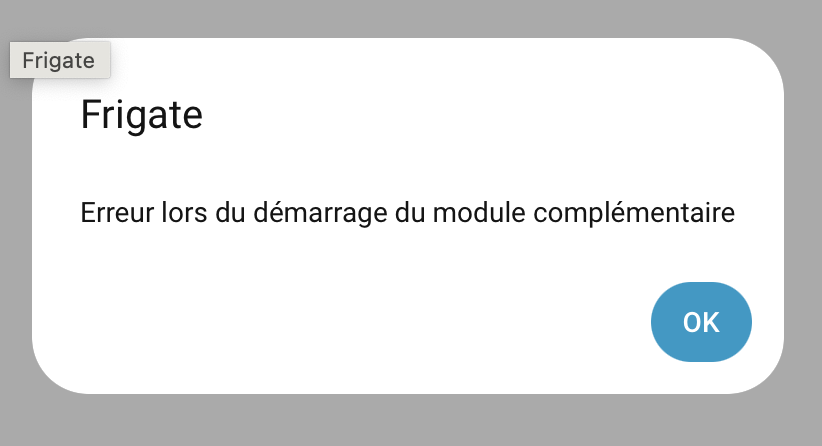
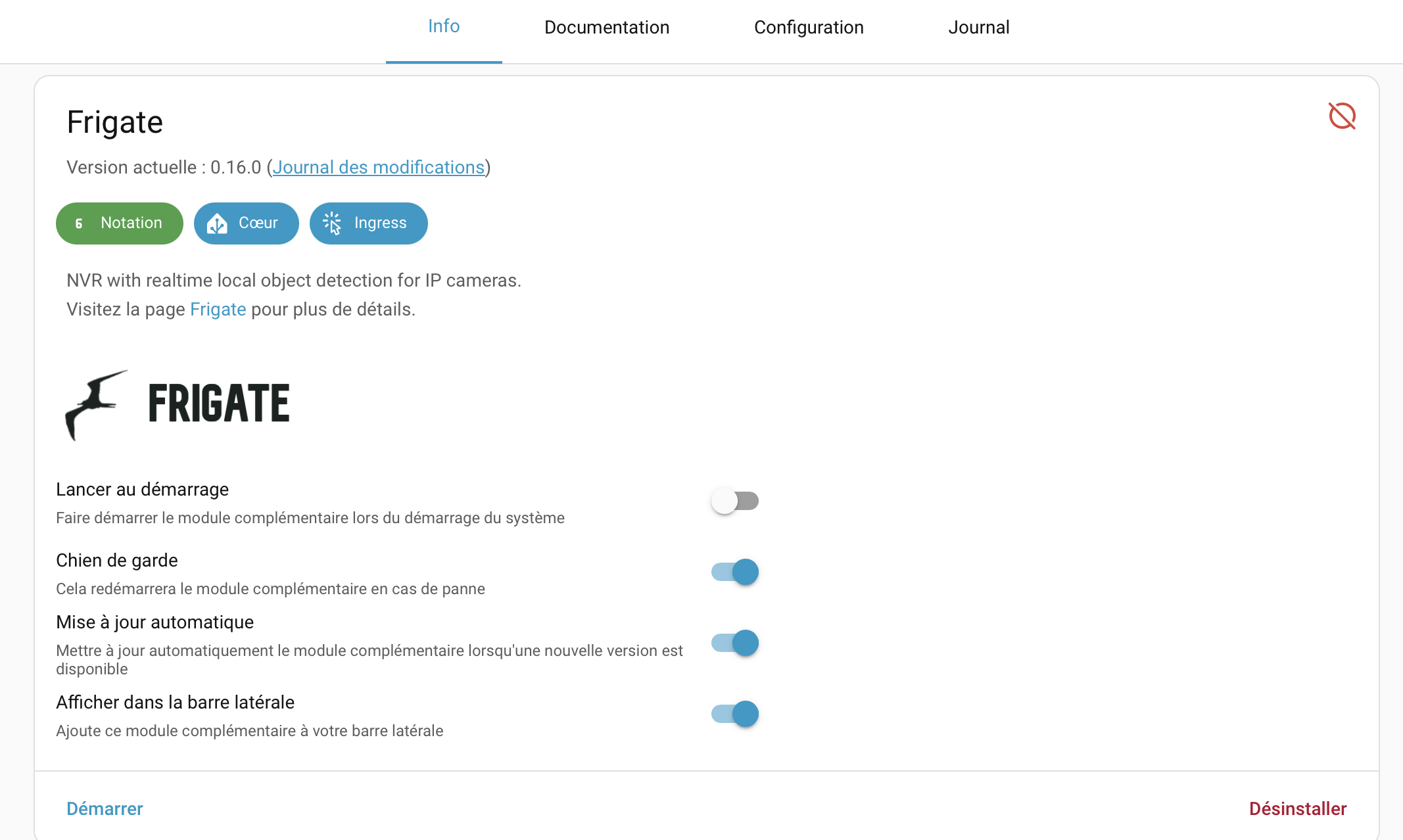
j’ai ensuite réinstallé frigate puis pour le module supplémentaire j’ai ce message :
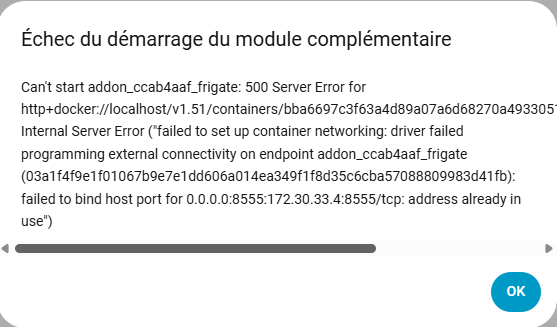
Échec du démarrage du module complémentaire
Can't start addon_ccab4aaf_frigate: 500 Server Error for http+docker://localhost/v1.48/containers/48c9ff95c1652388f22b0e419f2bc988baf3a77c559b4f87bfa3edb5ed5511cf/start: Internal Server Error ("failed to set up container networking: driver failed programming external connectivity on endpoint addon_ccab4aaf_frigate (0cbd16b2f07fe5afa364da3815cdff6d7a2696b35e4a2d802d80d83853727690): failed to bind host port for 0.0.0.0:8555:172.30.33.5:8555/tcp: address already in use")
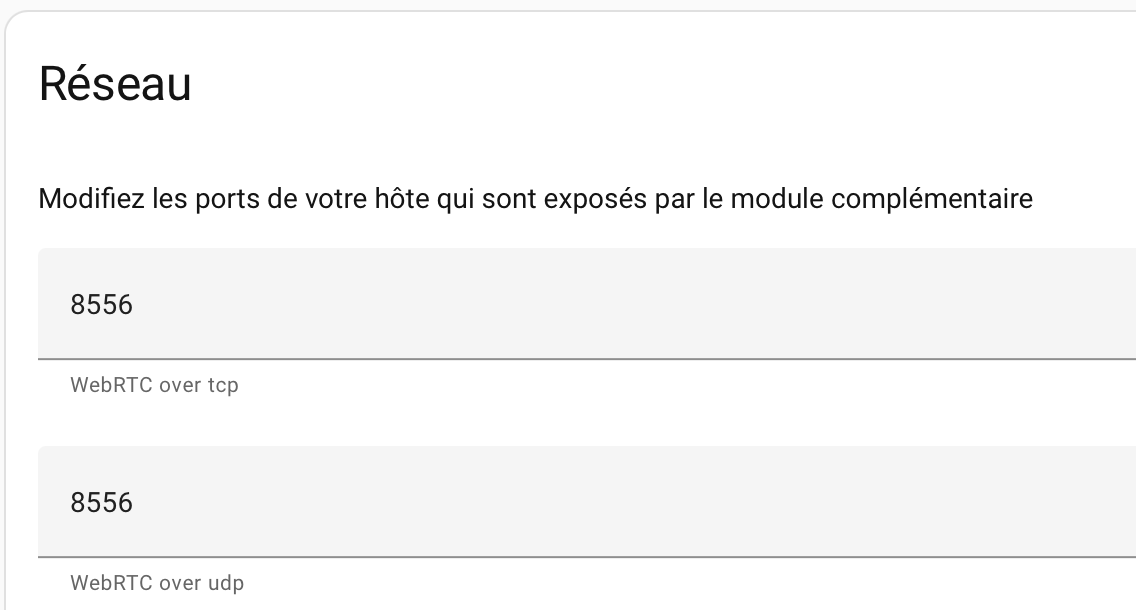
j’ai donc changé le port 8555 par 8556 mais pareil marche pas
De quel port tu parles ? C’est le port 5000 pour Frigate.
Tu n’as pas un Go2RTC qui est installé ?
je parlais de ces ports :
oui j’ai bien un go2rtc d’installer
Go2RTC est intégré à Frigate, donc tu peux supprimer ce module complémentaire (il est probable que le conflit de port soit lié à Go2RTC)
Je l’avais fait en suivant ce tuto vidéo :
[image]
Mais rien depuis
ok j’ai suivi tes conseils, j’ai viré go2rtc et relancé HA
mon module ne veut toujours pas se lancer et mon intégration est toujours en échec
logs
Cette erreur provient d'une intégration personnalisée

Enregistreur: custom_components.frigate.api
Source: custom_components/frigate/api.py:402
intégration: Frigate (documentation, problèmes)
S'est produit pour la première fois: 09:15:36 (8 occurrences)
Dernier enregistrement: 09:17:40

Error fetching information from http://ccab4aaf_frigate:5000/api/stats: Cannot connect to host ccab4aaf_frigate:5000 ssl:False [DNS server returned answer with no data]
Error fetching information from http://ccab4aaf_frigate:5000/api/login: Cannot connect to host ccab4aaf_frigate:5000 ssl:False [DNS server returned answer with no data]
Error fetching information from http://ccab4aaf-frigate:5000/api/login: Cannot connect to host ccab4aaf-frigate:5000 ssl:default [Connect call failed ('172.30.33.5', 5000)]
Error fetching information from http://ccab4aaf-frigate:5000/api/login: Cannot connect to host ccab4aaf-frigate:5000 ssl:False [Connect call failed ('172.30.33.5', 5000)]
Error fetching information from http://ccab4aaf_frigate:5000/api/login: Cannot connect to host ccab4aaf_frigate:5000 ssl:default [DNS server returned answer with no data]
Mets “http://homeassistant.local:5000 ” comme URL
Tu ne pourras pas lancer l’intégration tant que le module complémentaire ne sera pas opérationnel.
Tu as cette fenêtre quand tu essaies de démarrer le module complémentaire ?
oui
ça donne rien, Mets “http://homeassistant.local:5000 ” comme URL
j’ai refait un fichier yml plus simple
logs

Cette erreur provient d'une intégration personnalisée

Enregistreur: custom_components.frigate.api
Source: custom_components/frigate/api.py:402
intégration: Frigate (documentation, problèmes)
S'est produit pour la première fois: 09:15:36 (44 occurrences)
Dernier enregistrement: 09:54:09

Error fetching information from http://ccab4aaf_frigate:5000/api/stats: Cannot connect to host ccab4aaf_frigate:5000 ssl:False [DNS server returned answer with no data]
Error fetching information from http://ccab4aaf_frigate:5000/api/login: Cannot connect to host ccab4aaf_frigate:5000 ssl:False [DNS server returned answer with no data]
Error fetching information from http://ccab4aaf-frigate:5000/api/login: Cannot connect to host ccab4aaf-frigate:5000 ssl:default [Connect call failed ('172.30.33.5', 5000)]
Error fetching information from http://ccab4aaf-frigate:5000/api/login: Cannot connect to host ccab4aaf-frigate:5000 ssl:False [Connect call failed ('172.30.33.5', 5000)]
Error fetching information from http://ccab4aaf_frigate:5000/api/login: Cannot connect to host ccab4aaf_frigate:5000 ssl:default [DNS server returned answer with no data]


yml


mqtt:
  host: 192.168.1.16
  port: 1883
  user: mqtt
  password: xxx

cameras:
  cam-nord:
    ffmpeg:
      inputs:
        - path: rtsp://Cam2:xxx@192.168.1.177:554/h265Preview_01_sub
          input_args: preset-rtsp-generic
          roles:
            - detect
    detect:
      enabled: true
      width: 1280
      height: 720
Bonne nouvelle,
j’ai encore désinstallé frigate puis relancer et maintenant ça fonctionne
ça n’explique pas pourquoi ça déconnait !!!
merci beaucoup pour ton aide et ta patience
Bon ben tant mieux
L’essentiel est que ça fonctionne maintenant
1 « J'aime »
system
Août 30, 2025, 8:19
17
Ce sujet a été automatiquement fermé après 2 jours. Aucune réponse n’est permise dorénavant.