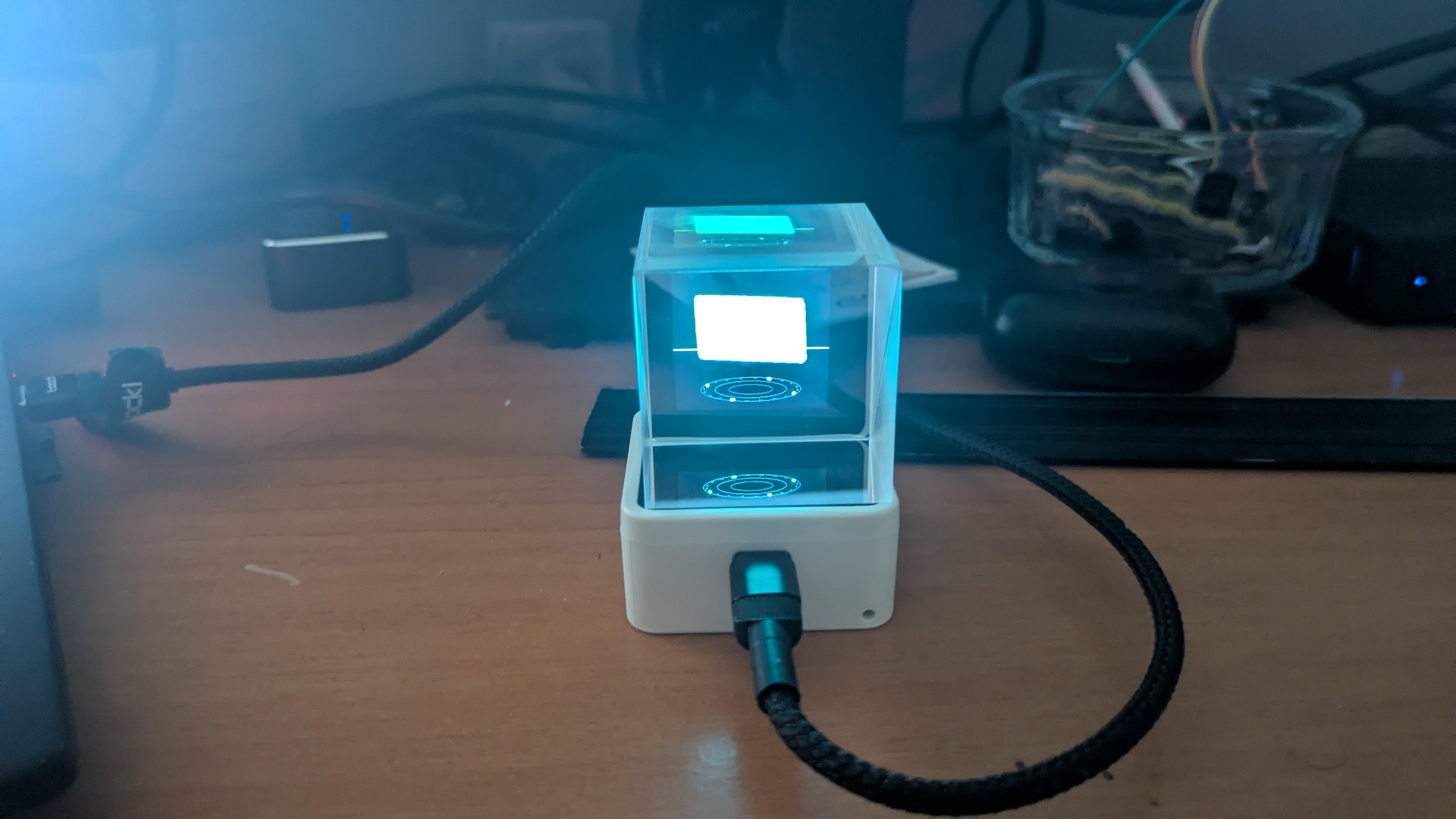
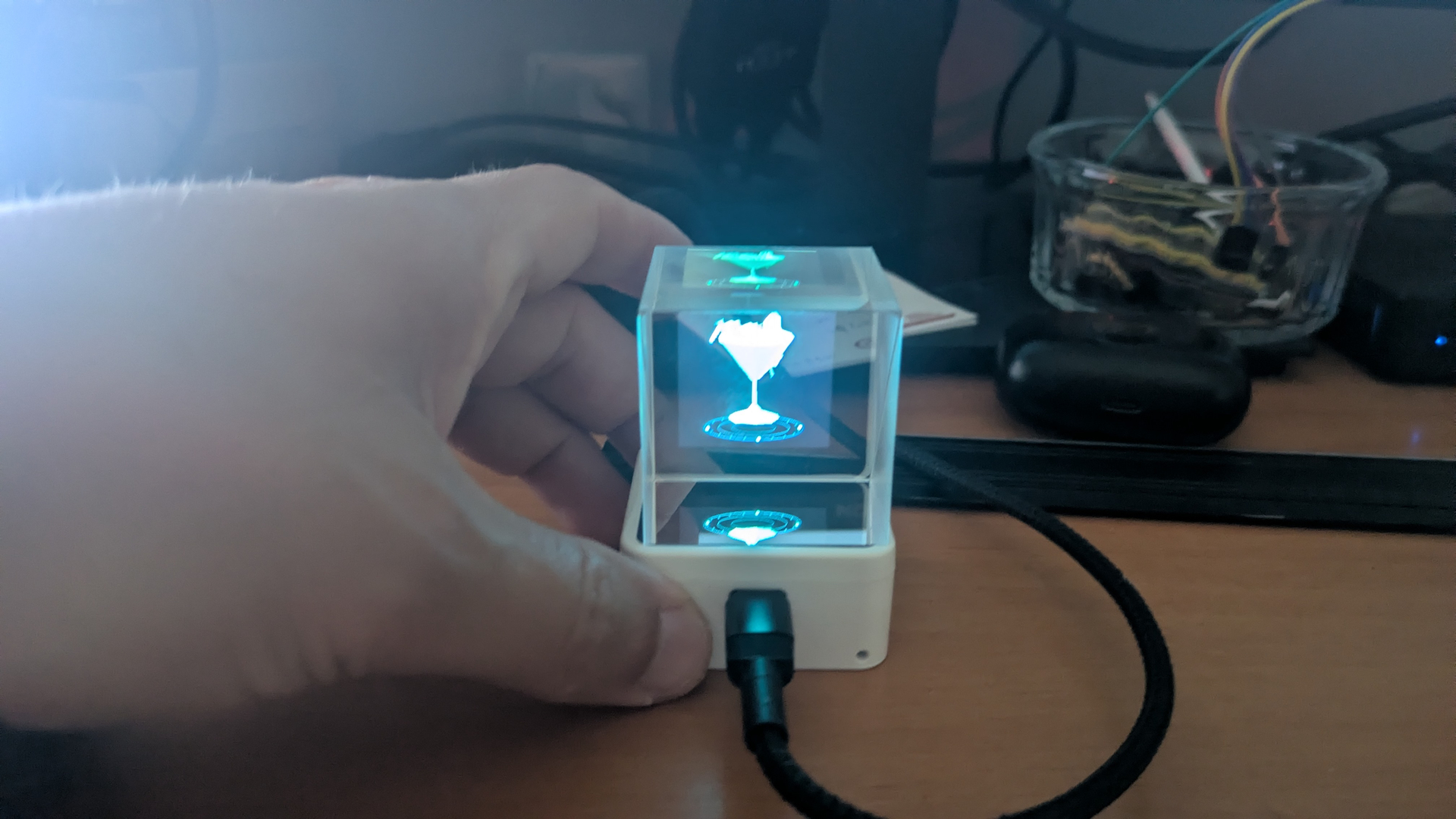
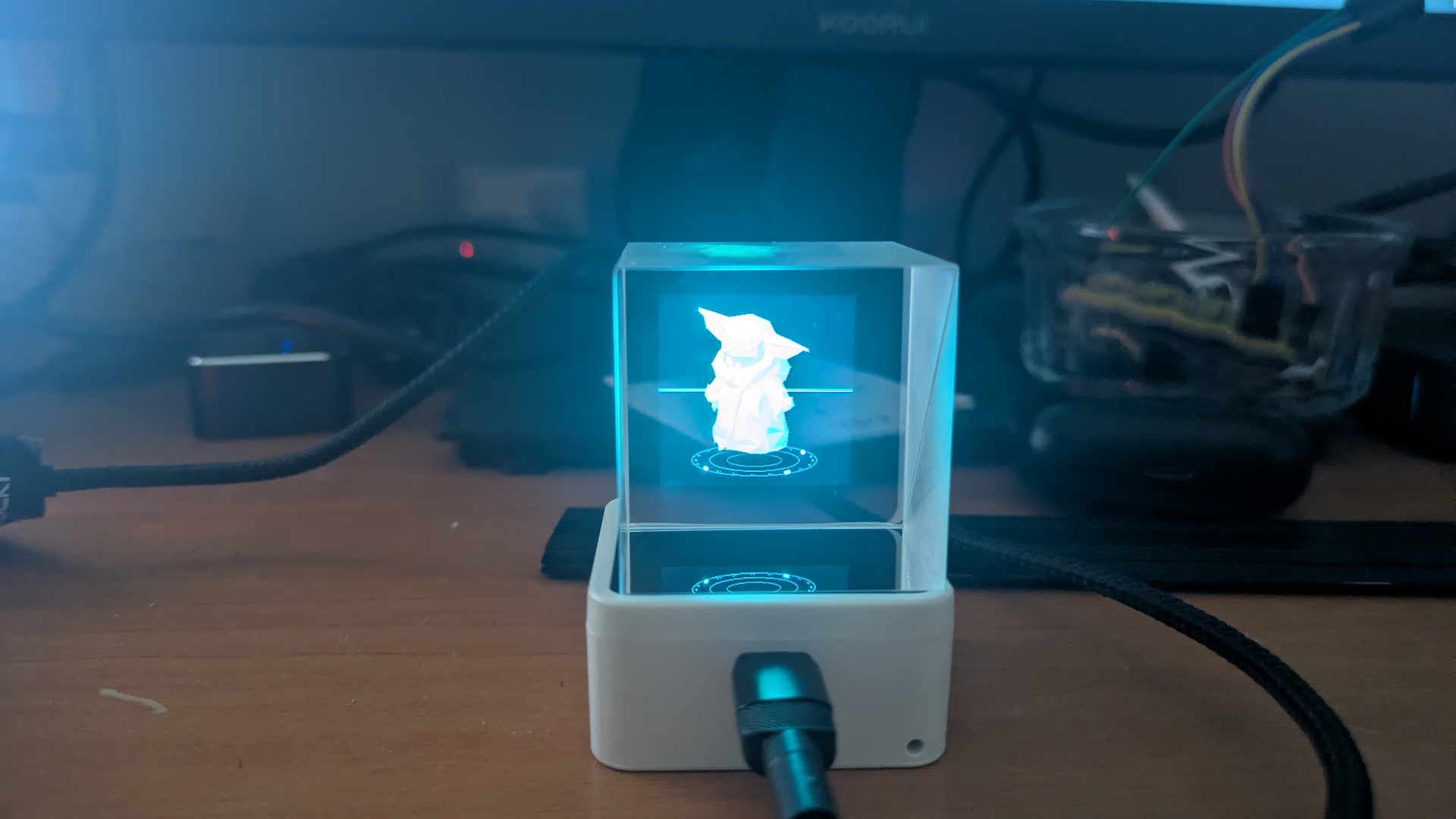
Bonjour,
cela fait longtemps que je n'avais pas partagé de projets, après les oiseaux, les hologrammes.
J'ai voulu égaillé mon salon avec un hologramme qui s'allume lorsque je reçois du courrier.
J'avais déjà fait cela avec un plaque led et wled et ca foncitonnait très bien mais je me suis passons au 3d maintenant!
Je vous présente donc un tutoriel rapide pour réaliser ce projet :
Matériel acheté :
- Waveshare ESP32-S3-Touch-LCD-1.54
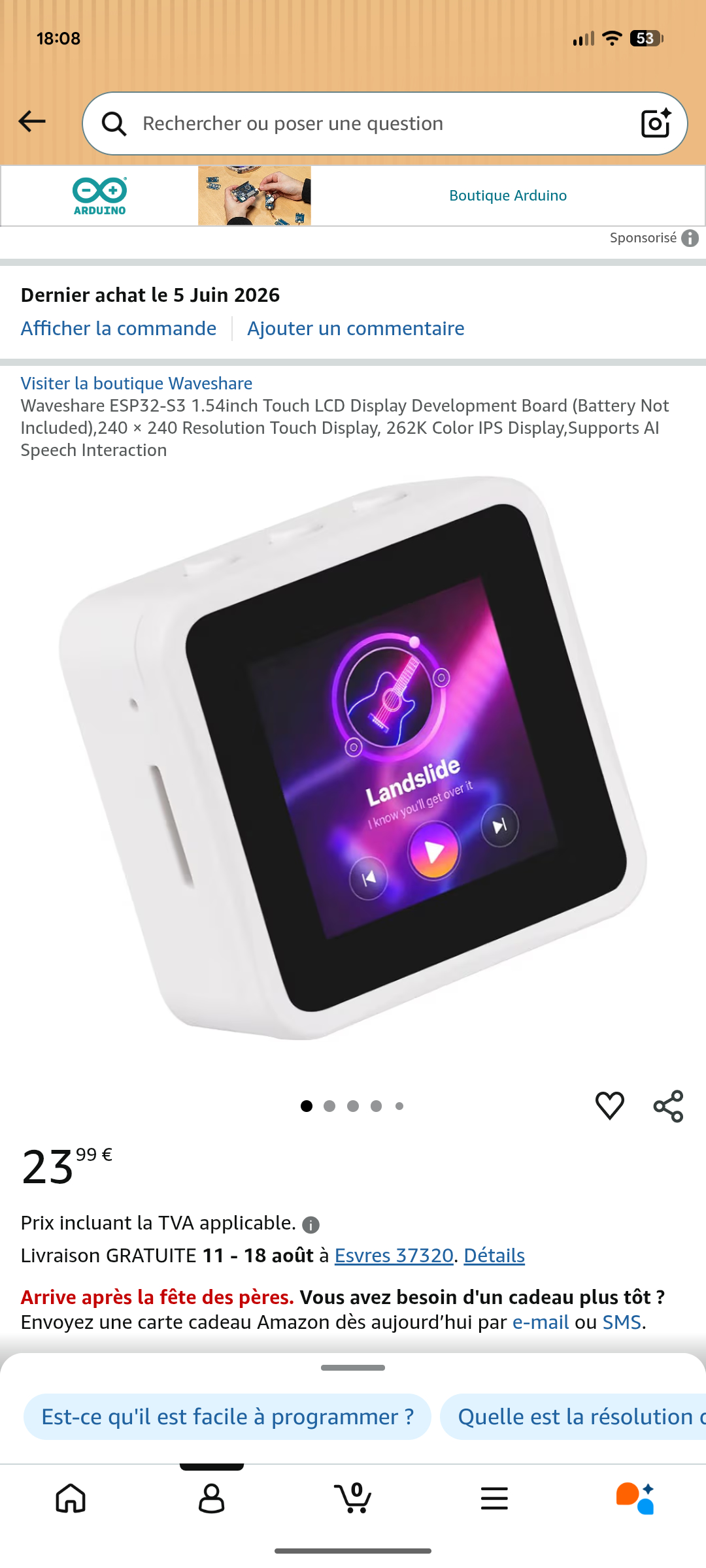
Vous pouvez aussi monter votre propre matériel en achetant individuellement la carte esp32-s3 et un écran.
- Cube en verre optique 12.7/15/20/25.4/30/40mm, prisme séparateur de faisceau, revêtement AR, prisme de séparation semi-réfléchissant et semi-transmissive
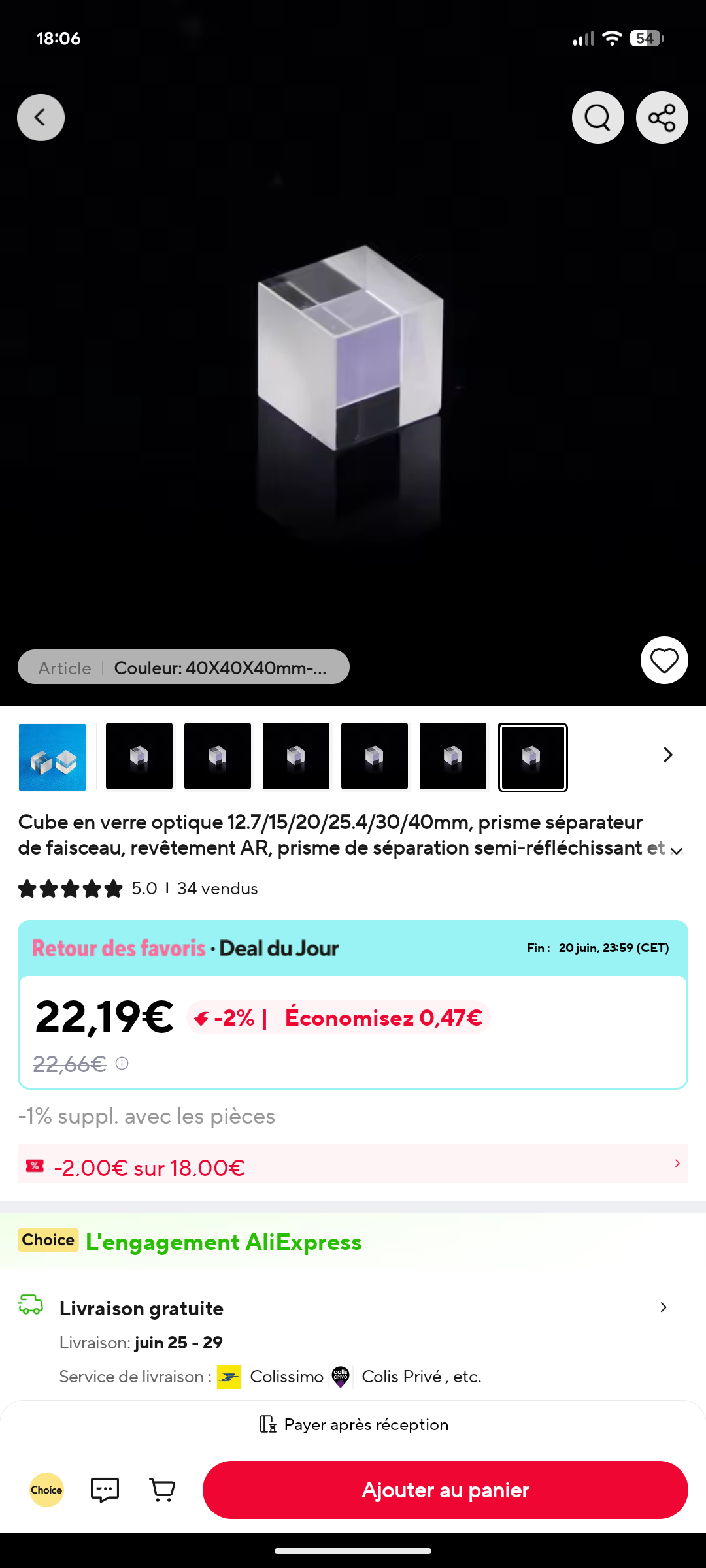
Lien aliexpresse : https://a.aliexpress.com/_Ev5D8mO
- cable usb
- une carte micro sd
Logiciels utilisés:
- Arduino IDE : pour compiler le code ino sur l'esp32-S3
- https://3d.hunyuan.tencent.com/ : pour générer des fichiers *.stl (3d) depuis une image (gratuit et 20 générations par jour)
-
- Builder 3D : pour simplifier le rendu *.stl et réduire le nombre de triangle
Code ino
Le code que j'utilise :
/* Hologramme ESP32-S3-Touch-LCD-1.54 (Waveshare)
* - rendu 3D solide z-buffer depuis fichiers .hmesh sur carte SD
* - changement d'hologramme : boutons physiques + MQTT (Home Assistant, auto-discovery)
*
* Bibliotheques requises : Arduino_GFX_Library, PubSubClient
* Carte SD : deposer les .hmesh dans le dossier /holograms
*/
#include <WiFi.h>
#include <WebServer.h>
#include <PubSubClient.h>
#include <FS.h>
#include <SD_MMC.h>
#include <Arduino_GFX_Library.h>
#include <esp_heap_caps.h>
#include <math.h>
#include <time.h>
// ====================== A PERSONNALISER ======================
const char* WIFI_SSID = "XXXXX";
const char* WIFI_PASS = "XXXXX";
const char* MQTT_HOST = "XXX.XXX.X.XX";
const int MQTT_PORT = 1883;
const char* MQTT_USER = "XXXXXXX";
const char* MQTT_PASS = "XXXXXXXXXX";
const char* DEV_ID = "holo_esp32"; // identifiant unique de l'appareil
// =============================================================
// ---- broches ecran (ESP32-S3-Touch-LCD-1.54) ----
#define LCD_DC 45
#define LCD_CS 21
#define LCD_SCK 38
#define LCD_MOSI 39
#define LCD_RST 40
#define TFT_BL 46
// ---- broches SD (SDMMC) ----
#define SD_CLK 16
#define SD_CMD 15
#define SD_D0 17
#define SD_D1 18
#define SD_D2 13
#define SD_D3 14
// ---- boutons ----
#define BTN_PREV 0 // KEY MINUS
#define BTN_NEXT 4 // KEY PLUS
#define BTN_MODE 5 // KEY PWR
#define W 240
#define H 240
#define BLACK 0x0000
#define CYAN 0x07FF
#define MAX_VERT 4000
#define MAX_FACE 7000
#define MAX_HOLO 24
Arduino_DataBus *bus = new Arduino_ESP32SPI(LCD_DC, LCD_CS, LCD_SCK, LCD_MOSI, -1);
Arduino_GFX *output = new Arduino_ST7789(bus, LCD_RST, 2, true, 240, 240, 0, 0, 0, 80);
Arduino_Canvas *gfx = new Arduino_Canvas(240, 240, output);
WiFiClient net;
PubSubClient mqtt(net);
WebServer server(80);
File uploadFile;
uint32_t showIpUntil = 0;
bool netUp = false;
static inline uint16_t C565(uint8_t r, uint8_t g, uint8_t b) {
return ((uint16_t)(r & 0xF8) << 8) | ((uint16_t)(g & 0xFC) << 3) | (b >> 3);
}
// -------- geometrie courante (en PSRAM) --------
float *Vx, *Vy, *Vz; // sommets normalises
uint16_t *Fi; // faces (3 indices par face)
int nVert = 0, nFace = 0;
// buffers de travail
float *Px, *Py, *Pz, *Dz;
int *Sx, *Sy;
uint16_t *fb, *zb;
// -------- bibliotheque d'hologrammes --------
String holoNames[MAX_HOLO];
int holoCount = 0;
int holoIndex = 0;
// -------- rendu --------
const int CX = 120, CY = 108;
const float Rscale = 86, TILT = 0.22f;
float ct, st, rot = 0, scanY = 0;
const float Lx = 0.35f, Ly = 0.55f, Lz = 0.76f;
// -------- divers --------
bool screenOn = true, screenDirty = true;
bool clockMode = false; int lastSec = -1;
uint32_t lastBtn = 0, lastStatePub = 0;
bool stateDirty = true;
// ============================================================
uint16_t shade(float d) {
if (d < 0) d = 0; if (d > 1) d = 1;
float t = 0.50f + 0.50f * d;
float r = 175.0f * t * t * t;
return C565((uint8_t)r, (uint8_t)(255 * t), (uint8_t)(255 * t));
}
void rasterTri(int x0,int y0,float z0,int x1,int y1,float z1,
int x2,int y2,float z2,uint16_t color){
int minx=x0<x1?(x0<x2?x0:x2):(x1<x2?x1:x2);
int maxx=x0>x1?(x0>x2?x0:x2):(x1>x2?x1:x2);
int miny=y0<y1?(y0<y2?y0:y2):(y1<y2?y1:y2);
int maxy=y0>y1?(y0>y2?y0:y2):(y1>y2?y1:y2);
if(minx<0)minx=0; if(maxx>W-1)maxx=W-1;
if(miny<0)miny=0; if(maxy>H-1)maxy=H-1;
float area=(float)((x1-x0)*(y2-y0)-(x2-x0)*(y1-y0));
if(area>-0.5f&&area<0.5f)return;
float invA=1.0f/area;
for(int y=miny;y<=maxy;y++){
int row=y*W;
for(int x=minx;x<=maxx;x++){
float w0=(float)((x1-x)*(y2-y)-(x2-x)*(y1-y));
float w1=(float)((x2-x)*(y0-y)-(x0-x)*(y2-y));
float w2=(float)((x0-x)*(y1-y)-(x1-x)*(y0-y));
bool neg=(w0<0)||(w1<0)||(w2<0);
bool pos=(w0>0)||(w1>0)||(w2>0);
if(neg&&pos)continue;
float z=(w0*z0+w1*z1+w2*z2)*invA;
uint16_t zi=(uint16_t)z; int idx=row+x;
if(zi>zb[idx]){zb[idx]=zi; fb[idx]=color;}
}
}
}
void drawBase(){
int by=206;
for(int k=0;k<3;k++){int rr=34+k*22;
gfx->drawEllipse(CX,by,rr,(int)(rr*0.26f),C565(0,40+k*14,60+k*18));}
for(int i=0;i<20;i++){float a=rot*1.5f+i*(2*PI/20);
int px=CX+(int)(cosf(a)*74),py=by+(int)(sinf(a)*74*0.26f);
bool big=(i%5==0); gfx->fillCircle(px,py,big?2:1,big?CYAN:C565(0,90,120));}
}
// ------------- chargement d'un .hmesh -------------
bool loadMesh(const String& name){
String path = "/holograms/" + name;
File f = SD_MMC.open(path);
if(!f){ Serial.printf("ouverture echouee: %s\n", path.c_str()); return false; }
char magic[4]; f.read((uint8_t*)magic,4);
if(memcmp(magic,"HMSH",4)!=0){ f.close(); Serial.println("magic invalide"); return false; }
uint16_t ver,nv,nf;
f.read((uint8_t*)&ver,2); f.read((uint8_t*)&nv,2); f.read((uint8_t*)&nf,2);
if(nv>MAX_VERT||nf>MAX_FACE){ f.close(); Serial.println("mesh trop gros"); return false; }
for(int i=0;i<nv;i++){ int16_t t[3]; f.read((uint8_t*)t,6);
Vx[i]=t[0]/10000.0f; Vy[i]=t[1]/10000.0f; Vz[i]=t[2]/10000.0f; }
for(int i=0;i<nf;i++){ uint16_t t[3]; f.read((uint8_t*)t,6);
Fi[i*3]=t[0]; Fi[i*3+1]=t[1]; Fi[i*3+2]=t[2]; }
f.close();
nVert=nv; nFace=nf;
Serial.printf("charge %s : %d sommets, %d faces\n", name.c_str(), nVert, nFace);
return true;
}
void scanLibrary(){
holoCount=0;
File dir = SD_MMC.open("/holograms");
if(dir && dir.isDirectory()){
File e;
while((e=dir.openNextFile()) && holoCount<MAX_HOLO-1){
String n = e.name(); int sl=n.lastIndexOf('/'); if(sl>=0) n=n.substring(sl+1);
if(n.endsWith(".hmesh")) holoNames[holoCount++]=n;
e.close();
}
dir.close();
} else Serial.println("dossier /holograms absent");
holoNames[holoCount++]="__clock__"; // horloge procedurale, toujours dispo
Serial.printf("%d entrees (dont horloge)\n", holoCount);
}
// ------------- hologramme procedural : horloge 3D sept-segments -------------
// segments a,b,c,d,e,f,g (indices 0..6)
const bool SEG[10][7] = {
{1,1,1,1,1,1,0},{0,1,1,0,0,0,0},{1,1,0,1,1,0,1},{1,1,1,1,0,0,1},{0,1,1,0,0,1,1},
{1,0,1,1,0,1,1},{1,0,1,1,1,1,1},{1,1,1,0,0,0,0},{1,1,1,1,1,1,1},{1,1,1,1,0,1,1}
};
// ajoute un pave (boite) centre en (cx,cy,cz), demi-dimensions (hx,hy,hz)
void addBox(float cx,float cy,float cz,float hx,float hy,float hz){
if(nVert+8>MAX_VERT || nFace+12>MAX_FACE) return;
int b=nVert;
const float xs[8]={-1,1,1,-1,-1,1,1,-1};
const float ys[8]={-1,-1,1,1,-1,-1,1,1};
const float zs[8]={-1,-1,-1,-1,1,1,1,1};
for(int k=0;k<8;k++){ Vx[nVert]=cx+xs[k]*hx; Vy[nVert]=cy+ys[k]*hy; Vz[nVert]=cz+zs[k]*hz; nVert++; }
const int tri[12][3]={{0,1,2},{0,2,3},{4,6,5},{4,7,6},{0,5,1},{0,4,5},
{3,2,6},{3,6,7},{0,3,7},{0,7,4},{1,5,6},{1,6,2}};
for(int t=0;t<12;t++){ Fi[nFace*3]=b+tri[t][0]; Fi[nFace*3+1]=b+tri[t][1]; Fi[nFace*3+2]=b+tri[t][2]; nFace++; }
}
void addDigit(int d,float x){
if(d<0||d>9) return;
const bool* s=SEG[d];
const float hw=0.34f, hh2=0.72f, T=0.10f, dep=0.10f;
float vz=hh2*0.5f, vhz=hh2*0.5f-1.5f*T;
if(s[0]) addBox(x,0,+hh2-T, hw-2*T,dep,T); // a (haut)
if(s[6]) addBox(x,0,0, hw-2*T,dep,T); // g (milieu)
if(s[3]) addBox(x,0,-hh2+T, hw-2*T,dep,T); // d (bas)
if(s[5]) addBox(x-hw+T,0,+vz, T,dep,vhz); // f (haut-gauche)
if(s[1]) addBox(x+hw-T,0,+vz, T,dep,vhz); // b (haut-droite)
if(s[4]) addBox(x-hw+T,0,-vz, T,dep,vhz); // e (bas-gauche)
if(s[2]) addBox(x+hw-T,0,-vz, T,dep,vhz); // c (bas-droite)
}
void addColon(float x){
addBox(x,0,+0.24f, 0.09f,0.10f,0.09f);
addBox(x,0,-0.24f, 0.09f,0.10f,0.09f);
}
void normalizeVerts(){
if(nVert==0) return;
float mnx=Vx[0],mxx=Vx[0],mny=Vy[0],mxy=Vy[0],mnz=Vz[0],mxz=Vz[0];
for(int i=1;i<nVert;i++){
if(Vx[i]<mnx)mnx=Vx[i]; if(Vx[i]>mxx)mxx=Vx[i];
if(Vy[i]<mny)mny=Vy[i]; if(Vy[i]>mxy)mxy=Vy[i];
if(Vz[i]<mnz)mnz=Vz[i]; if(Vz[i]>mxz)mxz=Vz[i];
}
float cx=(mnx+mxx)*0.5f, cy=(mny+mxy)*0.5f, cz=(mnz+mxz)*0.5f;
float ex=(mxx-mnx)*0.5f, ey=(mxy-mny)*0.5f, ez=(mxz-mnz)*0.5f;
float m=ex; if(ey>m)m=ey; if(ez>m)m=ez; if(m<1e-4f)m=1;
float inv=1.0f/m;
for(int i=0;i<nVert;i++){ Vx[i]=(Vx[i]-cx)*inv; Vy[i]=(Vy[i]-cy)*inv; Vz[i]=(Vz[i]-cz)*inv; }
}
void buildDigits(int hh,int mm,int ss){
nVert=0; nFace=0;
const float DP=0.80f; // pas entre chiffres
float x=0;
addDigit(hh/10,x); x+=DP;
addDigit(hh%10,x); x+=DP*0.6f;
addColon(x); x+=DP*0.6f;
addDigit(mm/10,x); x+=DP;
addDigit(mm%10,x); x+=DP*0.6f;
addColon(x); x+=DP*0.6f;
addDigit(ss/10,x); x+=DP;
addDigit(ss%10,x);
normalizeVerts();
}
void buildClock(){
struct tm ti; int hh=0,mm=0,ss=0;
if(getLocalTime(&ti,5)){ hh=ti.tm_hour; mm=ti.tm_min; ss=ti.tm_sec; }
buildDigits(hh,mm,ss);
}
String dispName(int i){
if(holoNames[i]=="__clock__") return "Horloge";
String n=holoNames[i]; n.replace(".hmesh",""); return n;
}
void applyHolo(int i){
if(i<0||i>=holoCount) return;
holoIndex=i;
if(holoNames[i]=="__clock__"){ clockMode=true; lastSec=-1; buildClock(); }
else { clockMode=false; loadMesh(holoNames[i]); }
stateDirty=true;
}
// ------------- MQTT / Home Assistant -------------
String tBase() { return String(DEV_ID); }
String tStatus() { return tBase()+"/status"; }
String tSet() { return tBase()+"/select/set"; }
String tState() { return tBase()+"/select/state"; }
String tScrSet() { return tBase()+"/screen/set"; }
String tScrState() { return tBase()+"/screen/state"; }
String tIp() { return tBase()+"/ip"; }
String devBlock(){ return "\"dev\":{\"ids\":[\""+tBase()+"\"],\"name\":\"Hologramme ESP32\",\"mf\":\"DIY\"}"; }
void setScreen(bool on){ screenOn=on; digitalWrite(TFT_BL,on?HIGH:LOW); screenDirty=true; }
void publishScreen(){ mqtt.publish(tScrState().c_str(), screenOn?"ON":"OFF", true); screenDirty=false; }
void publishIp(){ mqtt.publish(tIp().c_str(), WiFi.localIP().toString().c_str(), true); }
void publishDiscovery(){
// select (hologramme)
{ String opts="[";
for(int i=0;i<holoCount;i++){
opts += (i?",":""); opts += "\""+dispName(i)+"\""; }
opts+="]";
String p = "{\"name\":\"Hologramme\",\"uniq_id\":\""+tBase()+"_select\","
"\"cmd_t\":\""+tSet()+"\",\"stat_t\":\""+tState()+"\",\"avty_t\":\""+tStatus()+"\","
"\"options\":"+opts+","+devBlock()+"}";
mqtt.publish(("homeassistant/select/"+tBase()+"/config").c_str(), p.c_str(), true);
}
// switch (ecran on/off)
{ String p = "{\"name\":\"Ecran\",\"uniq_id\":\""+tBase()+"_screen\","
"\"cmd_t\":\""+tScrSet()+"\",\"stat_t\":\""+tScrState()+"\",\"avty_t\":\""+tStatus()+"\","
"\"pl_on\":\"ON\",\"pl_off\":\"OFF\",\"ic\":\"mdi:television\","+devBlock()+"}";
mqtt.publish(("homeassistant/switch/"+tBase()+"_screen/config").c_str(), p.c_str(), true);
}
// capteur (adresse IP, diagnostic)
{ String p = "{\"name\":\"Adresse IP\",\"uniq_id\":\""+tBase()+"_ip\","
"\"stat_t\":\""+tIp()+"\",\"avty_t\":\""+tStatus()+"\","
"\"ic\":\"mdi:ip-network\",\"ent_cat\":\"diagnostic\","+devBlock()+"}";
mqtt.publish(("homeassistant/sensor/"+tBase()+"_ip/config").c_str(), p.c_str(), true);
}
}
void publishState(){
if(holoCount==0) return;
mqtt.publish(tState().c_str(), dispName(holoIndex).c_str(), true);
stateDirty=false;
}
void selectByName(const String& want){
for(int i=0;i<holoCount;i++) if(dispName(i)==want){ applyHolo(i); return; }
}
void onMqtt(char* topic, byte* payload, unsigned int len){
String msg; for(unsigned int i=0;i<len;i++) msg+=(char)payload[i];
String t = String(topic);
if(t==tSet()) selectByName(msg);
else if(t==tScrSet()) setScreen(msg=="ON"||msg=="on"||msg=="1");
}
void mqttConnect(){
if(mqtt.connected()) return;
mqtt.setServer(MQTT_HOST, MQTT_PORT);
mqtt.setBufferSize(1024);
mqtt.setCallback(onMqtt);
String cid = tBase()+"-"+String((uint32_t)ESP.getEfuseMac(),HEX);
if(mqtt.connect(cid.c_str(), MQTT_USER, MQTT_PASS,
tStatus().c_str(), 0, true, "offline")){
mqtt.publish(tStatus().c_str(), "online", true);
mqtt.subscribe(tSet().c_str());
mqtt.subscribe(tScrSet().c_str());
publishDiscovery();
publishIp();
stateDirty=true; screenDirty=true;
}
}
// ------------- serveur web (upload .hmesh) -------------
String htmlPage(){
String s = F("<!DOCTYPE html><html><head><meta charset='utf-8'>"
"<meta name='viewport' content='width=device-width,initial-scale=1'>"
"<title>Hologrammes</title><style>"
"body{background:#02141a;color:#7ff;font-family:system-ui,sans-serif;margin:0;padding:24px}"
"h1{color:#0ff;font-weight:600}a{color:#5fd;text-decoration:none}"
".card{background:#03222b;border:1px solid #0aa;border-radius:12px;padding:18px;max-width:520px;margin:auto}"
"li{margin:6px 0}input[type=submit]{background:#0aa;color:#012;border:0;padding:8px 16px;border-radius:6px;cursor:pointer}"
"</style></head><body><div class='card'><h1>Bibliotheque d'hologrammes</h1><ul>");
for(int i=0;i<holoCount;i++){
String nm=holoNames[i]; String disp=nm; disp.replace(".hmesh","");
s += "<li>"+disp+" <a href='/delete?f="+nm+"' onclick=\"return confirm('Supprimer ?')\">supprimer</a></li>";
}
s += F("</ul><h3>Ajouter un .hmesh</h3>"
"<form method='POST' action='/upload' enctype='multipart/form-data'>"
"<input type='file' name='f' accept='.hmesh' required> "
"<input type='submit' value='Envoyer'></form>"
"<p style='opacity:.6;font-size:13px'>Enregistre sur la carte SD (/holograms) et ajoute a Home Assistant.</p>"
"</div></body></html>");
return s;
}
void handleRoot(){ server.send(200,"text/html",htmlPage()); }
void handleUpload(){
HTTPUpload& up = server.upload();
if(up.status==UPLOAD_FILE_START){
String fn=up.filename; int p=fn.lastIndexOf('/'); if(p>=0)fn=fn.substring(p+1);
p=fn.lastIndexOf('\\'); if(p>=0)fn=fn.substring(p+1);
if(!fn.endsWith(".hmesh")) fn+=".hmesh";
String path="/holograms/"+fn;
uploadFile = SD_MMC.open(path.c_str(), FILE_WRITE);
} else if(up.status==UPLOAD_FILE_WRITE){
if(uploadFile) uploadFile.write(up.buf, up.currentSize);
} else if(up.status==UPLOAD_FILE_END){
if(uploadFile) uploadFile.close();
}
}
void handleDelete(){
if(server.hasArg("f")){
String f=server.arg("f"); int p=f.lastIndexOf('/'); if(p>=0)f=f.substring(p+1);
String path="/holograms/"+f;
SD_MMC.remove(path.c_str());
scanLibrary(); if(mqtt.connected()) publishDiscovery();
}
server.sendHeader("Location","/"); server.send(303,"text/plain","OK");
}
// ------------- boutons -------------
void changeHolo(int delta){
if(holoCount==0) return;
applyHolo((holoIndex + delta + holoCount) % holoCount);
}
void pollButtons(){
if(millis()-lastBtn < 220) return; // anti-rebond simple
if(digitalRead(BTN_NEXT)==LOW){ changeHolo(+1); lastBtn=millis(); }
else if(digitalRead(BTN_PREV)==LOW){ changeHolo(-1); lastBtn=millis(); }
else if(digitalRead(BTN_MODE)==LOW){ setScreen(!screenOn); lastBtn=millis(); }
}
// ============================================================
void setup(){
Serial.begin(115200);
pinMode(TFT_BL,OUTPUT); digitalWrite(TFT_BL,HIGH);
pinMode(BTN_PREV,INPUT_PULLUP);
pinMode(BTN_NEXT,INPUT_PULLUP);
pinMode(BTN_MODE,INPUT_PULLUP);
gfx->begin();
gfx->fillScreen(BLACK);
ct=cosf(TILT); st=sinf(TILT);
fb = gfx->getFramebuffer();
// allocations PSRAM
zb = (uint16_t*)heap_caps_malloc(W*H*2, MALLOC_CAP_SPIRAM);
Vx = (float*)heap_caps_malloc(MAX_VERT*4, MALLOC_CAP_SPIRAM);
Vy = (float*)heap_caps_malloc(MAX_VERT*4, MALLOC_CAP_SPIRAM);
Vz = (float*)heap_caps_malloc(MAX_VERT*4, MALLOC_CAP_SPIRAM);
Px = (float*)heap_caps_malloc(MAX_VERT*4, MALLOC_CAP_SPIRAM);
Py = (float*)heap_caps_malloc(MAX_VERT*4, MALLOC_CAP_SPIRAM);
Pz = (float*)heap_caps_malloc(MAX_VERT*4, MALLOC_CAP_SPIRAM);
Dz = (float*)heap_caps_malloc(MAX_VERT*4, MALLOC_CAP_SPIRAM);
Sx = (int*) heap_caps_malloc(MAX_VERT*4, MALLOC_CAP_SPIRAM);
Sy = (int*) heap_caps_malloc(MAX_VERT*4, MALLOC_CAP_SPIRAM);
Fi = (uint16_t*)heap_caps_malloc(MAX_FACE*3*2, MALLOC_CAP_SPIRAM);
// carte SD (SDMMC 4-bit)
SD_MMC.setPins(SD_CLK, SD_CMD, SD_D0, SD_D1, SD_D2, SD_D3);
if(!SD_MMC.begin("/sdcard", false)) // false = 4-bit ; true = 1-bit (plus robuste)
Serial.println("SD non montee");
scanLibrary(); // ajoute aussi l'horloge (dispo meme sans SD)
applyHolo(0);
// WiFi
WiFi.mode(WIFI_STA);
WiFi.begin(WIFI_SSID, WIFI_PASS);
configTzTime("CET-1CEST,M3.5.0,M10.5.0/3", "pool.ntp.org", "time.nist.gov"); // heure FR (NTP)
// serveur web
server.on("/", HTTP_GET, handleRoot);
server.on("/upload", HTTP_POST, [](){
scanLibrary(); if(mqtt.connected()) publishDiscovery();
server.sendHeader("Location","/"); server.send(303,"text/plain","OK");
}, handleUpload);
server.on("/delete", HTTP_GET, handleDelete);
server.begin();
}
void loop(){
// reseau (non bloquant)
if(WiFi.status()==WL_CONNECTED){
if(!netUp){ netUp=true; Serial.print("IP: "); Serial.println(WiFi.localIP());
showIpUntil=millis()+8000; }
server.handleClient();
if(!mqtt.connected()){ static uint32_t t=0; if(millis()-t>3000){ t=millis(); mqttConnect(); } }
else mqtt.loop();
} else netUp=false;
pollButtons();
if(screenDirty && mqtt.connected()){ publishScreen(); }
if(stateDirty && mqtt.connected() && millis()-lastStatePub>200){ lastStatePub=millis(); publishState(); }
if(!screenOn){ delay(20); return; } // ecran eteint : on garde reseau/boutons, pas de rendu
// mode horloge : reconstruire la geometrie au changement de minute
if(clockMode){ static uint32_t tck=0; if(millis()-tck>250){ tck=millis();
struct tm ti; if(getLocalTime(&ti,5) && ti.tm_sec!=lastSec){ lastSec=ti.tm_sec; buildDigits(ti.tm_hour,ti.tm_min,ti.tm_sec); } } }
// ---- rendu d'une frame ----
float ang;
if(clockMode) ang = 0.45f*sinf(millis()*0.0008f); // oscillation douce (lisible)
else { rot += 0.03f; ang = rot; }
float ca=cosf(ang), sa=sinf(ang);
for(int i=0;i<nVert;i++){
float x=Vx[i],y=Vy[i],z=Vz[i];
float rx=x*ca-y*sa, ry=x*sa+y*ca;
Px[i]=rx; Py[i]=z*ct-ry*st; Pz[i]=z*st+ry*ct;
Sx[i]=CX+(int)(rx*Rscale); Sy[i]=CY-(int)(Py[i]*Rscale);
Dz[i]=(Pz[i]+2.0f)*12000.0f;
}
gfx->fillScreen(BLACK);
drawBase();
memset(zb,0,W*H*2);
for(int f=0;f<nFace;f++){
int a=Fi[f*3],b=Fi[f*3+1],c=Fi[f*3+2];
float ux=Px[b]-Px[a],uy=Py[b]-Py[a],uz=Pz[b]-Pz[a];
float vx=Px[c]-Px[a],vy=Py[c]-Py[a],vz=Pz[c]-Pz[a];
float nx=uy*vz-uz*vy,ny=uz*vx-ux*vz,nz=ux*vy-uy*vx;
float inv=1.0f/sqrtf(nx*nx+ny*ny+nz*nz+1e-6f);
float diff=fabsf((nx*Lx+ny*Ly+nz*Lz)*inv);
rasterTri(Sx[a],Sy[a],Dz[a],Sx[b],Sy[b],Dz[b],Sx[c],Sy[c],Dz[c],shade(diff));
}
scanY+=2.4f; if(scanY>=240)scanY=-6; int sy=(int)scanY;
gfx->drawFastHLine(0,sy,240,C565(120,255,255));
if(millis()<showIpUntil){
gfx->setTextColor(C565(180,255,255));
gfx->setTextSize(2);
gfx->setCursor(6,4);
gfx->print(WiFi.localIP());
}
gfx->flush();
}
Tutoriel rapide
1 - créer vos fichiers hmseh :
Pour créer vos hmesh il faut avoir comme base un fichier *.stl :
Pour obtenir les fichier *.stl j'utilise le site https://3d.hunyuan.tencent.com/ qui permet de transformer une image en fichier *.stl
Une fois télécharger, il faut simplifier les triangles car c'est encore trop gros.
Pour ma part j'utilise le logiciel 3d builder, c'est très simple( sélectionner l'objet, modifier, simplifier) et enregistrer
Ensuite on doit convertir le fichier *.stl en .hmesh, pour cela j'utilise le fichier python suivant :
#!/usr/bin/env python3
"""
Convertit un modele 3D en .hmesh binaire pour la bibliotheque SD de l'ESP.
    python3 stl2hmesh.py modele.stl sortie.hmesh [faces_cible]
A copier ensuite dans le dossier /holograms de la carte SD.

Format .hmesh (little-endian) :
  char[4] 'HMSH' | uint16 version | uint16 nVert | uint16 nFace
  int16  verts[nVert*3]  (coord normalisee [-1,1] * 10000)
  uint16 faces[nFace*3]
"""
import sys, struct, numpy as np, trimesh

src, dst = sys.argv[1], sys.argv[2]
target = int(sys.argv[3]) if len(sys.argv) > 3 else 800

m = trimesh.load(src, force='mesh')
if len(m.faces) > target:
    try:    s = m.simplify_quadric_decimation(face_count=target)
    except TypeError: s = m.simplify_quadric_decimation(target)
else:
    s = m            # deja sous la cible : on garde tel quel
s.fix_normals()

v = s.vertices.astype(np.float64)
v -= (v.min(0) + v.max(0)) / 2
v /= ((v.max(0) - v.min(0)) / 2).max()
F = s.faces.astype(np.int32)
nv, nf = len(v), len(F)
assert nv < 65535 and nf < 65535, "trop de sommets/faces (max 65535)"

with open(dst, "wb") as f:
    f.write(b"HMSH")
    f.write(struct.pack("<HHH", 1, nv, nf))
    for x, y, z in v:
        f.write(struct.pack("<hhh",
            max(-32767, min(32767, int(round(x * 10000)))),
            max(-32767, min(32767, int(round(y * 10000)))),
            max(-32767, min(32767, int(round(z * 10000))))))
    for a, b, c in F:
        f.write(struct.pack("<HHH", a, b, c))
print(f"OK -> {dst} : {nv} sommets, {nf} faces ({4+6+nv*6+nf*6} octets)")
Il faut enregistrer le script ci-dessus dans un dossier et mettre le fichier stl dans le même dossier et lancer la commande :
python stl2hmesh.py <entrée.stl> <sortie.hmesh> [faces_cible]
comme par exemple :
python stl2hmesh.py dragon.stl dragon.hmesh 1200
Pour informations :
~300–500 : très fluide, low-poly marqué.
~800 : bon compromis (ce qu'on utilise).
~1500–2000 : plus détaillé, mais le rendu z-buffer ralentit.
2 - Formater une carte micro sd en FAT32.
3 - Créer un dossier /holograms à la racine de la SD.
4 - Déposer le ou les fichiers dans la carte micro sd créer par le script.
5 - Insérer la carte sd dans l'esp32-s3 et brancher l'esp32 à votre PC.
6 - ouvrir Adruino IDE :
6-1 installer dans préférences l'url de gestionnaire de cartes supplémentaires : https://raw.githubusercontent.com/espressif/arduino-esp32/gh-pages/package_esp32_index.json
6-2 : installer les bibliothèques suivantes :
-
A. Arduino_GFX Library, Nom exact : Arduino_GFX Library by moononournation
C'est cette bibliothèque qui permet de piloter l'écran ST7789. -
B. ESP32 by Espressif Systems Via le gestionnaire de cartes Arduino, Nom : esp32 by Espressif Systems
-
C. Adafruit GFX Library, by Adafruit
6-3 Créer un projet *.ino et coller le code partagé ci-dessus.
Pensez à modifier les XXX pour les ssid et mots de passe ainsi que pour le mqtt.6-4 : mettez à jour les paramètres dans outils d'Arduino ID comme tel :
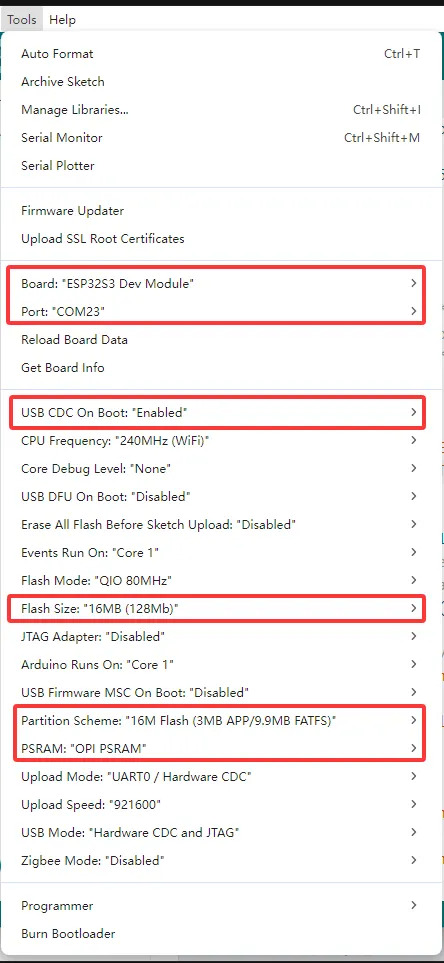
6-5 Compiler et téléverser.
A cette étape vous devirer voir l'image tourner sur l'écran.
Vous pouvez appuyer sur les boutons gauche et droite pour faire défiler les images.
Le bouton du milieu sert à allumer ou éteindre l'écran.
Pour information, l'adresse ip s'affiche sur l'écran pendant quelques secondes afin de connaitre l'IP sur votre réseau.
Un mini-serveur permet de déposer les fichiers .hmesh depuis une page web directement sur la carte sd. Vous pouvez accéder dessus en tapant l'adresse ip dans un navigateur
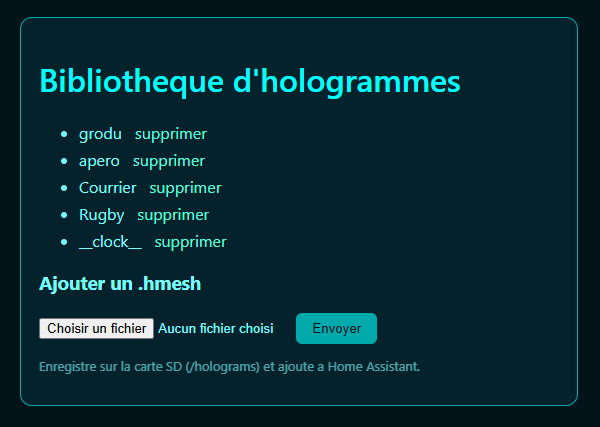
7- Coté Home assistant, le code *.ino prévoit une communication et une découverte automatique en mqtt de l'esp32.
Il apparait sous le nom de Hologramme ESP32 dans l'intégration mqtt.
Vous pouvez contrôler l'écran et sélectionner les hologrammes.
A partir de là tout est possible!
Pour ma part j'ai réutilisé une automatisation qui me permettait d'allumer un écran wled lorsque j'avais du courrier et l'éteindre quand je passais l'interrupteur virtuel à off.
J'ai fait pareil avec l'esp32. Maintenant, j'ai un courrier qui tourne quand j'ai une lettre dans ma boite aux lettres.
Le site suivant indique comment le pins/gpio sont raccordés :
https://docs.waveshare.com/ESP32-S3-Touch-LCD-1.54/Development-Environment-Setup-Arduino
Il y a aussi du son sur l'esp, il est surement possible de faire une annonce également.
Amusez vous bien et n'hésitez pas à partager les évolutions. Ca ne reste qu'une base, je pense que c'est infini!
A bientôt
JPJOBE
Quelques images :