C’est un peu complexe.
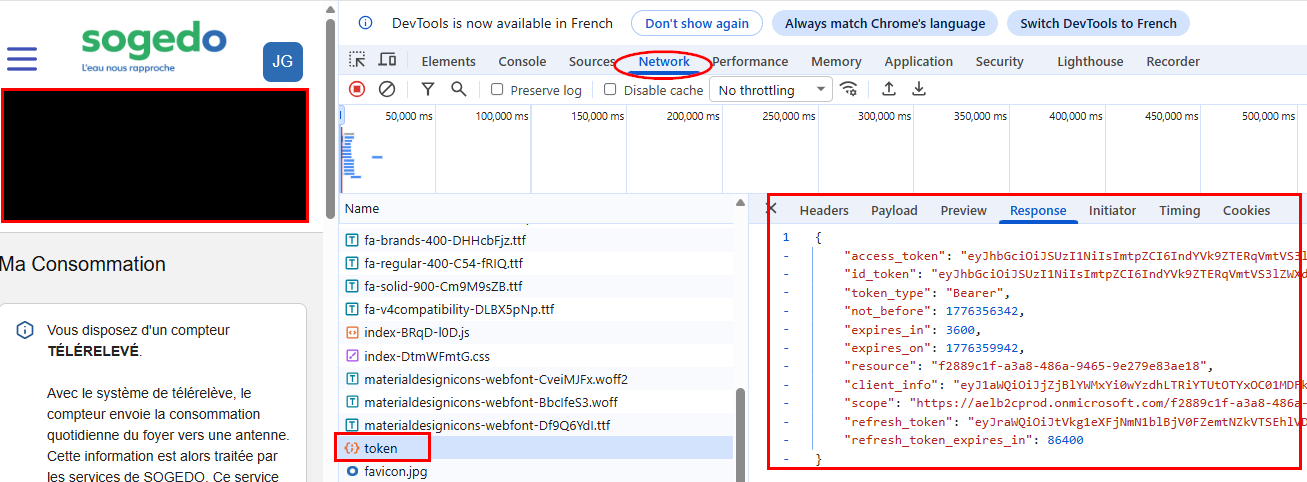
Il faut se connecter au site Sogedo avec ton identifiant, puis faire F12.
Dans la section ‹ Network › il faut retrouver le ‹ token › où se trouve toutes les informations nécessaires.
Il faut ensuite créer un fichier token.json avec les infos suivantes (trouvées dans le token):
{
    "client_id": "f2...",
    "meter_id": "17c...",
    "access_token": "ey...",
    "refresh_token": "ey...",
    "expires_on": 1776063940,
    "refresh_token_expires_in": 85791,
    "obtained_at": 1776060340
}
Et mettre ce fichier dans le répertoire /config/sogedo.
J’ai écrit un script Python avec l’aide de chatGPT:
#!/usr/bin/env python3
import requests
from datetime import datetime, timedelta, timezone
import json
import sys
import os
import urllib3
import time

# -------------------
# CONFIGURATION
# -------------------
B2C_POLICY = "b2c_1a_signup_signin"
TENANT = "aelb2cprod.onmicrosoft.com"
TOKEN_URL = f"https://login.mon-compte.sogedo.fr/{TENANT}/{B2C_POLICY}/oauth2/v2.0/token"
SCRIPT_DIR = os.path.dirname(os.path.abspath(__file__))  # Folder where the script is
TOKEN_FILE = os.path.join(SCRIPT_DIR, "token.json")      # Absolute path to token.json


def get_access_token():
    """
    Return a valid access token thanks to the refresh token stored in token.json
    If the current access token is expired or missing, refresh it using the refresh token.
    """
    # ======= Step 1: Load existing tokens from JSON =======
    if not os.path.exists(TOKEN_FILE):
        raise Exception(f"{TOKEN_FILE} not found. You must generate it first.")

    with open(TOKEN_FILE, "r") as f:
        token_data = json.load(f)

    # Ensure we have a refresh token
    refresh_token = token_data.get("refresh_token")
    if not refresh_token:
        raise Exception("No refresh_token found in token.json. You must generate it first.")

    # Get Client ID and Meter ID from token data
    client_id = token_data.get("client_id")
    meter_id = token_data.get("meter_id")

    if not client_id:
        raise Exception("No client_id found in token.json. You must define it first.")
    if not meter_id:
        raise Exception("No meter_id found in token.json. You must define it first.")

    # ======= Step 2: Prepare the payload for refresh =======
    payload = {
        "grant_type": "refresh_token",
        "client_id": client_id,
        "scope": f"https://{TENANT}/{client_id}/read offline_access",
        "refresh_token": refresh_token
    }

    # ======= Step 3: Request new tokens =======
    response = requests.post(TOKEN_URL, data=payload)

    if response.status_code == 200:
        new_tokens = response.json()
        #print(new_tokens)		# For debug

        # ======= Step 4: Update token.json with the new structure =======
        token_data = {
            "client_id": client_id,
            "meter_id": meter_id,
            "access_token": new_tokens["access_token"],
            "refresh_token": new_tokens.get("refresh_token", refresh_token),
            "expires_on": new_tokens.get("expires_on", 0),
            "refresh_token_expires_in": new_tokens.get("refresh_token_expires_in", 0),
	    "obtained_at": int(time.time())
        }

        with open(TOKEN_FILE, "w") as f:
            json.dump(token_data, f, indent=4)

        #print("Tokens refreshed successfully!")
        #print("New access_token:", token_data["access_token"])
    else:
        print("Refresh error:", response.status_code, response.text)
    return token_data

def get_index(token_data):
    """
    Return the last available water index
    """
    access_token = token_data.get("access_token")
    meter_id = token_data.get("meter_id")

    if not access_token:
        raise Exception("No access_token found in token.json. You must generate it first.")
    if not meter_id:
        raise Exception("No meter_id found in token.json. You must define it first.")

    # -------------------
    # CALCULATE DATES (last 2 days)
    # -------------------
    today = datetime.now(timezone.utc).date()
    start_date = today - timedelta(days=2)
    start = f"{start_date.year},{start_date.month},{start_date.day}"
    end = f"{today.year},{today.month},{today.day}"

    # -------------------
    # CALL THE API
    # -------------------
    url = f"https://mon-compte.sogedo.fr/api/Consumption/GetDailyMeterConsumption/{meter_id}"
    params = {"startDate": start, "endDate": end}

    try:
        # disable only the insecure request warning
        urllib3.disable_warnings(urllib3.exceptions.InsecureRequestWarning)
        response = requests.get(url, headers={"Authorization": f"Bearer {access_token}"}, params=params, verify=False)
        data = response.json()
        #print(data)					    # For debug
    except Exception as e:
        print(f"API Error: {e}")
        print("Using token:", access_token[:10] + "…")    # For debug
        print("URL:", response.url)			    # For debug
        sys.exit(1)

    if not data:
        print("Using token:", TOKEN[:10] + "…")  	    # For debug
        print("URL:", response.url)			    # For debug
        print("Response:", response)  		            # For debug
        print("Data:", data)  			            # For debug

    # Filter valid days
    valid_days = [d for d in data if d["isIndexValueAvailable"]]

    if not valid_days:
        print("No data available")
        sys.exit(1)

    # Get the last day with an index
    latest = valid_days[-1]

    result = {
        "index": latest["indexValue"],
        "date": latest["indexDate"],
        "refresh": token_data.get("refresh_token_expires_in")
    }
    #"access_token_end": token_data.get("expires_on", 0),

    return result


# --- MAIN ---
if __name__ == "__main__":
    token_data = get_access_token()
    index = get_index(token_data)
    print(json.dumps(index))
Il faut le mettre ce script Python dans le répertoire /config/sogedo/
Tu peux tester ce script dans le terminal de Home Assistant:

Ensuite, il faut créer une entité ‹ sogedo_water_index › dans ton fichier configuration.yaml:
    # -------------------------------
    # SOGEDO Water Index Sensor
    # -------------------------------
  - platform: command_line
    name: sogedo_water_index
    unique_id: sogedo_water_index
    command: "/config/sogedo/venv/bin/python3 /config/sogedo/sogedo_get_index.py"
    value_template: "{{ value_json.index }}"
    unit_of_measurement: "m³"
    device_class: water
    state_class: total_increasing
    scan_interval: 21600  # update every 6 hours (in seconds)
    json_attributes:
      - date
      - refresh
Le script python a besoin de certaines librairies qui ne s’installent dans mon environnement HA OS de mon Raspberry Pi4.
J’ai dû créer un environnement virtuel (venv).
La connexion au site est assurée pour 24 heures, mais je n’arrive pas à récupérer automatiquement un nouveau ‹ refresh_token ›.
Je le fais donc manuellement tous les jours (oui, c’est pas top) en allant sur le site Sogedo, puis en faisant F12 et en récupérant le ‹ refresh_token ›, puis en lançant ce script depuis le terminal:
#!/usr/bin/env python3

import json
import time
from pathlib import Path
import argparse


def main():
    parser = argparse.ArgumentParser(description="Update Sogedo token.json file")
    parser.add_argument("--refresh-token", required=True, help="New refresh_token")
    parser.add_argument("--access-token", help="Optional new access_token")
    parser.add_argument("--expires-in", type=int, help="Optional expires_in in seconds")

    args = parser.parse_args()

    # token.json in same directory as script
    file_path = Path(__file__).parent / "token.json"

    if not file_path.exists():
        print(f"Error: token.json not found in {file_path.parent}")
        return

    # Read existing file
    with open(file_path, "r") as f:
        data = json.load(f)

    # Backup before modification
    backup_path = file_path.with_suffix(".json.bak")
    with open(backup_path, "w") as f:
        json.dump(data, f, indent=4)

    # Update fields
    data["refresh_token"] = args.refresh_token

    if args.access_token:
        data["access_token"] = args.access_token

    if args.expires_in:
        now = int(time.time())
        data["expires_on"] = now + args.expires_in
        data["obtained_at"] = now

    # Write updated file
    with open(file_path, "w") as f:
        json.dump(data, f, indent=4)

    print("Token successfully updated")
    print(f"Backup created: {backup_path}")


if __name__ == "__main__":
    main()

 Il faut donc passer par leur site pour récupérer les données.