Bonjour
Je suis ultra débutant.
J’essai d’intégrer un Airsend2 a Home Assistant.
J’ai intégrer mes volets sur Airsend.cloud.
J’ai ajouté l’Addon comme décrit dans le Github Installation.
Problème n°1
Comme demande dans Github Configuration YAML:
J’ai créé sous File editor une fichier « airsend.yaml » contenant un copie/coller du fichier exporte de airsend.cloud
J’ai ajoute au fichier configuration.yaml de HA la ligne suivante:
airsend: !include airsend.yaml
Probleme: Il y a une erreur lors du redémarrage de HA.
Problème N°2
Dans Github Configuration Local LAN connection
je ne comprends pas ce que je dois faire.
ou collez du code ici
Configuration
YAML
To integrate airsend into Home Assistant, go to airsend.cloud -> import/export -> Export YAML and add the contents of the downloaded file into your HA configuration configuration.yaml.

Local LAN connection
The configuration allows to use the local mode (if hass_airsend-addon is started) by adding the field spurl: !secret spurl in each device. In this mode you must modify the file secrets.yaml by adding the local url of the AirSend with its local ipv4 (ex: 192.168.x.x so spurl: sp://airsend_password@192.168.x.x), the local ipv6 fe80:: does not work because of virtualization. You can also remove fields apiKey.

Preview
Merci pour ta repose, j’apprends tranquillement a formater mes réponses. J’espere que se sera lisible.
https://github.com/devmel/hass_airsend
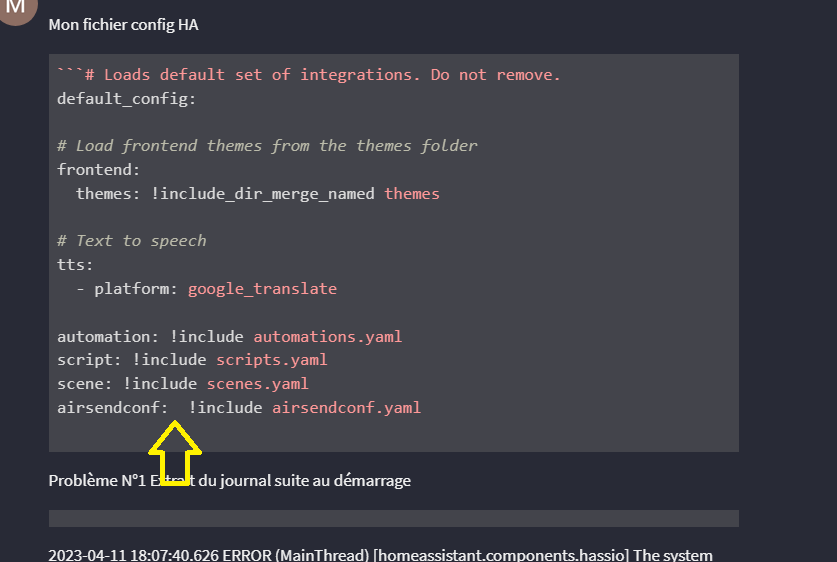
Mon fichier config HA
```# Loads default set of integrations. Do not remove.
default_config:

# Load frontend themes from the themes folder
frontend:
  themes: !include_dir_merge_named themes

# Text to speech
tts:
  - platform: google_translate

automation: !include automations.yaml
script: !include scripts.yaml
scene: !include scenes.yaml
airsendconf:  !include airsendconf.yaml
Problème N°1 Extrait du journal suite au démarrage
2023-04-11 18:07:40.626 ERROR (MainThread) [homeassistant.components.hassio] The system cannot restart because the configuration is not valid: Error loading /config/configuration.yaml: in « /config/configuration.yaml », line 16, column 14: Unable to read file /config/airsendconf.yaml.
2023-04-11 18:07:40.638 ERROR (MainThread) [homeassistant.components.websocket_api.http.connection] [139798275526992] The system cannot restart because the configuration is not valid: Error loading /config/configuration.yaml: in « /config/configuration.yaml », line 16, column 14: Unable to read file /config/airsendconf.yaml.
Traceback (most recent call last):
File « /usr/src/homeassistant/homeassistant/components/websocket_api/commands.py », line 199, in handle_call_service
await hass.services.async_call(
File « /usr/src/homeassistant/homeassistant/core.py », line 1820, in async_call
task.result()
File « /usr/src/homeassistant/homeassistant/core.py », line 1857, in _execute_service
await cast(Callable[[ServiceCall], Awaitable[None]], handler.job.target)(
File « /usr/src/homeassistant/homeassistant/components/hassio/init.py », line 557, in async_handle_core_service
raise HomeAssistantError(
homeassistant.exceptions.HomeAssistantError: The system cannot restart because the configuration is not valid: Error loading /config/configuration.yaml: in « /config/configuration.yaml », line 16, column 14: Unable to read file /config/airsendconf.yaml.
bonjour
Suite a l’exposition de mon problème, j’avais un doute en nommant le fichier airsend.yaml (peut être utilise ailleurs) donc je l’ai renommé airsendconf.yaml et j’ai modifié le config de HA.
Si on regarde ma dernière réponse les noms de fichiers sont identiques et le problème est toujours la.
merci
Bonsoir
j'avais deja corriger cet ecart.
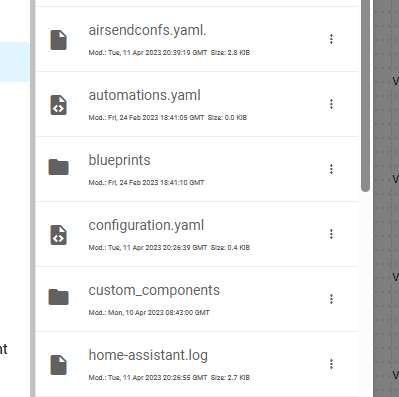
J'ai remarque que l'icone des fichiers YAML que j'ai creer via File Editor est différente de celle que j'ai créer. Il y a une petite croix en plus. Est ce normal?
ma config: je n'ai pas mis de s au premier airsendconf pour etre indentique aux autre lignes.
# Loads default set of integrations. Do not remove.
default_config:

# Load frontend themes from the themes folder
frontend:
  themes: !include_dir_merge_named themes

# Text to speech
tts:
  - platform: google_translate

automation: !include automations.yaml
script: !include scripts.yaml
scene: !include scenes.yaml
airsendconf: !include airsendconfs.yaml
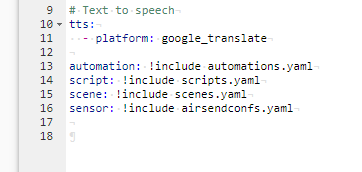
J'ai remplace airsendconf par sensor et cela permet de lancer le fichier config.
On ne peut certainement utiliser que les mots: script, scene etc;; connu par HA
Bonjour
La nuit n’a pas vraiment porte conseil…
Suite au remplacement dans le fichier configuration.yaml de :
airsendconf: !include airsendconfs.yaml
par
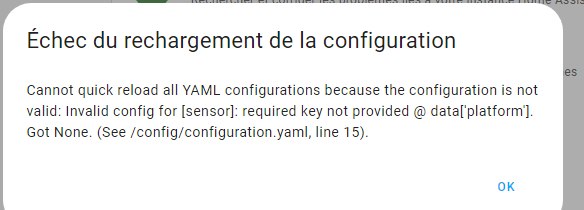
sensor: !include airsendconfs.yaml
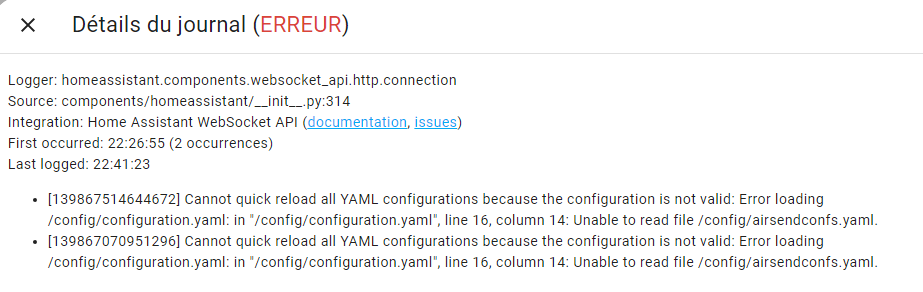
j’ai le message suivant:
Bonjour,
Pour ma part, j’ai copié le contenu du fichier directement dans configuration.yaml avec comme début ceci :
airsend:
devices:
Portail:
id:
As-tu bien fait l’installation de départ des composants en exécutant la ligne de commande ?
La connexion lan n’a pas indispensable par ailleurs
Bonsoir
Problème résolu grâce au soutien de l’équipe DEVMEL vendeur du Airsend.
J’avais mal chargé les fichiers de GITHUB.
J’ai copie le fichier du airsend.cloud dans un fichier airsendconfs.yaml (créé sous File Editor) en supprimant la première ligne (airsend:) et décalant toutes les lignes de 2 caractères a gauche.
Puis ajoute airsend: !include airsendconfs.yaml dans le configuration.yaml de HA.
Les 11 volets fonctionnent très bien.
merci a tous.
Je ne trouves pas de référence au fichier airsendconfs.yaml
Je suis sous HA supervisé et sous debian pur

Voici le message d'erreur de mon coté :
Logger: homeassistant.setup
Source: components/hassio/handler.py:52
First occurred: 21:16:36 (1 occurrences)
Last logged: 21:16:36
Error during setup of component airsend
Traceback (most recent call last):
File « /usr/src/homeassistant/homeassistant/setup.py », line 288, in _async_setup_component
result = await task
^^^^^^^^^^
File « /config/custom_components/airsend/init.py », line 25, in async_setup
addon_info: dict = await async_get_addon_info(hass, « local_airsend »)
^^^^^^^^^^^^^^^^^^^^^^^^^^^^^^^^^^^^^^^^^^^^^^^^^
File « /usr/src/homeassistant/homeassistant/components/hassio/handler.py », line 65, in async_get_addon_info
return await hassio.get_addon_info(slug)
^^^^^^^^^^^^^^^^^^^^^^^^^^^^^^^^^
File « /usr/src/homeassistant/homeassistant/components/hassio/handler.py », line 52, in _wrapper
raise HassioAPIError(data[« message »])
homeassistant.components.hassio.handler.HassioAPIError: Addon local_airsend does not exist
A priori un souci sur l'addon MAIS pour autant dans les logs de l'Addon :
s6-rc: info: service s6rc-oneshot-runner: starting
s6-rc: info: service s6rc-oneshot-runner successfully started
s6-rc: info: service fix-attrs: starting
s6-rc: info: service fix-attrs successfully started
s6-rc: info: service legacy-cont-init: starting
s6-rc: info: service legacy-cont-init successfully started
s6-rc: info: service legacy-services: starting
s6-rc: info: service legacy-services successfully started
AirSendWebService arch x86_64
[Tue Jul 25 20:47:21 2023] PHP 8.0.29 Development Server (http://127.0.0.1:80) started