Bonjour @Othar
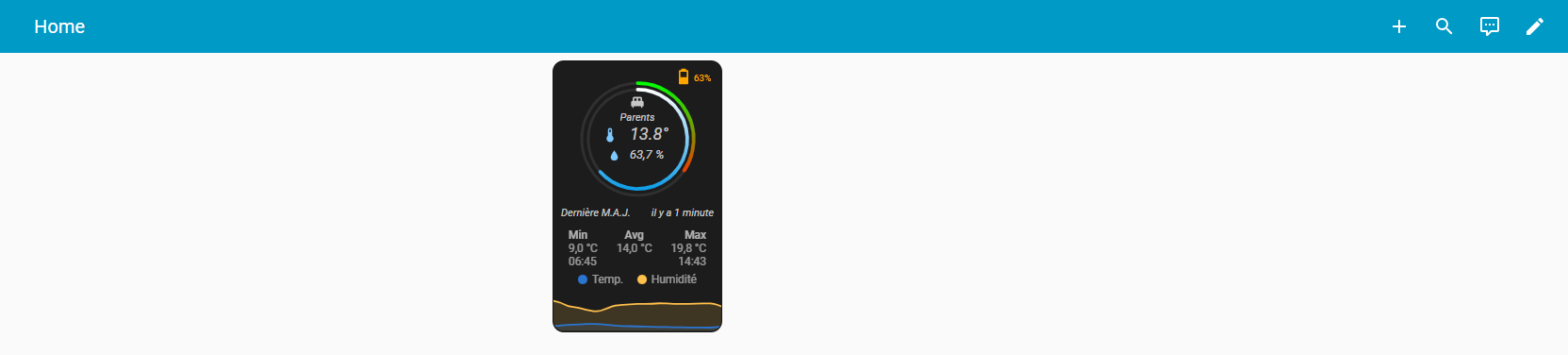
Voilà ce que donne la carte sur PC :
et sur téléphone portable (Companion) :
Le custom_fields “apex” reste centré sur la carte support.
styles:
  card:
    - aspect-ratio: 1/1.6
    - width: 180px
    - position: relative
    - background-color: "#1C1C1C"
  custom_fields:
    apex:
      - position: absolute
      - display: flex
      - justify-content: center
      - align-items: center
      - top: 29%
      - left: 50%
      - transform: translate(-50%, -50%)
      - width: 85%
      - height: 85%
      - overflow: visible
      - "--ha-card-border-width": 0
      - "--ha-card-background": transparent
Ce sont la paramètres “display: flex”, “justify-content: center”, “align-items: center” et “transform: translate(-50%, -50%)” qui permettent de garder le centrage du custom_fields.
Voici le code complet actuel de la carte (je vais ajouter un custom_fields pour le link quality) :
type: custom:button-card
entity: sensor.perron_thermometre_temperature
show_icon: false
show_state: false
show_name: false
custom_fields:
  room:
    card:
      type: custom:button-card
      icon: mdi:bed-double
      show_label: true
      label: Parents
      styles:
        card:
          - border: none
          - background: transparent
          - width: 180px
        icon:
          - width: 20px
          - color: rgba(255,255,255,0.75)
        label:
          - font-size: 11px
          - font-style: italic
          - color: rgba(255,255,255,0.75)
  temp:
    card:
      type: custom:button-card
      entity: sensor.perron_thermometre_temperature
      icon: mdi:thermometer
      show_state: true
      show_name: false
      state_display: |
        [[[
          return parseFloat(entity.state).toFixed(1) + '°';
        ]]]
      layout: icon_state
      numeric_precision: 1
      styles:
        card:
          - width: 82px
          - font-style: italic
          - border: none
          - background: transparent
        icon:
          - width: 18px
          - color: "#7dc8ff"
        state:
          - color: rgba(255,255,255,0.75)
          - font-size: 18px
  hum:
    card:
      type: custom:button-card
      entity: sensor.perron_thermometre_humidity
      icon: mdi:water
      show_state: true
      show_name: false
      layout: icon_state
      numeric_precision: 1
      styles:
        card:
          - width: 70px
          - font-style: italic
          - border: none
          - background: transparent
        icon:
          - width: 15px
          - color: "#7dc8ff"
        state:
          - color: rgba(255,255,255,0.75)
          - font-size: 13px
  battery:
    card:
      type: custom:button-card
      show_name: false
      show_label: true
      layout: icon_label
      icon: |-
        [[[
          var entity = states['sensor.perron_thermometre_battery'];
          if (!entity || entity.state === 'unavailable' || entity.state === 'unknown')
            return 'mdi:battery-alert-variant-outline';
          var battery = parseInt(entity.state);
          if (isNaN(battery) || battery < 1)
            return 'mdi:battery-alert-variant-outline';
          if (battery <= 10)
            return 'mdi:battery-10';
          if (battery <= 20)
            return 'mdi:battery-10';
          if (battery <= 70)
            return 'mdi:battery-50';
          return 'mdi:battery';
        ]]]
      label: |
        [[[
          var entity = states['sensor.perron_thermometre_battery'];
          if (entity && entity.state !== 'unavailable' && entity.state !== 'unknown') {
            return entity.state + '%';
          }
          return '';
        ]]]
      styles:
        card:
          - border: none
          - background: transparent
          - aspect-ratio: 1/1
          - border-radius: 0
          - width: 50px
        icon:
          - color: |-
              [[[
                var entity = states['sensor.perron_thermometre_battery'];
                if (!entity || entity.state === 'unavailable' || entity.state === 'unknown')
                  return 'lightgrey';
                var battery = parseInt(entity.state);
                if (isNaN(battery) || battery < 1)
                  return 'lightgrey';
                if (battery <= 10)
                  return 'darkred';
                if (battery <= 20)
                  return 'red';
                if (battery <= 70)
                  return 'orange';
                return 'green';
              ]]]
          - width: 100%
        label:
          - font-size: 10px
          - color: |-
              [[[
                var entity = states['sensor.perron_thermometre_battery'];
                if (!entity || entity.state === 'unavailable' || entity.state === 'unknown')
                  return 'lightgrey';
                var battery = parseInt(entity.state);
                if (isNaN(battery) || battery < 1)
                  return 'lightgrey';
                if (battery <= 10)
                  return 'darkred';
                if (battery <= 20)
                  return 'red';
                if (battery <= 70)
                  return 'orange';
                return 'green';
              ]]]
          - padding-top: 3px
          - margin-left: "-10px"
  update_text: |
    [[[ return 'Dernière M.A.J.'; ]]]
  update_time: |
    [[[ return helpers.relativeTime(entity.last_changed); ]]]
  apex:
    card:
      type: custom:apexcharts-card
      chart_type: radialBar
      series:
        - entity: sensor.perron_thermometre_temperature
          max: 40
          color: "#00FF00"
          show:
            legend_value: false
        - entity: sensor.perron_thermometre_humidity
          max: 100
          color: "#FEFEFE"
          show:
            legend_value: false
      apex_config:
        plotOptions:
          radialBar:
            offsetY: 0
            hollow:
              size: 70%
            dataLabels:
              name:
                show: false
              value:
                show: false
            track:
              dropShadow:
                enabled: true
                top: 3
                left: 0
                blur: 4
                opacity: 0.25
              strokeWidth: 75%
              margin: 3
        fill:
          type: gradient
          gradient:
            type: vertical
            gradientToColors:
              - "#E73E01"
              - "#0F9DE8"
            stops:
              - 0
              - 100
        legend:
          show: false
        chart:
          height: 100%
  graph:
    card:
      type: custom:mini-graph-card
      name: Parents
      hours_to_show: 24
      points_per_hour: 1
      hour24: true
      line_width: 5
      decimals: 1
      entities:
        - entity: sensor.perron_thermometre_temperature
          name: Temp.
          color: "#2a75cf"
        - entity: sensor.perron_thermometre_humidity
          color: "#ffc04c"
          name: Humidité
      show_line: true
      show_points: true
      show_legend: true
      y_axis: secondary
      show:
        fill: true
        graph: line
        icon: false
        name: false
        state: false
        labels: false
        extrema: true
        average: true
        icon_adaptive_color: false
        labels_secondary: false
        align_icon: right
        align_state: left
      font_size: 85
styles:
  card:
    - aspect-ratio: 1/1.6
    - width: 180px
    - position: relative
    - background-color: "#1C1C1C"
  custom_fields:
    apex:
      - position: absolute
      - display: flex
      - justify-content: center
      - align-items: center
      - top: 29%
      - left: 50%
      - transform: translate(-50%, -50%)
      - width: 85%
      - height: 85%
      - overflow: visible
      - "--ha-card-border-width": 0
      - "--ha-card-background": transparent
    room:
      - position: absolute
      - display: flex
      - justify-content: center
      - align-items: center
      - top: 17%
      - left: 50%
      - transform: translate(-50%, -50%)
    temp:
      - position: absolute
      - display: flex
      - justify-content: center
      - align-items: center
      - top: 22%
      - left: 44px
    hum:
      - position: absolute
      - display: flex
      - justify-content: center
      - align-items: center
      - top: 30%
      - left: 50px
    battery:
      - position: absolute
      - right: 0%
      - top: "-3%"
    update_text:
      - position: absolute
      - top: 54%
      - left: 8px
      - color: rgba(255,255,255,0.75)
      - font-size: 11px
      - font-style: italic
    update_time:
      - position: absolute
      - top: 54%
      - right: 8px
      - color: rgba(255,255,255,0.75)
      - font-size: 11px
      - font-style: italic
    graph:
      - position: absolute
      - bottom: 0%
      - left: 0%
      - "--ha-card-border-width": 0
      - "--ha-card-background": transparent
      - "--primary-text-color": rgba(255,255,255, 0.75)
      - "--mini-graph-card-legend-font-size": 10px
 ). Le problème a déjà été évoqué sur le github. Il semble qu’il soit impossible de concaténer du texte avec le résultat du helpers, car celui ci n’est pas donné sous forme de texte.