Bonjour,
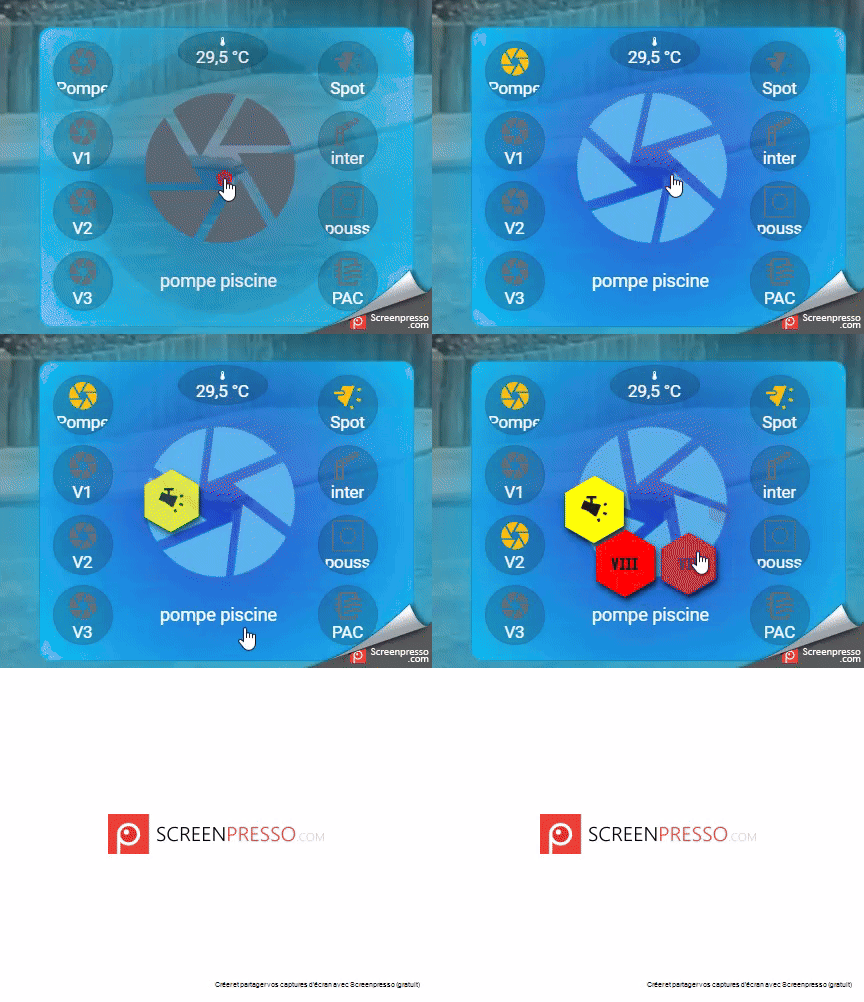
je suis en train d'essayer de réaliser une custom button card qui regrouperai toutes mes infos piscine .
j'ai pour l'instant réussi pas mal de chose ( vu mon niveau)
actuellement lors d'un appui sur le bouton , j'ouvre une carte honeycomb qui me permet de piloter la marche de la pompe , les 3 vitesses de la pompes et la lumière piscine.
show_name: true
show_icon: true
show_state: true
type: custom:button-card
state:
  - value: "off"
    color: null
  - value: "on"
    color: rgb(90,180,233)
    icon: mdi:camera-iris
    styles:
      icon:
        - animation:
            - rotating 1.0s linear infinite
      card:
        - background: radial-gradient(circle, rgb(9,20,241, 50%), rgb(9,192,241, 150%))
        - box-shadow: 0px 0px 100px rgb(11,188,236,200%)
name: pompe piscine
entity: switch.smart_switch_4_canaux_moteur_piscine_l4
tap_action:
  action: fire-dom-event
  honeycomb_menu:
    buttons:
      - icon: mdi:power
        state:
          - value: "off"
            color: red
          - value: "on"
        color_type: card
        color: green
        tap_service: call-service
        service: switch.toggle
        entity: switch.sonoff_10017b5457
      - icon: mdi:camera-iris
        state:
          - value: "off"
            color: red
          - value: "on"
        color_type: card
        color: green
        tap_service: call-service
        service: switch.toggle
        entity: switch.smart_switch_4_canaux_moteur_piscine_l4
      - icon: mdi:roman-numeral-6
        state:
          - value: "off"
            color: red
          - value: "on"
        color_type: card
        color: blue
        tap_service: call-service
        service: switch.toggle
        entity: switch.smart_switch_4_canaux_moteur_piscine_l1
      - icon: mdi:roman-numeral-7
        state:
          - value: "off"
            color: red
          - value: "on"
        color_type: card
        color: blue
        tap_service: call-service
        service: switch.toggle
        entity: switch.smart_switch_4_canaux_moteur_piscine_l2
      - icon: mdi:roman-numeral-8
        state:
          - value: "off"
            color: red
          - value: "on"
        color_type: card
        color: blue
        tap_service: call-service
        service: switch.toggle
        entity: switch.smart_switch_4_canaux_moteur_piscine_l3
      - icon: mdi:track-light
        state:
          - value: "off"
            color: rgb(239,238,155)
          - value: "on"
        color_type: card
        color: yellow
        tap_service: call-service
        service: switch.toggle
        entity: switch.smart_switch_4_canaux_lumiere_terrasse_et_piscine_l1
icon: mdi:camera-iris
j'ai aussi sur 2 cartes differentes divers retour d'info
- une custom boutton card qui pour l'instant double la cde honeycomb , mais me permet surtout d'avoir un retour direct de l'etat de la pompe
type: custom:button-card
state:
  - value: "off"
    icon: mdi:camera-iris
  - value: "on"
    color: rgb(90,180,233)
    icon: mdi:camera-iris
    styles:
      icon:
        - animation:
            - rotating 1.0s linear infinite
      card:
        - background: radial-gradient(circle, rgb(9,20,241, 50%), rgb(9,192,241, 150%))
        - box-shadow: 0px 0px 100px rgb(11,188,236,200%)
tap_action:
  action: toggle
entity: switch.smart_switch_4_canaux_moteur_piscine_l4
name: Pompe piscine
...
- une carte mushroom chips qui me permet de connaitre l'état de divers commande ( pompe a chaleur / nage a contre courant / inter marche forcée
type: custom:mushroom-chips-card
chips:
  - type: entity
    entity: binary_sensor.shelly_shellyplusi4_90380c376e34_4_switch
    content_info: name
    use_entity_picture: false
    icon_color: light-blue
    name: Pompe piscine
    icon: mdi:camera-iris
  - type: entity
    entity: binary_sensor.shelly_shellyplusi4_90380c376e34_3_switch
    content_info: name
    use_entity_picture: true
    tap_action:
      action: more-info
    name: inter marche forcée
    icon_color: primary
    icon: mdi:boom-gate-up-outline
  - type: entity
    entity: binary_sensor.shelly_shellyplusi4_90380c376e34_2_switch
    icon_color: deep-orange
    content_info: name
    name: Bouton poussoir
    icon: phu:button
  - type: entity
    entity: binary_sensor.shelly_shellyplusi4_90380c376e34_1_switch
    content_info: name
    name: PAC
    icon_color: red
    icon: mdi:air-filter
alignment: center
je souhaiterai avoir toutes ces infos directement afficher sur ma carte custom button card principale.et malgré de nombreuse recherche je n'arrive pas a trouver une solution correct..
des idées ?