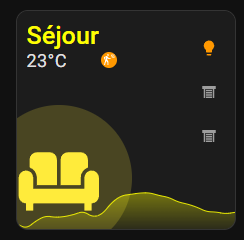
@Jujuka89 en jouant un peu plus avec cardmod, en modifiant la hauteur et la couleur du mini graph card:
code attention, j'ai mis des entités à moi pour avoir le graph...
type: custom:vertical-stack-in-card
cards:
  - type: custom:mushroom-template-card
    entity: light.ampoule_bureau
    icon: mdi:sofa
    icon_color: |
      {% if is_state(entity, 'on') %}
        yellow
      {% else %}
        grey
      {% endif %}
    primary: Séjour
    secondary: "{{ states('sensor.vindstyrka_temperature') }}°C"
    layout: horizontal
    tap_action:
      action: navigate
      navigation_path: /lovelace-smartphone/salon
    double_tap_action:
      action: navigate
      navigation_path: /lovelace-smartphone/salon
    hold_action:
      action: toggle
    badge_icon: >
      {% if is_state('binary_sensor.detecteur_presence_bureau_occupancy', 'on')
      %}
        mdi:motion-sensor
      {% else %}
        mdi:motion-sensor-off
      {% endif %}
    badge_color: >
      {% if is_state('binary_sensor.detecteur_presence_bureau_occupancy', 'on')
      %}
        orange
      {% else %}
        grey
      {% endif %}
    picture: ""
    card_mod:
      style:
        mushroom-state-info$: |
          .primary {
            font-size: 25px !important;
            color: yellow !important;
            position: relative;
            top: -50px;
            left: -155px;
            overflow: visible !important;
            white-space: normal !important;
          }
          .secondary {
            font-size: 18px !important;

            position: relative;
            overflow: visible !important;
            top: -42px;
            left: -155px;
          }
        mushroom-shape-icon$: |
          .shape {
            position: relative;
            left: -40px;
            top: 85px;
          }
        .: |
          :host {
            --mush-icon-size: 146px;
          }
        style: |
          mushroom-badge-icon {
            left: 75px;
            top: 32px;
          }
  - type: custom:mini-graph-card
    entities:
      - entity: sensor.alocatia_temperature_2
        name: Temperature
        color: yellow
    height: 90
    hours_to_show: 24
    points_per_hour: 1
    line_width: 2
    font_size: 20
    animate: true
    show:
      name: false
      icon: false
      state: false
      legend: false
      fill: fade
    card_mod:
      style:
        .: |
          ha-card {
            background: none;
          }
  - type: custom:mushroom-chips-card
    chips:
      - type: template
        entity: light.ampoule_bureau
        tap_action:
          action: toggle
        icon: mdi:lightbulb
        hold_action:
          action: toggle
        icon_color: |-
          {% if is_state(entity, 'on') %}
           orange
          {% elif is_state(entity, 'off') %}
           grey
          {% else %}
           grey
          {% endif %}
      - type: template
        entity: cover.volet_du_bureau
        hold_action:
          action: toggle
        tap_action:
          action: toggle
        icon: |-
          {% if is_state(entity, 'open') %}
           mdi:window-shutter-open
          {% elif is_state(entity, 'closed') %}
           mdi:window-shutter
          {% else %}
           mdi:window-shutter-alert
          {% endif %}
        icon_color: |-
          {% if is_state(entity, 'open') %}
           green
          {% elif is_state(entity, 'closed') %}
           grey
          {% else %}
           orange
          {% endif %}
      - type: template
        entity: cover.volet_du_bureau
        hold_action:
          action: toggle
        tap_action:
          action: toggle
        icon: |-
          {% if is_state(entity, 'open') %}
           mdi:window-shutter-open
          {% elif is_state(entity, 'closed') %}
           mdi:window-shutter
          {% else %}
           mdi:window-shutter-alert
          {% endif %}
        icon_color: |-
          {% if is_state(entity, 'open') %}
           green
          {% elif is_state(entity, 'closed') %}
           grey
          {% else %}
           orange
          {% endif %}
    card_mod:
      style:
        .: |
          ha-card {
            width: 66px;
            margin-left: 80%;
            top: -200px;
            background: none;
            --chip-border-width: 0;
          }
layout_options:
  grid_columns: 2
  grid_rows: auto
card_mod:
  style: |
    ha-card {
      height: 220px ;
      width: 220px ;
      margin-left: auto;
      margin-right: auto;
    }
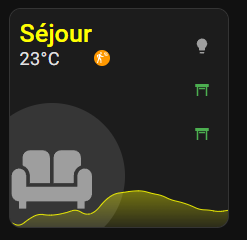
Par contre, personnellement, je n’ai jamais réussi à avoir quelque chose qui marche vraiment bien avec ces cartes « carrées » sur tous les types d’écran. Il y a toujours de la place « perdue » ou alors il faut les laisser « s’étaler » et j’aime moins le rendu… Sans compter qu’on met du card mod partout et dès qu’on change un truc, tout bouge et faut tout refaire… C’est pour ça que j’ai abandonné les versions carrées. Il vaut mieux partir sur du minimalist en full yaml que tenter de jouer avec du mushroom pour ça. (de mon point de vue bien sur…)

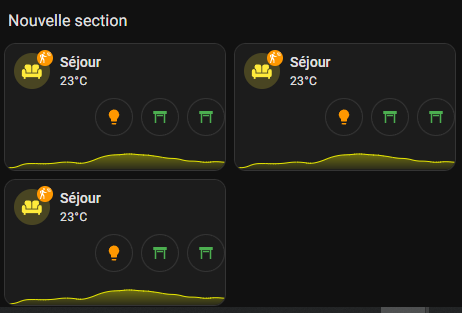
La même carte sans card mod, juste en jouant sur la position du graph, est déjà pas mal et tellement plus simple à maintenir (et moins gourmande en ressources):

et une fois collée dans des sections, on peut ajuster sa taille par rapport à la grille, sans avoir besoin de cardmod: