Bonjour @Bob,
Pas de soucis, comme dit juste au-dessus j’ai apporté de légères modifications pour simplifier le code et rendre la chose un petit plus esthétique, à mes yeux en tout cas 
Pour moi en dashboard « tuile », le meilleur compromis est de 2 capteurs par carte, possiblement 3 si on enlève la partie Mini-graph-card et en réduisant légèrement la taille mais je préfère 2.
Aperçu actuel:
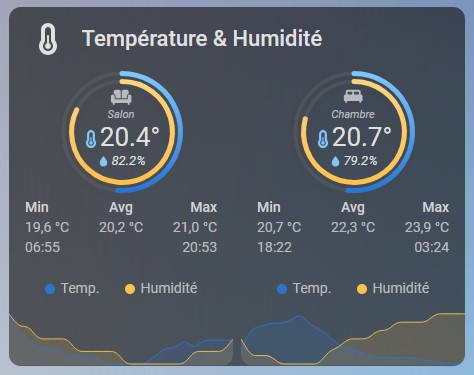
Et voici le code:
Cards
type: vertical-stack
cards:
  - type: custom:button-card
    name: Température & Humidité
    icon: mdi:thermometer
    layout: icon_name
    styles:
      card:
        - background-color: rgba(0,0,0,0)
        - padding: 6px
      icon:
        - height: 32px
        - width: 48px
      name:
        - font-weight: 500
        - font-size: 22px
        - text-align: left
      grid:
        - grid-template-columns: 15% min-content
    card_mod:
      style: |
        ha-card {
          margin-bottom: -5px  !important;
          border: none;
        }
  - square: false
    columns: 2
    type: grid
    cards:
      - type: custom:stack-in-card
        cards:
          - type: custom:apexcharts-card
            chart_type: radialBar
            series:
              - entity: sensor.capteur_temperature_1_temperature
                max: 40
                color: "#7dc8ff"
                show:
                  legend_value: false
              - entity: sensor.capteur_temperature_1_humidity
                max: 100
                color: "#ffd27f"
                show:
                  legend_value: false
            apex_config:
              plotOptions:
                radialBar:
                  offsetY: -10
                  hollow:
                    size: 65%
                  dataLabels:
                    name:
                      show: false
                    value:
                      show: false
                  track:
                    dropShadow:
                      enabled: true
                      top: 3
                      left: 0
                      blur: 4
                      opacity: 0.25
                    strokeWidth: 75%
                    margin: 3
              fill:
                type: gradient
                gradient:
                  type: vertical
                  gradientToColors:
                    - "#2a75cf"
                    - "#ffc04c"
                  stops:
                    - 0
                    - 100
              legend:
                show: false
              chart:
                height: 200
            card_mod:
              style: |
                ha-card {
                  background: none;
                  box-shadow: none;
                  border: none;
                }
          - type: custom:button-card
            entity: sensor.capteur_temperature_1_temperature
            size: 10%
            icon: mdi:sofa
            show_state: false
            show_name: false
            label: Salon
            show_label: true
            styles:
              grid:
                - grid-template-areas: "\"i\" \"l\" \"temp\" \"hum\""
              label:
                - font-size: 11px
                - font-style: italic
                - opacity: 75%
              icon:
                - opacity: 75%
              custom_fields:
                temp:
                  - font-size: 26px
                hum:
                  - font-size: 13px
                  - font-style: italic
            custom_fields:
              temp: >
                [[[ var temp =
                states['sensor.capteur_temperature_1_temperature' ].state;
                return `<ha-icon
                  icon="mdi:thermometer"
                  style="width: 18px; height: 18px; color: #7dc8ff ">
                  </ha-icon>` + temp + '°'; ]]]
              hum: >
                [[[ var hum = states['sensor.capteur_temperature_1_humidity'
                ].state;     return `<ha-icon
                  icon="mdi:water"
                  style="width: 15px; height: 15px; color: #7dc8ff ">
                  </ha-icon>` + hum + '%'; ]]]
            card_mod:
              style: |
                ha-card {
                  margin-top: -142px;
                  background: none;
                  box-shadow: none;
                  border: none;
                }
        card_mod:
          style: |
            ha-card {
              background: none;
              box-shadow: none;
              border: none;
            }
      - type: custom:stack-in-card
        cards:
          - type: custom:apexcharts-card
            chart_type: radialBar
            series:
              - entity: sensor.capteur_temperature_2_temperature
                max: 40
                color: "#7dc8ff"
                show:
                  legend_value: false
              - entity: sensor.capteur_temperature_2_humidity
                max: 100
                color: "#ffd27f"
                show:
                  legend_value: false
            apex_config:
              plotOptions:
                radialBar:
                  offsetY: -10
                  hollow:
                    size: 65%
                  dataLabels:
                    name:
                      show: false
                    value:
                      show: false
                  track:
                    dropShadow:
                      enabled: true
                      top: 3
                      left: 0
                      blur: 4
                      opacity: 0.25
                    strokeWidth: 75%
                    margin: 3
              fill:
                type: gradient
                gradient:
                  type: vertical
                  gradientToColors:
                    - "#2a75cf"
                    - "#ffc04c"
                  stops:
                    - 0
                    - 100
              legend:
                show: false
              chart:
                height: 200
            card_mod:
              style: |
                ha-card {
                  background: none;
                  box-shadow: none;
                  border: none;
                }
          - type: custom:button-card
            entity: sensor.capteur_temperature_2_temperature
            size: 10%
            icon: mdi:bed-king
            show_state: false
            show_name: false
            label: Chambre
            show_label: true
            styles:
              grid:
                - grid-template-areas: "\"i\" \"l\" \"temp\" \"hum\""
              label:
                - font-size: 11px
                - font-style: italic
                - opacity: 75%
              icon:
                - opacity: 75%
              custom_fields:
                temp:
                  - font-size: 26px
                hum:
                  - font-size: 13px
                  - font-style: italic
            custom_fields:
              temp: >
                [[[ var temp =
                states['sensor.capteur_temperature_2_temperature' ].state;
                return `<ha-icon
                  icon="mdi:thermometer"
                  style="width: 18px; height: 18px; color: #7dc8ff ">
                  </ha-icon>` + temp + '°'; ]]]
              hum: >
                [[[ var hum = states['sensor.capteur_temperature_2_humidity'
                ].state;     return `<ha-icon
                  icon="mdi:water"
                  style="width: 15px; height: 15px; color: #7dc8ff ">
                  </ha-icon>` + hum + '%'; ]]]
            card_mod:
              style: |
                ha-card {
                  margin-top: -142px;
                  background: none;
                  box-shadow: none;
                  border: none;
                }
        card_mod:
          style: |
            ha-card {
              background: none;
              box-shadow: none;
              border: none;
            }
  - square: false
    columns: 2
    type: grid
    cards:
      - type: custom:mini-graph-card
        name: Salon
        height: 120
        hours_to_show: 24
        points_per_hour: 1
        hour24: true
        line_width: 2
        decimals: 1
        entities:
          - entity: sensor.capteur_temperature_1_temperature
            name: Temp.
            color: "#2a75cf"
          - entity: sensor.capteur_temperature_1_humidity
            color: "#ffc04c"
            name: Humidité
            show_line: true
            show_points: true
            show_legend: true
            y_axis: secondary
        show:
          fill: true
          graph: line
          icon: false
          name: false
          state: false
          labels: false
          extrema: true
          average: true
          icon_adaptive_color: false
          labels_secondary: false
        align_icon: right
        align_state: left
        card_mod:
          style: |
            ha-card {
            margin-top: -45px;
            background: none;
            box-shadow: none;
            border: none;
            }
      - type: custom:mini-graph-card
        name: Chambre
        height: 120
        hours_to_show: 24
        points_per_hour: 1
        hour24: true
        line_width: 2
        decimals: 1
        entities:
          - entity: sensor.capteur_temperature_2_temperature
            name: Temp.
            color: "#2a75cf"
          - entity: sensor.capteur_temperature_2_humidity
            color: "#ffc04c"
            name: Humidité
            show_line: true
            show_points: true
            show_legend: true
            y_axis: secondary
        show:
          fill: true
          graph: line
          icon: false
          name: false
          state: false
          labels: false
          extrema: true
          average: true
          icon_adaptive_color: false
          labels_secondary: false
        align_icon: right
        align_state: left
        card_mod:
          style: |
            ha-card {
            margin-top: -45px;
            background: none;
            box-shadow: none;
            border: none;
            }
Il s’agit d’un vertical stack, au 1er niveau le titre, au 2e carte type « grille » Apex charts + button card et au 3e carte type « grille » Mini-graph-card. Chaque partie peut-être supprimée indépendamment si l’on ne les souhaite pas toutes.
Sensors à remplacer:
- sensor.capteur_temperature_1_temperature
- sensor.capteur_temperature_1_humidity
- sensor.capteur_temperature_2_temperature
- sensor.capteur_temperature_2_humidity
Ps : ne jugez toujours pas le niveau d’humidité, je suis encore en pleine orage là