Salut à tous !
Je vous propose aujourd’hui un guide complet pour transformer un ventilateur classique 3 vitesses en appareil Zigbee natif via un ESP32-H2. Ce projet est idéal pour débuter avec le Zigbee DIY : c’est stable, ultra-réactif et sans aucun passage par le Wi-Fi.

 Le Matériel (Hardware)
- Microcontrôleur : ESP32-H2 .
- Alimentation : Transformateur moulé 220V → 5V (type Hi-Link) pour une intégration propre.
- Actionneurs : 3 Relais 5V / 220V (Vitesse 1, 2 et 3).

 Sécurité & Câblage (Important !)
- Hardware Interlocking : Reliez la phase sur le NC (Normalement Fermé) puis le COM (Commun) de chaque relais en cascade. Si aucun relais n’est activé, le ventilateur est physiquement coupé du secteur.
- Sécurité Logicielle : Mon code éteint toutes les sorties avant d’en activer une seule.
- Note : On perd l’usage du bouton physique d’origine. Le pilotage devient 100% Zigbee.

 Tutoriel 1 : Flasher l’ESP32-H2 avec Arduino IDE
- Installez l’Arduino IDE et le support des cartes ESP32 (version 3.x minimum pour le H2).
- Dans Outils, configurez ainsi :
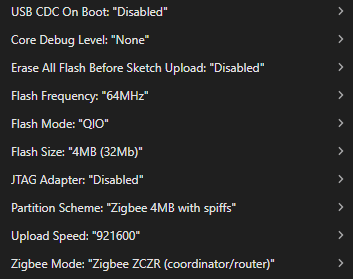
- Copiez le code ci-dessous et flashez.
▶ Cliquez pour voir le code Arduino complet
`#ifndef ZIGBEE_MODE_ZCZR
#error « Zigbee coordinator mode is not selected in Tools->Zigbee mode »
#endif
#include « Zigbee.h »
/* Zigbee light bulb configuration */
#define ZIGBEE_FAN_CONTROL_ENDPOINT 1
#ifdef RGB_BUILTIN
uint8_t led = RGB_BUILTIN; // To demonstrate the current fan control mode
#else
uint8_t led = 2;
#endif
uint8_t button = BOOT_PIN;
const int PIN_LOW = 5;
const int PIN_MED = 4;
const int PIN_HIGH = 10;
ZigbeeFanControl zbFanControl = ZigbeeFanControl(ZIGBEE_FAN_CONTROL_ENDPOINT);
/********************* Arduino functions **************************/
void setup() {
Serial.begin(115200);
// Init LED that will be used to indicate the current fan control mode
rgbLedWrite(led, 0, 0, 0);
// Init button for factory reset
pinMode(button, INPUT_PULLUP);
//Optional: set Zigbee device name and model
zbFanControl.setManufacturerAndModel(« Cyriltech », « ZBFanControl »);
// Set the fan mode sequence to LOW_MED_HIGH
zbFanControl.setFanModeSequence(FAN_MODE_SEQUENCE_LOW_MED_HIGH);
// Set callback function for fan mode change
zbFanControl.onFanModeChange(setFan);
//Add endpoint to Zigbee Core
Serial.println(« Adding ZigbeeFanControl endpoint to Zigbee Core »);
Zigbee.addEndpoint(&zbFanControl);
// When all EPs are registered, start Zigbee in ROUTER mode
if (!Zigbee.begin(ZIGBEE_ROUTER)) {
Serial.println(« Zigbee failed to start! »);
Serial.println(« Rebooting… »);
ESP.restart();
}
Serial.println(« Connecting to network »);
while (!Zigbee.connected()) {
Serial.print(« . »);
delay(100);
}
Serial.println();
// Initialisation sorties
pinMode(PIN_LOW, OUTPUT);
pinMode(PIN_MED, OUTPUT);
pinMode(PIN_HIGH, OUTPUT);
// On s’assure que tout est éteint au démarrage
digitalWrite(PIN_LOW, LOW);
digitalWrite(PIN_MED, LOW);
digitalWrite(PIN_HIGH, LOW);
}
/********************* fan control callback function **************************/
void setFan(ZigbeeFanMode mode) {
// Sécurité logicielle : on éteint tout avant de changer
digitalWrite(PIN_LOW, LOW);
digitalWrite(PIN_MED, LOW);
digitalWrite(PIN_HIGH, LOW);
switch (mode) {
case FAN_MODE_OFF:
rgbLedWrite(led, 0, 0, 0); // Off
Serial.println(« Fan mode: OFF »);
break;
case FAN_MODE_LOW:
rgbLedWrite(led, 0, 0, 255); // bleu
digitalWrite(PIN_LOW, HIGH);
Serial.println(« Fan mode: LOW »);
break;
case FAN_MODE_MEDIUM:
rgbLedWrite(led, 255, 255, 255); // blanc
digitalWrite(PIN_MED, HIGH);
Serial.println(« Fan mode: MEDIUM »);
break;
case FAN_MODE_HIGH:
rgbLedWrite(led, 255, 0, 0); // Rouge
digitalWrite(PIN_HIGH, HIGH);
Serial.println(« Fan mode: HIGH »);
break;
case FAN_MODE_ON:
rgbLedWrite(led, 125, 125, 125); //
Serial.println(« Fan mode: ON »);
break;
default: log_e(« Unhandled fan mode: %d », mode); break;
}
}
void loop() {
// Checking button for factory reset
if (digitalRead(button) == LOW) { // Push button pressed
// Key debounce handling
delay(100);
int startTime = millis();
while (digitalRead(button) == LOW) {
delay(50);
if ((millis() - startTime) > 3000) {
// If key pressed for more than 3secs, factory reset Zigbee and reboot
Serial.println(« Resetting Zigbee to factory and rebooting in 1s. »);
delay(1000);
Zigbee.factoryReset();
}
}
}
delay(100);
}
Tutoriel 2 : Créer le fichier de configuration (ESM) dans Zigbee2MQTT
Pour que votre ESP32 soit reconnu par Zigbee2MQTT, il faut créer un External Converter.
- Allez dans votre dossier de configuration Zigbee2MQTT (via l’addon Samba ou l’éditeur de fichier de Home Assistant).
- Créez un nouveau fichier nommé
espfan.jsdans le dossier/homeassistant/zigbee2mqtt/external_converters/. - Copiez ce code à l’intérieur :
▶ Cliquez pour voir le code complet
`JavaScriptimport * as exposes from « zigbee-herdsman-converters/lib/exposes »;
const fanModes = { off: 0, low: 1, medium: 2, high: 3, on: 4 };
export default [{
zigbeeModel: [« ZBFanControl »],
model: « ZBFanControl »,
vendor: « Cyriltech »,
description: « Contrôle ventilateur HVAC via ESP32-H2 »,
fromZigbee: [{
cluster: « hvacFanCtrl »,
type: [« attributeReport », « readResponse »],
convert: (model, msg, publish, options, meta) => {
const modeVal = msg.data.fanMode;
return { fan_mode: Object.keys(fanModes).find(key => fanModes[key] === modeVal) };
},
}],
toZigbee: [{
key: [« fan_mode »],
convertSet: async (entity, key, value, meta) => {
const mode = fanModes[value.toLowerCase()];
await entity.write(« hvacFanCtrl », {fanMode: mode}, {disableDefaultResponse: true});
return {state: {fan_mode: value}};
},
}],
exposes: [exposes.enum(« fan_mode », exposes.access.ALL, Object.keys(fanModes))],
}];`
- Ouvrez votre fichier
configuration.yamlde Zigbee2MQTT et ajoutez ceci à la fin :
`YAMLexternal_converters:
- /external_converters/espfan.js
- Redémarrez Zigbee2MQTT. Appairez l’ESP32 : il sera reconnu immédiatement !
Tutoriel 3 : L’interface animée dans Home Assistant
Pour avoir une icône qui tourne avec la vitesse, installez l’extension Card Mod (via HACS). Créez ensuite une carte Tile avec ce code YAML :

▶ Cliquez pour voir le code YAML Dashboard
`YAMLtype: tile
entity: select.ventilateur_papa_fan_mode
name: Mode Ventilateur
features:
- type: select-options
card_mod:
style: |
ha-tile-icon {
{% set s = states(‹ select.ventilateur_papa_fan_mode ›) %}
{% if s != ‹ off › %}
{% if s == ‹ low › %}
animation: rotation 3s linear infinite;
–tile-color: #ADD8E6;
{% elif s == ‹ medium › %}
animation: rotation 1.5s linear infinite;
–tile-color: #00BFFF;
{% elif s == ‹ high › or s == ‹ on › %}
animation: rotation 0.6s linear infinite;
–tile-color: #00FFFF;
{% endif %}
{% endif %}
}
@keyframes rotation {
from { transform: rotate(0deg); }
to { transform: rotate(360deg); }
}`
Bon bricolage à tous ! Si vous avez des soucis sur l’ESM ou le câblage, posez vos questions en commentaire.


 pour mettre du code.