Non ils n’ont toujours pas été généré, c’est ça que je trouve bizarre malgré la remise à jour de Let’s

Tu peux faire un copier coller du log de l’addon let’s encrypt (pas de capture c’est pas trop lisible) en n’oubliant pas de coller le texte entre des balises code
Tant que c’est fichiers ne sont pas générés impossible d’aller plus loin
08:24:41] INFO: Use propagation seconds: 60
[08:24:41] INFO: Detecting existing certificate type for homeassistant.handicarauto.com
Saving debug log to /var/log/letsencrypt/letsencrypt.log
[08:24:47] INFO: No certificate found - using 'ecdsa' key type.
Saving debug log to /var/log/letsencrypt/letsencrypt.log
Requesting a certificate for homeassistant.xxxxxx.com
Error determining zone identifier for homeassistant.xxxxxx.com: 403 Client Error: Forbidden for url: https://eu.api.ovh.com/1.0/domain/zone/. (Are your Application Key and Consumer Key values correct?)
Ask for help or search for solutions at https://community.letsencrypt.org. See the logfile /var/log/letsencrypt/letsencrypt.log or re-run Certbot with -v for more details.
s6-rc: info: service legacy-services: stopping
s6-rc: info: service legacy-services successfully stopped
s6-rc: info: service legacy-cont-init: stopping
s6-rc: info: service legacy-cont-init successfully stopped
s6-rc: info: service fix-attrs: stopping
s6-rc: info: service fix-attrs successfully stopped
s6-rc: info: service s6rc-oneshot-runner: stopping
s6-rc: info: service s6rc-oneshot-runner successfully stopped
s6-rc: info: service s6rc-oneshot-runner: starting
s6-rc: info: service s6rc-oneshot-runner successfully started
s6-rc: info: service fix-attrs: starting
s6-rc: info: service fix-attrs successfully started
s6-rc: info: service legacy-cont-init: starting
cont-init: info: running /etc/cont-init.d/file-structure.sh
cont-init: info: /etc/cont-init.d/file-structure.sh exited 0
s6-rc: info: service legacy-cont-init successfully started
s6-rc: info: service legacy-services: starting
services-up: info: copying legacy longrun lets-encrypt (no readiness notification)
s6-rc: info: service legacy-services successfully started
[08:26:54] INFO: Selected DNS Provider: dns-ovh
[08:26:54] INFO: Use propagation seconds: 60
[08:26:54] INFO: Detecting existing certificate type for homeassistant.xxxxx.com
Saving debug log to /var/log/letsencrypt/letsencrypt.log
[08:26:55] INFO: No certificate found - using 'ecdsa' key type.
Saving debug log to /var/log/letsencrypt/letsencrypt.log
Requesting a certificate for homeassistant.handicarauto.com
Error determining zone identifier for homeassistant.xxxxx.com: 403 Client Error: Forbidden for url: https://eu.api.ovh.com/1.0/domain/zone/. (Are your Application Key and Consumer Key values correct?)
Ask for help or search for solutions at https://community.letsencrypt.org. See the logfile /var/log/letsencrypt/letsencrypt.log or re-run Certbot with -v for more details.
s6-rc: info: service legacy-services: stopping
s6-rc: info: service legacy-services successfully stopped
s6-rc: info: service legacy-cont-init: stopping
s6-rc: info: service legacy-cont-init successfully stopped
s6-rc: info: service fix-attrs: stopping
s6-rc: info: service fix-attrs successfully stopped
s6-rc: info: service s6rc-oneshot-runner: stopping
s6-rc: info: service s6rc-oneshot-runner successfully stopped
s6-rc: info: service s6rc-oneshot-runner: starting
s6-rc: info: service s6rc-oneshot-runner successfully started
s6-rc: info: service fix-attrs: starting
s6-rc: info: service fix-attrs successfully started
s6-rc: info: service legacy-cont-init: starting
cont-init: info: running /etc/cont-init.d/file-structure.sh
cont-init: info: /etc/cont-init.d/file-structure.sh exited 0
s6-rc: info: service legacy-cont-init successfully started
s6-rc: info: service legacy-services: starting
services-up: info: copying legacy longrun lets-encrypt (no readiness notification)
s6-rc: info: service legacy-services successfully started
[08:57:06] INFO: Selected DNS Provider: dns-ovh
[08:57:06] INFO: Use propagation seconds: 60
[08:57:06] INFO: Detecting existing certificate type for homeassistant.handicarauto.com
Saving debug log to /var/log/letsencrypt/letsencrypt.log
[08:57:07] INFO: No certificate found - using 'ecdsa' key type.
Saving debug log to /var/log/letsencrypt/letsencrypt.log
Requesting a certificate for homeassistant.xxxxx.com
Error determining zone identifier for homeassistant.xxxxx.com: 403 Client Error: Forbidden for url: https://eu.api.ovh.com/1.0/domain/zone/. (Are your Application Key and Consumer Key values correct?)
Ask for help or search for solutions at https://community.letsencrypt.org. See the logfile /var/log/letsencrypt/letsencrypt.log or re-run Certbot with -v for more details.
s6-rc: info: service legacy-services: stopping
s6-rc: info: service legacy-services successfully stopped
s6-rc: info: service legacy-cont-init: stopping
s6-rc: info: service legacy-cont-init successfully stopped
s6-rc: info: service fix-attrs: stopping
s6-rc: info: service fix-attrs successfully stopped
s6-rc: info: service s6rc-oneshot-runner: stopping
s6-rc: info: service s6rc-oneshot-runner successfully stopped
s6-rc: info: service s6rc-oneshot-runner: starting
s6-rc: info: service s6rc-oneshot-runner successfully started
s6-rc: info: service fix-attrs: starting
s6-rc: info: service fix-attrs successfully started
s6-rc: info: service legacy-cont-init: starting
cont-init: info: running /etc/cont-init.d/file-structure.sh
cont-init: info: /etc/cont-init.d/file-structure.sh exited 0
s6-rc: info: service legacy-cont-init successfully started
s6-rc: info: service legacy-services: starting
services-up: info: copying legacy longrun lets-encrypt (no readiness notification)
s6-rc: info: service legacy-services successfully started
[09:19:31] INFO: Selected DNS Provider: dns-ovh
[09:19:31] INFO: Use propagation seconds: 60
[09:19:31] INFO: Detecting existing certificate type for homeassistant.handicarauto.com
Saving debug log to /var/log/letsencrypt/letsencrypt.log
[09:19:32] INFO: No certificate found - using 'ecdsa' key type.
Saving debug log to /var/log/letsencrypt/letsencrypt.log
Requesting a certificate for homeassistant.xxxxx.com
Error determining zone identifier for homeassistant.xxxxx.com: 403 Client Error: Forbidden for url: https://eu.api.ovh.com/1.0/domain/zone/. (Are your Application Key and Consumer Key values correct?)
Ask for help or search for solutions at https://community.letsencrypt.org. See the logfile /var/log/letsencrypt/letsencrypt.log or re-run Certbot with -v for more details.
s6-rc: info: service legacy-services: stopping
s6-rc: info: service legacy-services successfully stopped
s6-rc: info: service legacy-cont-init: stopping
s6-rc: info: service legacy-cont-init successfully stopped
s6-rc: info: service fix-attrs: stopping
s6-rc: info: service fix-attrs successfully stopped
s6-rc: info: service s6rc-oneshot-runner: stopping
s6-rc: info: service s6rc-oneshot-runner successfully stopped
voila qui est clair
Error determining zone identifier for homeassistant.xxxxx.com: 403 Client Error: Forbidden for url: https://eu.api.ovh.com/1.0/domain/zone/. (Are your Application Key and Consumer Key values correct?)
Ask for help or search for solutions at https://community.letsencrypt.org. See the logfile /var/log/letsencrypt/letsencrypt.log or re-run Certbot with -v for more details.
il y’a un soucis avec l’utilisation des API OVH
J’utilise un sous-domaine , cela ne vient pas de ça ?
non
c’est juste mal paramétré
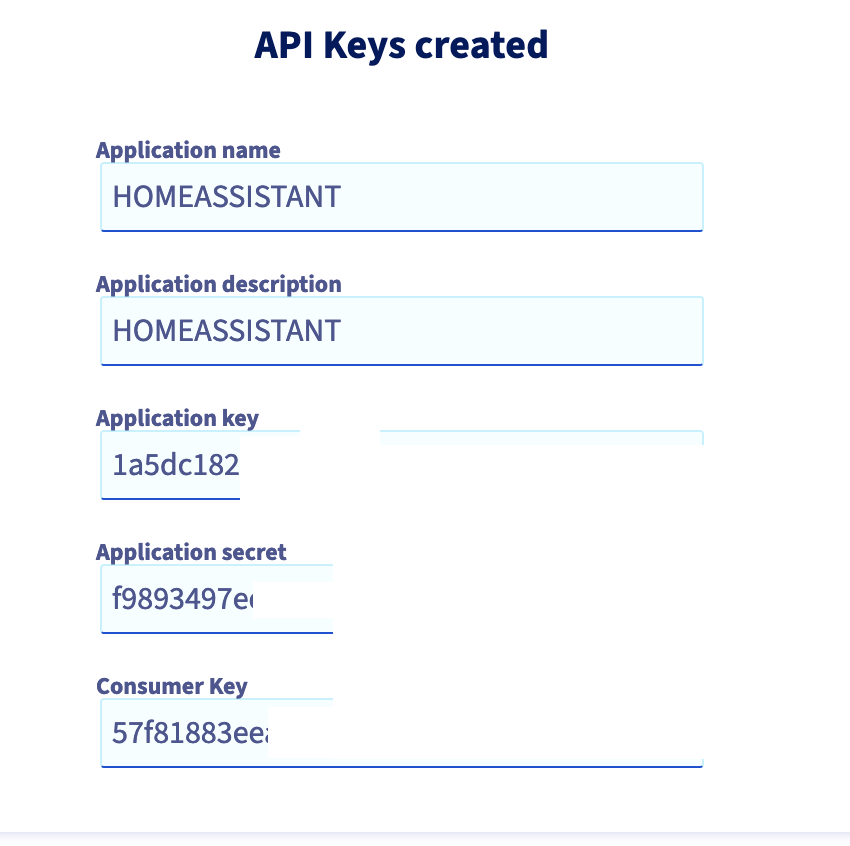

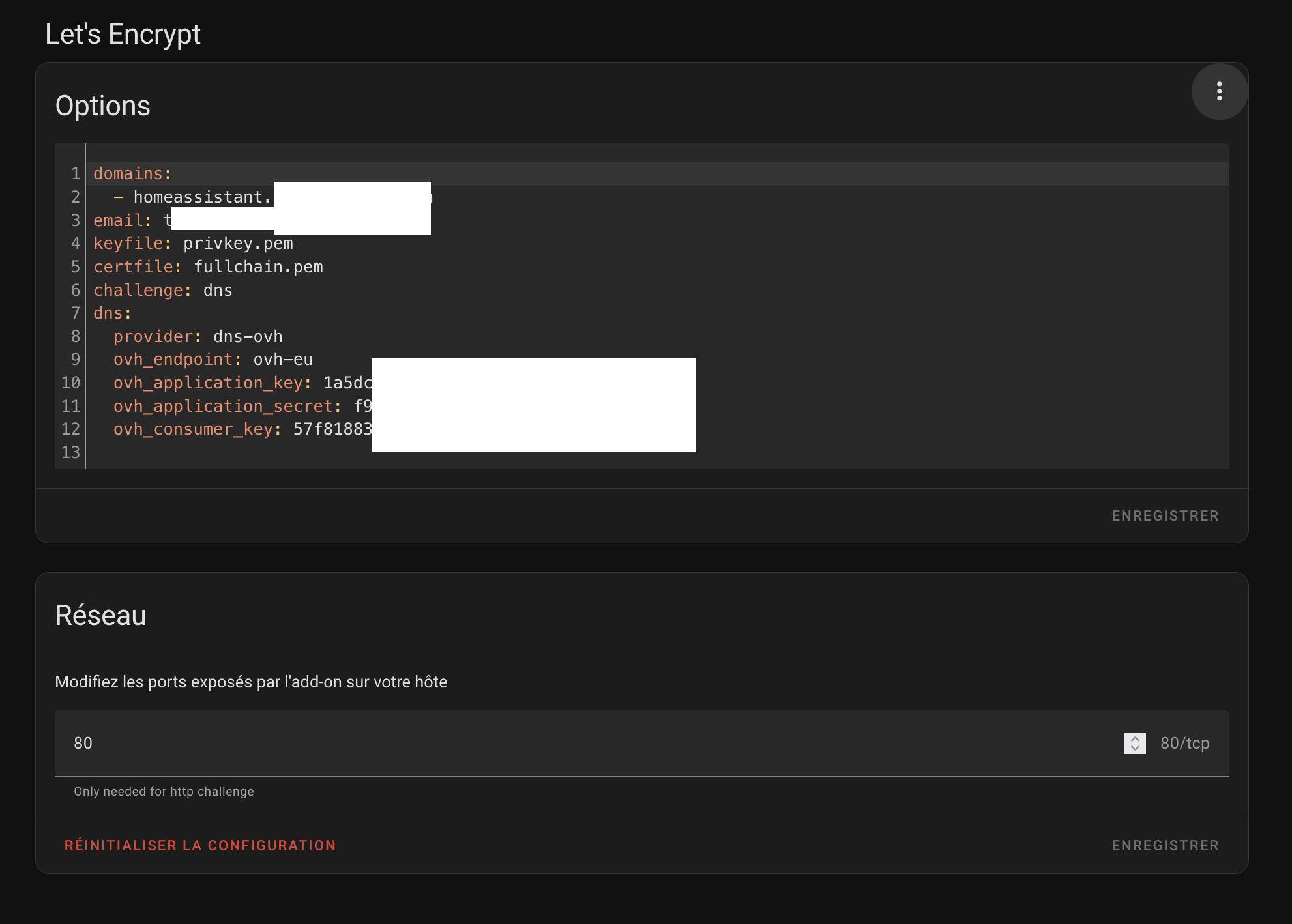
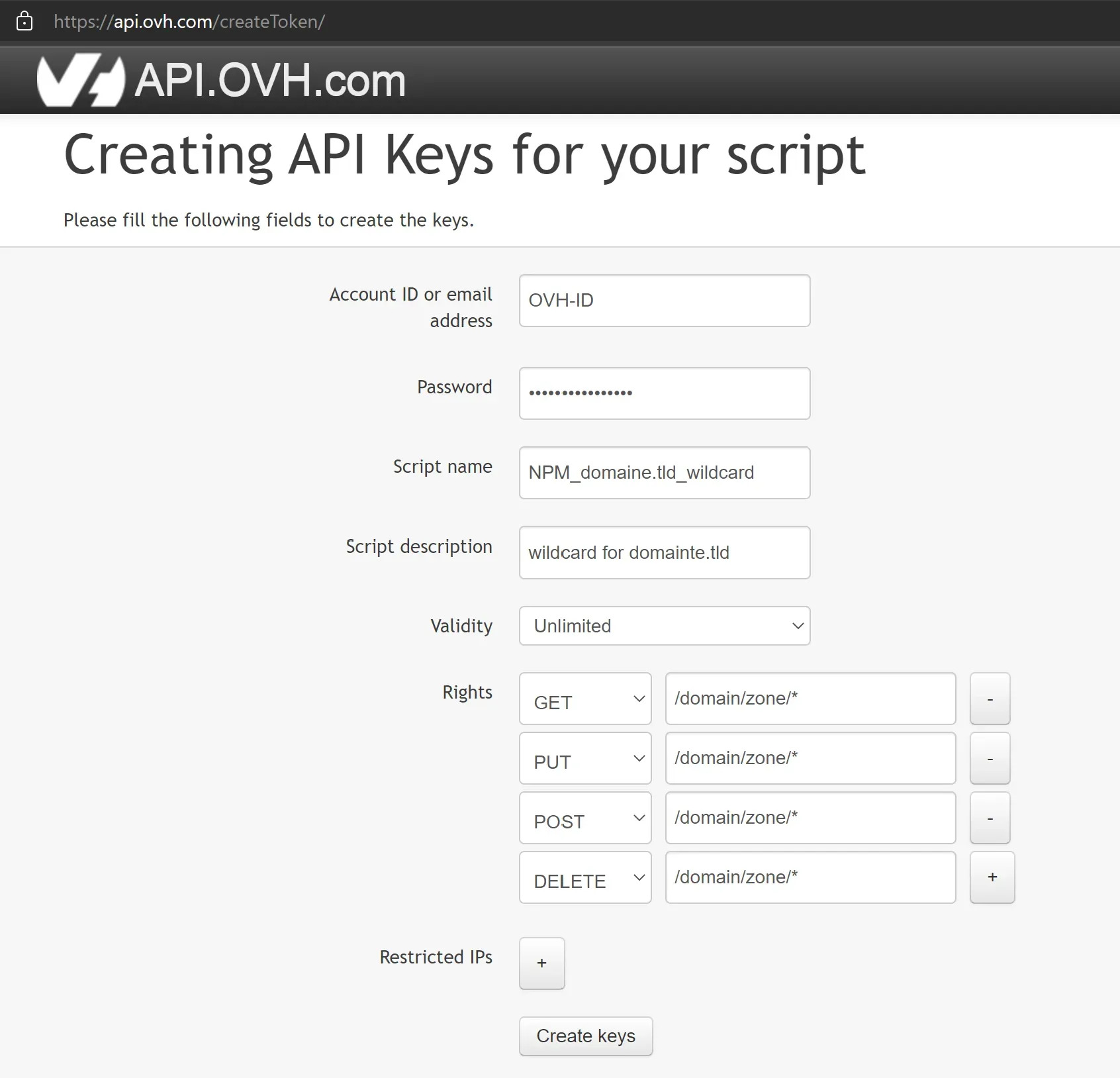
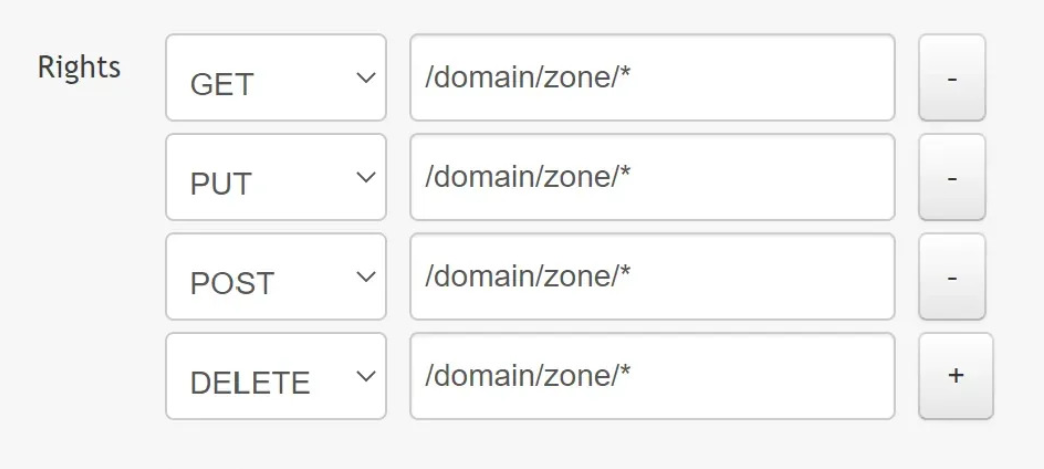
C’est à dire ? tu peux développer ?
il y’a plusiers façon de valider un/des certificats SSL
- un simple le http-01 ouvrir le port 80 et le laisser veirifer qu’un fichier est bine présent sur le serveur web qu’il met a dispositon pendant la validation
- un plus complexe le dns-01 pas de port a ouvrir mais il faut utiliser les API des registrar
voila
Perso, je préfère ne pas ouvrir le port 80.
Mode paranoïa activé 
Il y a des tutoriel ou explications là-dessus ?
tu passes de challenge DNS en http tu ouvre le port 80 de ta box vers le port 80 de ton HA et c’est tout
oui mais c’est n’importe quoi et surtout de véhiculer cette idée aussi
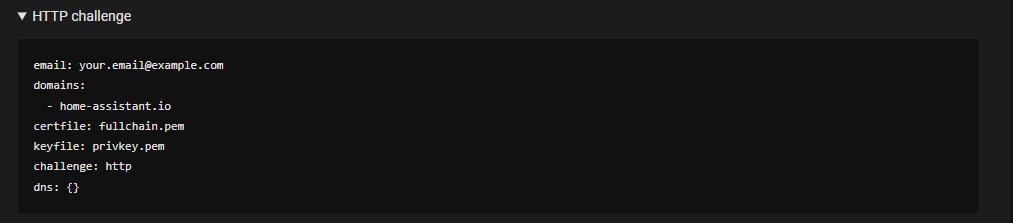
Trop tard je suis en challenge DNS 
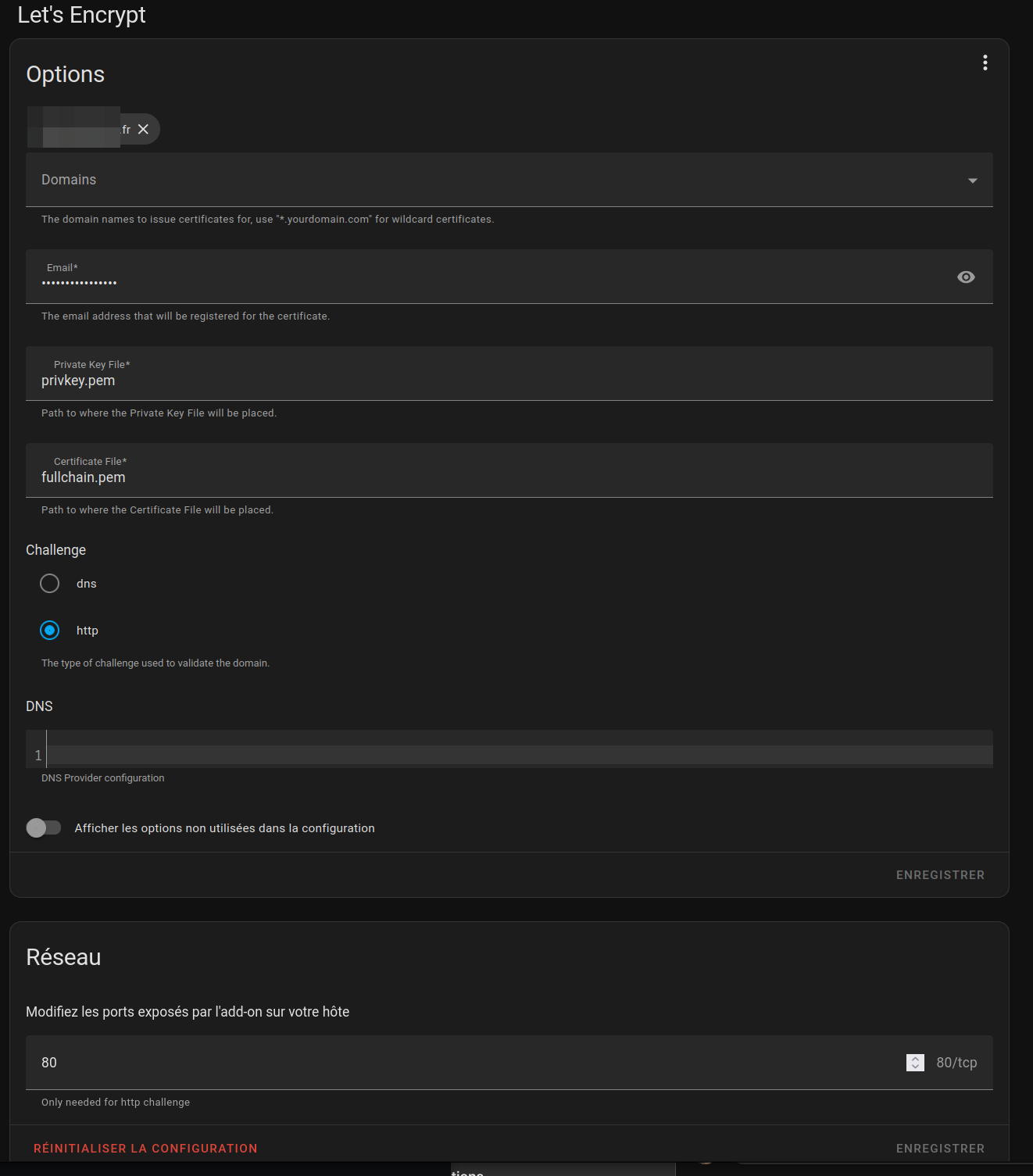
une fois que c’est mis en place pas de soucis
mais pour des debutants c’est la croix et la bannière (surtout avec les API ovh)